
🚨Starting Dec 16th, Meta AI will read your private messages - unless you opt out now! 🚨
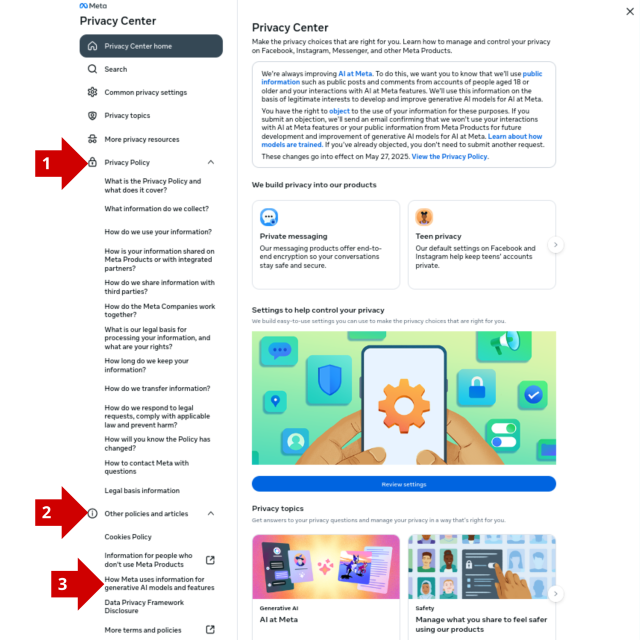
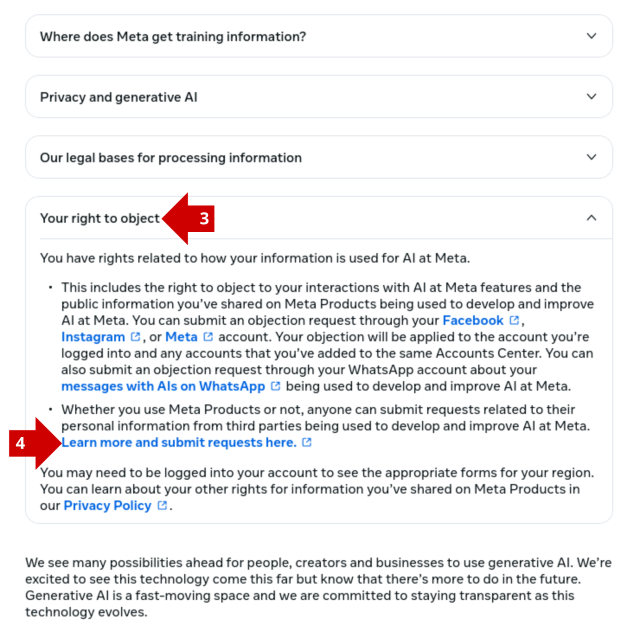
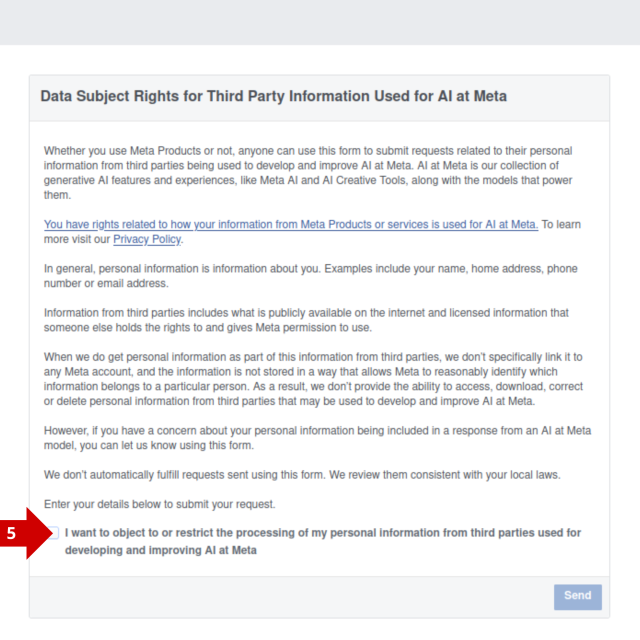
Opting out is hilariously complex, but we've got you covered:
1. Go to Meta Privacy Center on DESKTOP
2. Privacy Policy
3. Other Policies and articles
4. How Meta uses information for generative AI model and features
5. Your right to object
6. Learn more and submit requests here
7. Tick: I want to object to or restrict...
Oh, and @noybeu is already on it: tuta.com/blog/noyb-meta-ai-is-… 🍿
Meta will use your data to train Meta AI – but it could be illegal! | Tuta
Austrian NGO NOYB challenges Meta yet again and sends a cease-and-desist letter to stop the Big Tech from abusing your data.Tuta
Peter Vágner reshared this.
Tuta
in reply to Tuta • • •How to turn off Meta AI in WhatsApp? You can’t, but... | Tuta
Tutacake-duke
in reply to Tuta • • •tekhne
in reply to Tuta • • •You forgot #DeltaChat, which is an excellent alternative to WhatsApp.
@delta
Rebel Zhang
in reply to Tuta • • •Craig Aaen Stockdale
in reply to Tuta • • •dave
in reply to Tuta • • •thanks for the heads up. Here's how to do it on mobile:
- Navigate to Privacy Centre. On Facebook this will be under "settings and privacy". On Instagram this will be under "settings and activity"->"more info and support".
- In the privacy centre, search for "more detailed information about meta's generative AI models" and select it.
- Scroll down to "Your right to object", open and click "Learn more and submit requests here" which open the objection form.
- Do note that this form asks for yet more personal information about you, rather than just linking your objection with your account :/
Magnus Ahltorp
in reply to Tuta • • •Tuta
in reply to Magnus Ahltorp • • •Tobia Alberti
in reply to Tuta • • •Care to specify where in their announcement they state that they’re going to start using PRIVATE messages to train AI (effectively breaking end-to-end encryption)?
Because from what I can read on your own blog post and on their announcement post is that they’re going to use PUBLIC data and interactions with Meta AI..
Emilio ʕ̡̢̡ʘ̅͟͜͡ʘ̲̅ʔ̢̡̢
in reply to Tuta • • •Fardels Bear
in reply to Tuta • • •Todd G
in reply to Tuta • • •Tuta
in reply to Todd G • • •Kim Spence-Jones 🇬🇧😷
in reply to Tuta • • •facebook.com/privacy/genai
short-circuits some of those steps?
Jak společnost Meta využívá data v rámci generativních AI modelů
www.facebook.comGradientU0
in reply to Tuta • • •Alison Meeks
in reply to Tuta • • •SpaceLifeForm
in reply to Tuta • • •