Just tried #FastPlay. Wow, just wow! I'd like some more enhancements, but it seems to be very, very decent. At least, for a nitpicky guy like me who basically doesn't like anything except for Winamp and 1by1, FastPlay is definitely a thing to keep. Thanks so much @Bri! And special kudos for not using Python this time 😜
As every C++-based solution it's painful to build, but it's native which is a huge plus for me.
in reply to Bri🥰

Oh yeah, right, you have a download script also! Anyway, thanks so much for global hotkeys and speaking of times, like remaining time is a must for me. Only a small thing: you probably need to implement a custom hotkey input, it doesn't recognize Windows. I.e.: try Add global hotkey, then Play/pause, then try to press Windows+F8. You'll get just F8, without the Windows modifier. Although I saw in code you process it correctly.

Today I would like to introduce you to another audio player for Windows. As I understand it, the developer originally wrote this for his own use but has decided to share it. I am very glad that is the case.
The player is called FastPlay, so if you've been paying attention as to what is going on, you will know that this comes from the same developer as the social media client Fast-SM, which many of us are now using. That tells us two things: the app is going to be excellent and suggestions are very much considered.

This is a very small, lightweight, audio player. That means it is designed to be a small file size to download. That is important. I downloaded an app recently which contained approximately 5000 files comprising 500 MB which was absolutely crazy for the job at hand. This is just over 2 MB in size.
In order to describe some of its features, I can do no better than quote from the Readme file.
Fastplay is a very lightweight, simple, yet powerful and flexible media player for Windows. It is designed to be accessible, minimalistic, yet powerful, all at the same time. It is also very small, and fast and responsive.
Note! Fastplay is not designed to be a replacement for a complete media player. Rather, it's designed to be a small, lightweight media player that you can either use seriously or for fun! It has a vast list of effects including an EQ, reverb, echo, tempo/pitch, stereo width, and more, which you can adjust in realtime. End of quote.
I think that may have been the case when that statement was written, but it has evolved into including some very nice options indeed, such as:
Completely configurable Global hotkeys.
The ability to have the screen-reader speak events through keystrokes, such as elapsed time, remaining time etc, Control+Shift+E and Control+Shift+R.
Load all files in folder when pressing Enter.
You are able to set default file types. All of these are achieved through the Options dialog and there is an extraordinary amount of configuration in there.
Bookmarking of playback position in files.
A Radio menu currently allowing you to add stations if you have the URL. Searching for stations using various sources is also available. RadioBrowser is a very good starting point.
The ability to record the output from stations. This is a nice one. Some of us have used Tapin Radio for this previously. But the accessibility of that over the years has been somewhat questionable. Of course FastPlay is completely accessible. Not only that, but you can schedule recordings too.
It is possible to search for (and subscribe to) podcasts using Apple's iTunes directory. The vast majority of podcasts can be found there. The facility to add specific URL's pointing to podcast feeds can also be added.
There are many more features which you can explore and customise through the options, activated with Control+Comma.
End of Part 1.

This entry was edited (17 minutes ago)
in reply to Brian Hartgen

FastPlay Part 2.
If you do not wish to have the track title and artist displayed in the window title, this can be disabled, again in Options. However, you can press numbers 1 through to 0, above the letter keys, to cause the screen-reader to recite playing characteristics. For example when listening to an internet stream, press number 1 for the song title and artist. Add the Shift key to any of those numbers to display the information in an edit field for checking spelling or copying to the clipboard.

One interesting concept is the Virtual Sliders. You can configure which options appear as part of the sliders through Options, Effects.
The concept is that you press the left and right bracket keys to move between the effects, then use up and down arrow keys to adjust the focused effect.
For example, if Tempo was enabled, a good option to adjust for listening to talking books or podcasts, you would select this with right bracket and adjust with the up and down arrow keys.
Adjusting tempo was something which seriously caught me out. If you increase this when playing a podcast, and you subsequently play an internet radio stream, the app will try to play that stream using that newly selected tempo setting. I rather wish it did not do this and there was an option to configure it.
Should this happen to you, select tempo, then press Backspace to revert to normal playback.

This app has only been available for a few days but like Fast-SM shows an enormous amount of promise. If you've been using other players and experienced navigational difficulties especially, it is worth serious consideration. Take a look at Options, Control+Comma, as a starting point because there is so much configuration you can do. I've already extensively customised it myself.
You can obtain FastPlay at:
github.com/masonasons/FastPlay…

This entry was edited (19 minutes ago)
in reply to ludman1

indeed. Thanks to @link2xt for reminding me to look into this again.

fosstodon.org/@link2xt/1158434…


Not entirely related thread, but one problem I see after looking at Conversations again recently is that it is difficult to get in contact for new users. There is a QR code scanner button at the top, which is good, but getting your own QR code to show is hidden behind 3-dot-menu -> Manage accounts -> Account details -> Share -> Show QR code.

The other part of onboarding is creating an account, can also be improved but is otherwise ok compared to adding contacts.


@l

RE: mastodon.social/@Tutanota/1159…

* Email: @Tutanota (as of last week)
* Search: NoAI.DuckDuckGo.com
* Password Manager/Auth: @bitwarden
* Browser: @Waterfox
* Doc Editor: @ONLYOFFICE
* Storage: @nextcloud
* Maps: @openstreetmap

I need to get a proper YT proxy front-end going (I might install my own Invidious, but we'll see)
I am slowly switching EU-based services where possible, but it's not a requirement.

#noxp


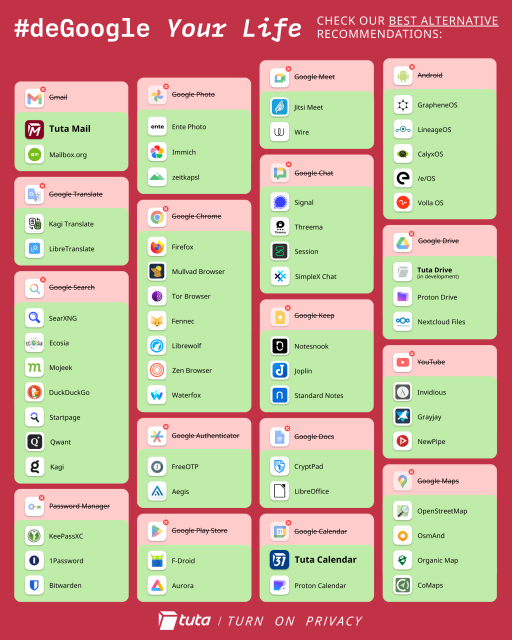
#NewYearResolution2026: Never let people tell you it's impossible to deGoogle your life. 💪

➡️ Find out the names to the icons: tuta.com/blog/degoogle-list


oh my. 5 hours of debugging and updating and trial and error later, and I discover that the version of libvips fwoof.space's server was using was somehow not built with png support among other things. Needless to say, videos and images (both uploading and viewing) now work again, after months. If an image or video doesn't play for you, give it time. I have a task running in the background that's grabbing 93551 remote images/videos and is going to take the next 5 hours, but after that we should be good!

Шульман выдает базу

youtu.be/AfiCFmb3sk8?si=EflUCL…

in reply to Roman

И еще одно интересно. "Традиционные ценности" там хорошо описаны. Это в целом странное явление. В области техники примитивизм очевидно невыгоден, экскаватор лучше лопаты. Примитивизм же в области социальных конструкций люди почему-то ценят и провозглашают, являясь своеобразными социальными луддитами. Хотя провести параллель не сложно.
in reply to Roman

Да, в смысле примитивизма, именно примитивность анархизма или прочих измов для меня всегда является первым признаком того, что это не лучшее решение сложных социальных проблем. Решение должно быть осмысленно сложным, это один из признаков его зрелости и работоспособности, хоть и туманный.