Search

Items tagged with: storage


I'm going to admit that I am doing something immature in my #homelab and I'm looking for opinions. I've got multiple #XCPng hosts, all using local storage. I have no NFS or iSCSI storage. That's kinda silly. Shared storage is super useful and I'm literally not using it.

Unless I go to some serious effort to make a high-performance SAN, I expect network storage performance to be so-so for VM storage, but maybe I'm too pessimistic. I currently only have copper gigabit in the rack. No fiber, no 2.5G copper or anything like that. I'm not sure if that's going to be viable for NFS or iSCSI.

I could dedicate a host to running TrueNAS Core with a bunch of storage. But what has always bugged me about this is that my storage host becomes a single point of failure for all the compute nodes. #TrueNAS is super reliable but everything has to reboot once in a while, and these stupid enterprise-grade servers take anywhere from 4-8 minutes to boot. If I had a single storage node, and I needed to reboot it for an OS upgrade, everything would hang for a while. That's no good. Not updating the OS on the storage system is also not good.

So what am I supposed to be doing for shared storage on a #Xen cluster? How do I avoid a storage host becoming a single point of failure? How do you update and reboot a storage node, without disrupting everything that depends on it?

#selfhosting #san #storage


So, have been eyeing up some #cloud #storage. Currently on a Dropbox plan, but pCloud's 60% off lifetime for Black Friday is showing up all over my Facebook feed. I've heard mixed reviews about it, but not having to constantly shell out for DB/Google Drive/whoever else is out there seems nice. I'm looking at the 2TB plan. Normally $600, now $280 with savings. Is it worth it?


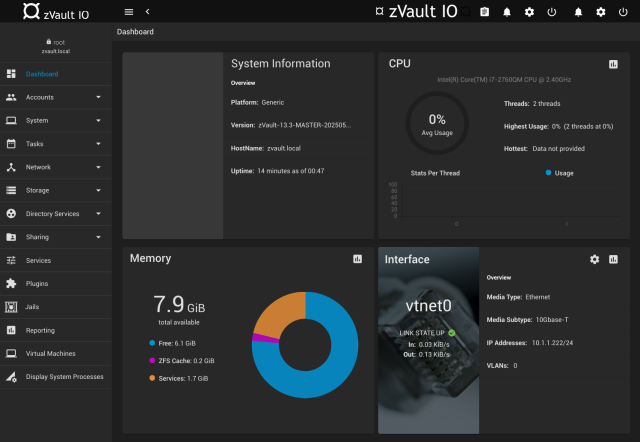
Added ๐—จ๐—ฃ๐——๐—”๐—ง๐—˜ ๐Ÿฎ - ๐—ง๐—ฟ๐˜‚๐—ฒ๐—ก๐—”๐—ฆ ๐—–๐—ข๐—ฅ๐—˜ ๐—ถ๐˜€ ๐——๐—ฒ๐—ฎ๐—ฑ - ๐—Ÿ๐—ผ๐—ป๐—ด ๐—Ÿ๐—ถ๐˜ƒ๐—ฒ ๐˜‡๐—ฉ๐—ฎ๐˜‚๐—น๐˜ to the ๐—ง๐—ฟ๐˜‚๐—ฒ๐—ก๐—”๐—ฆ ๐—–๐—ข๐—ฅ๐—˜ ๐˜ƒ๐—ฒ๐—ฟ๐˜€๐˜‚๐˜€ ๐—ง๐—ฟ๐˜‚๐—ฒ๐—ก๐—”๐—ฆ ๐—ฆ๐—–๐—”๐—Ÿ๐—˜ article.

vermaden.wordpress.com/2024/04โ€ฆ

#truenas #zvault #freebsd #zfs #storage #nas #core


#Synology upcoming Plus Series #NAS #storage #systems will restrict full functionality to users who install the company's self-branded hard drives. While third-party drives will still work for basic storage, critical features including drive health monitoring, volume-wide deduplication, lifespan analysis, and automatic firmware updates will be disabled tomshardware.com/pc-componentsโ€ฆ


Preparing to move the DB

Changing the #storage backend to reduce DB size.

Admin panel:

/admin/storageAdministration - Storage
Current Storage Backend: Database
Storage Configuration
Filesystem
Storage base path:storage
Folder where uploaded files are saved. For maximum security, This should be a path outside web server folder tree
Database
This backend doesn't have custom settings

Helpers-page information

/help/Settings#File+storage+backendFile upload
File storage backend
Set the backend used by #Friendica to store uploaded file data. Two storage backends are available with Friendica:
Database : Data is stored in a dedicated table in database (storage)
Filesystem : Data is stored as file on the filesystem.
Default value is 'Database (legacy)': it's the legacy way used to store data directly in database.
Existing data can be moved to the current active backend using the 'storage move' console command
If selected backend has configurable options, new fields are shown here.
Filesystem: Storage base path
The base path where Filesystem storage backend saves data.
For maximum security, this path should be outside the folder tree served by the web server: this way files can't be downloaded bypassing the privacy checks.
Default value is storage, that is the storage folder in Friendica code root folder.
Maximum Image Size
Maximum size in bytes of uploaded images. The default is set to 0, which means no limits.
#fediVerse #fediHelp

Moving storage via SSH

bin/console help storage informationbin/console help storage
console storage - manage storage backend and stored data
Synopsis
bin/console storage [-h|--help|-?] [-v]
Show this help
bin/console storage list
List available storage backends
bin/console storage set <name>
Set current storage backend
name storage backend to use. see "list".
bin/console storage move[table][-n 5000]
Move stored data to current storage backend.
table one of "photo" or "attach". default to both
-n limit of processed entry batch size

ยฟcorrect?:

SSH -> commands to move storage
mkdir /var/www/html/storage
./bin/console config storage.name = Filesystem
./bin/console config storage.filesystem_path = storage
./bin/console storage move

โ‡ง