
Hi folks. I’m finally back online after about 10 days! No surprise there, when dictators feel threatened, they seem to have no tools other than killing people and shutting down the internet. Let's see if they do it again.
In "I Still Hate WiFi" news:
In the house where I'm staying now, there are three wireless access points in strategic places in the house. Unfortunately, the linking isn't as optimal as I'd like it to be.
I've been primarily using a remote computer from my iPhone for nearly three weeks, so when there is any lag, it becomes pretty obvious.
Pretty much every night here, the lag increases to an annoying degree, so much so that I get better results by turning off WiFi and using mobile data (currently AT&T is working the best in the house).
Because I'm using Tailscale, I still get access to all the same resources whether I'm on WiFi or not, and it only takes a second or two to reestablish the connection when the provider is switched, even if I change between my primary and secondary eSIM for data.
This place is so congested, though. If I do an environment scan from my UniFi controller, I see about 85 wireless access points in the area.
It's not that bad in my New York City neighborhood.
I've confirmed that latency and jitter are perfectly fine on wired devices here in the house. Even with three wireless access points spread out as much as possible as far as spectrum goes, things still get stupid, especially in the upstream direction.
Anyway, I hate WiFi. The end.
In case anyone cares, here's the latency and jitter I get when pinging my iPhone on AT&T from one of my home computers in New York, about 500 miles away.
36 packets transmitted, 36 received, 0% packet loss, time 73ms
rtt min/avg/max/mdev = 40.558/171.173/370.040/104.540 ms
On WiFi, it was more like min 39ms, max 550 ms, average 100 something ms. I've seen better while on AT&T.
Ehhh, whatever.
#FastSM 0.3.0 is now available! This is a pretty big release, and contains all of the changes between 0.2.2 and now. Full changelog below, use your open URL hotkey if you wish to skip this.
Improved image viewer
The app now includes a much better, and actually working, image viewer, which replaces the image viewer which would appear when you press view image in the view post dialog with an image in the post. The new image viewer provides the ability to see all images in a post, as well as get AI image descriptions (see below).
AI image descriptions
You can now get AI descriptions for images in posts. Workflow: first, set up your GPT/Gemini API key, whichever one/ones you want to use, in the AI tab of the settings dialog. Set the service and model you wish to use in the combo box, and tweak the prompt to your liking. Next, on a post with an image, you can view the image/images in the post in a few different ways. The easiest is through the context menu/view image. Other ways include the view post dialog, or the global shortcut, control win alt V by default. Next, you are put in a dialog containing all of the images in the post, which you can move between with the arrows. On each image, there is an edit field with the current description of the image, if one is provided. If you tab, you will eventually find a get AI description button, which when pressed, will kick off the process of getting the AI description. This process may take a bit, depending on your model and service combination. It will then replace the description with the provided AI description.
Mac
FastSM has been able to run on Mac from source for a bit, but this is the first version of FastSM to provide a working, runnable MacOS build.
Audio Player
FastSM now has an audio player, in addition to just playing audio in audio posts. The audio player can be called up by pressing control shift A in the main window, or control win shift A in the invisible interface. In the audio player, you can press up and down arrows to change media volume, as well as left/right to seek. The media volume persists between audio files.
In addition to all of this, the audio player has two settings. One to have the audio player automatically come up when audio starts playing, and another to stop audio from playing when the audio player is closed.
Other audio improvements
You can now set a per account soundpack volume. You can either do this by adjusting the volume in the normal way, and it will only now adjust for the focused account, or you can use the new soundpack volume slider in the account options dialog.
Dark Mode
Add a very hacky/experimental dark mode support in the advanced tab of the app.
Spell Check
It is now possible to check spelling on a post or reply you are writing, with the new spell check button in the new post dialog.
Confirmations
It is now possible to enable confirmations for different toggle actions. For example, you may want a confirmation when you unfollow someone, so that you don't do it accidentally. In the program options dialog, there is now a new confirmations tab where you can enable individual confirmations for things such as favorite, unfavorite, boost, unboost, follow, unfollow.
Other additions/bugfixes
Add enable/disable notifications buttons in the user viewer dialog. This will make Mastodon send a notification to your notifications buffer every time a user with notifications enabled posts.
Add a feature where you can have the app only use a single API call on initial timeline loads.
Add a global shortcut for the update profile option, control win shift U.
Fix quoting. Quoting now works correctly in all cases.
Fix a bug where media descriptions did not show for boosted posts.
Fix a bug where you couldn't unschedule a scheduled post from the scheduled posts timeline.
Fix a bug which meant you couldn't call up the scheduled posts timeline.
Fix the title of conversation buffers when you load a conversation from a boosted post.
Fix deleting bookmarks.
Fix bugs with user selection when loading timelines/profiles.
Fix search timeline errors.
Fix pinned sound in user timelines.
Fix a 404 error when loading user timelines on app startup.
Fix various visual issues with the app.
Windows: github.com/masonasons/FastSM/r…
Mac: github.com/masonasons/FastSM/r…
Jonathan reshared this.
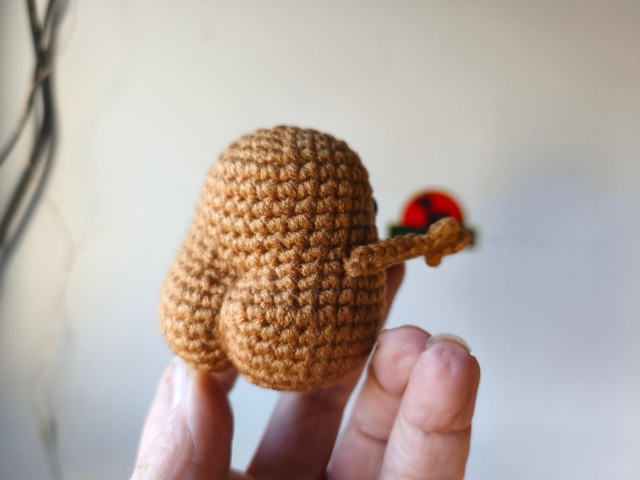
Me pidieron una patatita motivacional.... CULONA.
El mensaje es íntimo/secreto y no puedo mostrarlo PERO ESTE CULO MERECE SER PRESUMIDO.
#crochet #amigurumi #motivacional #MastoArt


Librsvg 2.61.90 is out! This is the first beta before the GNOME 50 release.
librsvg-rebind has a more sensible API, and an updated gtk-rs-core.
gitlab.gnome.org/GNOME/librsvg…

Version 2.61.90 librsvg crate version 2.62.0-beta.0 librsvg-rebind crate version 0.2.2 ...GitLab

"Will ICE Ignite a Mass Strike in Minnesota?"
"“We are not going to shop. We are not going to work. We are not going to school on Friday, January 23. For some people they call that a strike.. For many of us, this is our right to refusal until something changes.”"
*edited to fix a typo in a hashtag, also muting
labornotes.org/2026/01/will-ic…
#Minnesota #unions #strike #LaborNotes #uspol #ICE

Minnesota appears to be in gear for a mass uprising. Unions, community organizations, faith leaders, and small businesses there are calling for a statewide day of “no work (except for emergency services), no school, and no shopping” on January 23.Labor Notes
Choose European Today So Tomorrow We Don't Have To Choose How To Defend Greenland
#GoEuropean #Europe #EU #BuyFromEU

Interactive map of every ICE contractor working with the Trump administration.
readsludge.com/2026/01/16/the-…
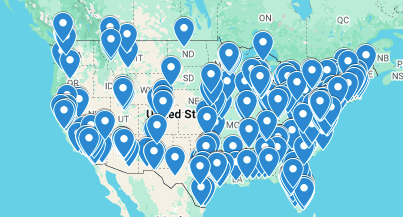
Sludge built an interactive map of every ICE contractor working with the Trump administration.Donald Shaw (Sludge)
reshared this
NEXT FRIDAY: Minnesotans are joining together for a statewide day of non-violent moral action and reflection.
That means no work, no school, and no shopping — only community, conscience, and collective action.
There will also be a peaceful march and rally in downtown Minneapolis: iceoutnowmn.com


why does no one make USB-C hubs? i don't mean docks, just a hub with 1 USB-C host port and 8 or so USB-C device ports.
only useful for low-bandwidth devices, obviously, but most USB devices (mouse, keyboard, audio device, wifi/BT radio...) don't need full speed all the time.


!["[Old PostgreSQL logo from 1996, featuring "PostgreSQL" text above what looks like a broken wall made out of brick, and with the space in the background] This was the first logo PostgreSQL used when released in July 1996. Frankly, it was a mistake to ever stop using it."](https://fedi.ml/photo/preview/640/749434 "\"[Old PostgreSQL logo from 1996, featuring \"PostgreSQL\" text above what looks like a broken wall made out of brick, and with the space in the background] This was the first logo PostgreSQL used when released in July 1996. Frankly, it was a mistake to ever stop using it.\"")
RE: fwoof.space/@Bri/1159076203262…
It's worth noting that this will bring up the GUI and that you'll have to dismiss that once your done, but it's not a biggy.

#FastSM tip: Use the invisible interface? You can call up the context menu, the same one as pressing shift F10/alt M in the window, by pressing control windows alt M! #TheMoreYouKnow
victor tsaran
in reply to Amir • • •Amir
in reply to victor tsaran • • •Brandon
in reply to Amir • • •Amir
in reply to Brandon • • •Brandon
in reply to Amir • • •Amir
in reply to Brandon • • •Brandon
in reply to Amir • • •Amir
in reply to Brandon • • •1. BlindRSS has issues with Youtube feeds. We can add them and articles get refreshed, but upon pressing Enter on their articles we get the following error:
Error dialog Could not resolve media URL via yt-dlp: ERROR: [youtube] Fub7pSvlrlc: Sign in to confirm you’re not a bot. Use --cookies-from-browser or --cookies for the authentication.
Check the following Youtube RSS URL as an example:
youtube.com/feeds/videos.xml?c…
2. BlindRSS has serious issues with Bluesky RSS feeds. Articles do appear, but the article name/ title/ text all are reported as being unknown. Try the following Bluesky RSS feed for an example:
bsky.app/profile/did:plc:mtxyc…
Brandon
in reply to Amir • • •Amir
in reply to Brandon • • •Brandon
in reply to Amir • • •Amir
in reply to Brandon • • •Brandon
in reply to Amir • • •Amir
in reply to Brandon • • •And can we do something for Bluesky feeds?
Brandon
in reply to Amir • • •Amir
in reply to Brandon • • •Brandon
in reply to Amir • • •Amir
in reply to Brandon • • •Bri🥰
in reply to Amir • • •Brandon
in reply to Bri🥰 • • •Cleverson
in reply to Amir • • •