Search

Items tagged with: iOSdev


Version 1.1.0 of #Paylino, my accessible bill scanning and splitting app, has just been released on the App Store with the following new features and improvements:

• Tip Your Way — Each guest can now choose their own, individual tip percentage when splitting a bill, making fair paying even more flexible.
• Even smarter Bill Splitting — Paylino now guides you through the splitting process with helpful prompts, showing exactly how many items still need to be assigned before you can view totals.
• Various performance and stability improvements throughout the app.

If you'd like to check it out, the following link will take you directly to the App Store page: apps.apple.com/de/app/paylino/…
#iOS #iOSDev #IndieDev #Accessibility #AccessibleDesign


I’ve been diving into the Mona 7 upgrade controversy, specifically the requirement for Mona 6 Pro users to buy a "Bridge Upgrade" to Pro Max ($10) in the old app just to unlock the *privilege* of buying the Ultra One-Time Purchase ($20) in the new app.

While a developer is absolutely allowed to release a new App ID and charge for it (that is standard practice), this specific "Bridge Purchase" mechanism appears to violate Apple's App Store Review Guidelines in two critical ways.

If you are frustrated by this, here is the technical breakdown of why this flow is likely non-compliant:

1. Violation of Guideline 3.1.1 (In-App Purchase Mechanics)
The core rule of IAP is that purchases must be for content/features *consumed within the app*.

Guideline 3.1.1 states: "Apps may not use their own mechanisms to unlock content or functionality... Apps and their metadata may not include buttons, external links, or other calls to action that direct customers to purchasing mechanisms other than in-app purchase."

By forcing users to buy an upgrade in Mona 6 (App A) specifically to unlock a price tier in Mona 7 (App B), the developer is effectively selling a "coupon" or "license key" for a different app.
* The $10 spent in Mona 6 is not primarily for Mona 6 features (since the user is abandoning that app for Mona 7); it is a fee paid in App A to modify the behavior of App B.
* Apple historically rejects apps that sell access to other apps. The "Loyalty Discount" should be native to Mona 7 (e.g., detecting the Mona 6 receipt), not gatekept behind a fresh paywall in a deprecated binary.

2. Violation of Guideline 2.3 (Accurate Metadata & Misleading Terms)
This is the "Bait and Switch" clause.

Guideline 2.3.1 states: "Customers should know what they’re getting when they download or buy your app... Don’t include any hidden or undocumented features in your app."

When users bought Mona 6 Pro as a "One-Time Purchase," the reasonable expectation was a perpetual license for that major version. By creating a *new* tier (Pro Max) and retroactively declaring it the *only* tier eligible for future loyalty benefits, the developer has obfuscated the value of the original purchase.
* Forcing a user to upgrade a "dead" product (Mona 6) to access the "live" product (Mona 7) is a "Junk Fee" structure that confuses the purchase flow and misleads users about the true cost of the upgrade ($11.99 original + $10 bridge + $20 new app = $41.99 total, vs the advertised $20).

The Bottom Line:
The developer has every right to charge $20 for Mona 7. They do NOT have the right to force you to spend $10 in Mona 6 to "unlock" that button.

If this flow remains, it sets a dangerous precedent where developers can tax users in legacy apps to gatekeep access to new ones. The "Loyalty Offer" should be available to *all* paid Mona 6 users, or the upgrade path should be handled entirely within Mona 7.

#MonaApp #AppStore #iOSDev #TechPolicy #Mastodon


Alright, it is time for a huge announcement, something that I've been wanting to get out there for a really long time, but decided to keep quiet about until it was fully prepped up and ready for showtime.
Friends, I am happy to announce my first app release as an indie developer!
Introducing Paylino, a simple yet powerful, fully accessible bill scanning and splitting app, available to download on iOS starting today.

Split bills in seconds — fast, easy, accurate.

Paylino is the iOS receipt scanner built for sharing. Snap a restaurant check, a shared grocery receipt, or any group expense. Paylino instantly detects line items, taxes, and totals, then lets you split everything fairly — down to the cent.

Start in a tap:
Snap the receipt → auto-detect → assign items → choose tip → done.

How it works

1. Snap or choose a receipt
Take a photo right in the app. Smart edge detection helps you line it up perfectly. Or import a photo from your library.

2. Capture everything automatically
Our specialized AI recognizes the merchant, currency, items, and taxes/extra fees. Everything is clearly organized and fully editable.

3. Split fairly with friends
Add names, tap who had what, and (optionally) select a tip percentage. Paylino calculates the total and each person’s share automatically.

4. Keep every receipt
Your scanned receipts are saved in the app and synced with iCloud, so you can pull them up anytime.

For those of us who are blind / visually impaired, Paylino makes it super simple to scan receipts, and then check item prices and totals in a consistent, unified format that can be super quickly navigated with VoiceOver. I personally am really bad when it comes to lining up my iPhone camera for a good shot, so hopefully the fact that I've been getting excellent results consistently is a good indication that it should work great for others as well.
If you've been reading this far and it's sparked your interest, I invite you to download Paylino from the App Store and give it a spin!

apps.apple.com/app/paylino/id6…

Note: since Paylino uses server-powered AI models for bill image analysis, using the app requires a paid subscription, the cheapest one is available at €0.99 / month, which enables 5 scan credits per month.
Any thoughts, comments and feedback is super super deeply appreciated!
#iOS #iOSDev #IndieDev

Accessibility matters ❤️ Here’s a quick demo of how the new Dice feature in Skoro works with VoiceOver, so even visually impaired users can use the app.

Skoro on the App Store:
➡️ apps.apple.com/app/id160831104…

#iOSdev #a11y #uxdesign #buildinpublic


Custom images from an asset catalog don't automatically resize with text. If an image is not purely decorative, we should ensure it scales appropriately when users adjust their preferred font size. We can easily do it with the ScaledMetric API in SwiftUI: nilcoalescing.com/blog/Adaptin…
#SwiftUI #iOSDev


The amazing thing about open source services is, you can create interfaces for it the way you imagine them best. Currently testing #Pipilo, an iOS Fediverse client by @luckkerr which presents each timeline as a horizontal bar you swipe through to get to the next post. From a VoiceOver perspective, a slider control is presented and you explore the posts by swiping up and down, then explore the screen to discover things like links, replies in the corresponding thread, attached multimedia. Łukasz also makes sure that everything works correctly with VO and more goodies are already there in the current Testflight build. Glad to see this level of attentiveness to accessibility and a fellow Polish person coding fedithings. Give it a try. apps.apple.com/pl/app/pipilo/i… #Accessibility #A11y #Blind #iOSDev


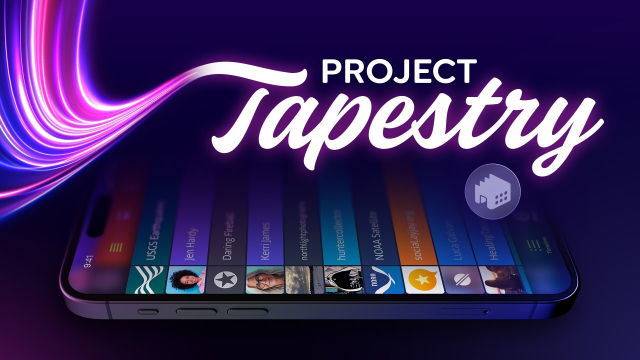
We’ve been floored by everyone’s support for Project Tapestry! Three of the pledge tiers on Kickstarter are already sold out, but there are still several to choose from with rewards ranging from wallpapers to stickers, pins, and even a free year of Wallaroo. At this rate, we’re going to need to come up with some more stretch goals soon! kickstarter.com/projects/iconf…

#ProjectTapestry #Fediverse #RSS #iOSDev


Online media can be overwhelming. It's fragmented between countless services, websites, social networks, and apps.

You need an app that weaves together an overview of nearly everything that’s happening across all the different services you follow.

That’s our vision for Project Tapestry, the new Kickstarter we're launching today.

kickstarter.com/projects/iconf…

#ProjectTapestry #Fediverse #iOSDev


Project Tapestry is a universal chronological timeline of your favorite social media services, blogs, RSS feeds & more. All updates in one place, in the order they’re posted with no algorithm deciding what you see or when you see it.

But we need your help! Check out our Kickstarter campaign to learn more about the project and the backer rewards we have planned, then make a pledge to help us turn Project Tapestry into a reality.

kickstarter.com/projects/iconf…

#ProjectTapestry #Fediverse #iOSDev


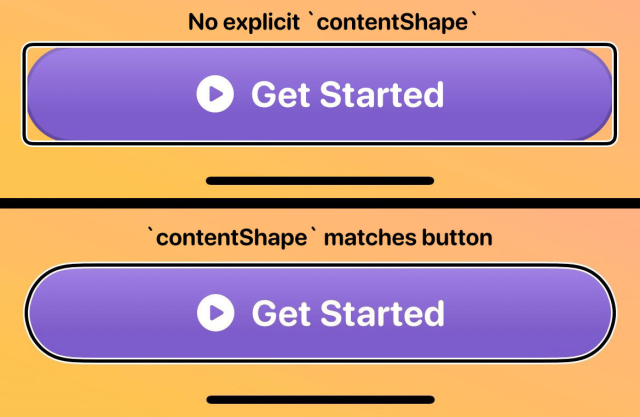
If you're adapting your app for #AppleVisionPro, you've probably added `contentShape` to your custom button styles to get a better `.hoverEffect()`

This also has a nicer side effect for VoiceOver highlighting, as it will now match the actual UI element!

#a11y #iosdev