Search

Items tagged with: selfhost


Jeff Bezos is saying the quiet part out loud. They want to kill local computing.

You will own nothing and be happy. You will rent your computing power from the cloud. You pay a subscription for the privilege of using a computer.

AI demand is artificially spiking DRAM prices and Big Tech is pushing "AI PCs," the squeeze is on to force us into a rental model.

Reject this future. :NoAI:

Keep your hardware local.

Run #Linux. :tux:

Own your data.

The "cloud" is just a landlord for your data.

#NoAi #FOSS #OpenSource #Privacy #SelfHost #SelfHosting #BigTech #RightToRepair #RAM #Amazon #EatTheRich

windowscentral.com/artificial-…


Today I heavily argued with a Hosting and VPS provider called IONOS; there's the domain ionos.com which brings to American site and there's no accessibility statement in that page. On the Italian though, ionos.it, on its footer I found an accessibility statement claiming this company took care of disability needs. It was very affordable. For 10 euro per month or so, I could obtain the Linux VPS L plan, with something like 4 CPU cores, 16GB RAM and 240 GB storage. I don't remember if it's exactly the amount of the offer but now I'm not talking about service's details.
Attracted by the offer I have subscribed to it and the products presentation and e-commerce procedure was actually accessible for screen reader users; but as soon as I has the service in hand, control panel and especially firewall rules, inaccessibility came. As an example, on a single firewall rule, the edit button was labelled with "y", the add with a "@" sign, the delete with a "]" (closed squared bracket) sign.
First thing I did was going to that accessibility page. There was no specialized e-mail for that kind of support but they linked to a contact form.
Clicked on it, it redirected me to a German-speaking page. Last time I spoke German was 1999.
And what did I find there? Phone numbers and a live-chat with German automated answers but nothing on accessibility.
I called them (Italian support) and warned them about the issue, they've been polite with me. I admit I've been quite unkind though, as I was angry. But I managed to obtain contract cancellation and they'll refund me tomorrow. But this issue must not remain under silence. What I'm asking is to all Ionos customers all over the world, to make them aware of this. It hasn't to pass under silence as this habit of placing a declaration without concretely working on accessibility, is becoming more and more normalized.
They find more convenience in violating the laws and losing customers, than create a real remediation.
And there are many faults for this: companies do their own interests, with no doubt. But our fault as people with disability, not to have stood up too much for the cause, or standing up in the wrong way. Not to have pressured governments about investing on LEARNING more than "tou must create accessible sites". You must create, but how many 30-40 years old developers have the culture of accessibility in mind?
How many companies and school have a real decades-long accessibility learning program?
No one wants to mock disability I'm convinced of this. But this practice is due to lack of basic awareness. We can not pretend of nothing.
I'm not inviting anyone to boycott. But to create awareness.
#accessibility #advocacy #awareness #blind #disability #SelfHost #SelfHosting


SelfHosting week2, phase 1.
Setup: Hostinger provider, KVM2 VPS plan. 2 CPU cores, 8 GB RAM, 100 GB storage, Debian 12, YunoHost 12.1.39 stable, WordPress 6.9 branch.
WordPress procedure, I assumed it had to be the easiest, where I am mostly skilled in; obviously, it wasn't.
First of all, because YunoHost installs a plugin called "Companion auto update" which gives an error just on admin page. F-off to it. In that case I deactivated it through terminal, but I found the error's origin thanks to an LLM which interpreted the log for me. If I were unexperienced with web sites advanced configurations, I couldn't have figured it out.
My current multilingual approach on production website, has been a very satisfying experience but I'm noticing it requires too much attention in long term; full-site editing (gutenberg), manual template switch for each English or Italian post, some custom code to manage search and taxonomies. But any deep maintenance could break everything.

So I decided to follow an advice from @2ndkauboy a German blogger who wrote about MultiLingualPress, plug-in connected to MultiSite WordPress platforms during Advent period in his "Plugin Advent Calendar".
Having a VPS now I assumed to be 100% free to perform Multisite and began to build it: YunoHost's WordPress installer asked me if I wanted MultiSite or not, I confirmed YES.
The first obstacle was it did not work as I desired: my idea was to get "domain.extension/" as main site while "domain.extension/english" as second language website but YunoHost refused to place WordPress into the main directory, namely subdomain.domain.extension/, with multisite setup on.
So I removed WordPress from @yunohost by command: "sudo yunohost app remove wordpress"
Re-installed through the same script, sudo yunohost app install wordpress, this time answering "NO" to multisite option, and it accepted to provide the / directory as location.
Enabled MultiSite manually by editing wp-config.php file and installing it, then added extra-lines in the wp-config as well, after the network creation, using subdirectories for multisite setup. YunoHost uses nginx, so I went to modify the subdomain's WordPress nginx configuration; in that case as well, LLM helped me.
But then came trouble: I was logged off WordPress admin. No way to recover the password, no way to access its dashboard.
So, I gave up.
Tried another day: remove, re-install, set MultiSite manually. This time I used another e-mail address and when I got stuck, I managed to reset its password. But after setting main and secondary web sites, the result was wp-admin on main site worked, while /english/wp-admin returned an error: "ERR_TOO_MANY_REDIRECTS".
No way to make it work at all!
So, I resigned. Removed, re-installed with multi-site on natively, by setting the path to subdomain.domain.ext/wp/
having /wp/ and /wp/english/ seemed to be the less evil.
In the end the too_many_redirects error was still there, and disappeared only when I added this string:
try_files $uri $uri/ /index.php?$args;
into the nginx WordPress-specific configuration, under the "location" setting.
Not bad, I assumed it was OK.
But installing MultilingualPress, the plugin suggested by the German blogger of before, wp-admin returned a critical error. Maybe a database, or something else.
Increased the php memory to 256M in wp-config.php and the multilingual press then resulted as active, in the network setup.
So I tried to connect the two blogs, setting related languages and trying to flag relations one another.
But nothing worked. The relations weren't flagged, and going to network / plugins, returned an error again.
So, in the end, I've resigned at the moment, to create two subdomains. English and Italian. Where I have two separate WordPress installations.
I'd like to try again the Multisite experience, though.
#accessibility #a11y #debian #multilingual #multisite #SelfHost #SelfHosting #WordPress #Yunohost


Sensitive content


#selfhosting week 1, phase 3B bis: Disappointment.
Subscribed to a Ionos vps in alternative to Hostinger, but the interface is much, much more complex (I'm referring to the vps and domains management) - thought Hostinger was the worst.
But, if accessibility declaration on Hostinger says "partially accessible" giving an e-mail address (not dedicated, it's the generic support), Ionos makes me point to an Italian paragraph where they claim barrier-free then says "for support, contact us through contact form", redirecting to a German accessibility page where NO FORM is displayed. Is it this way to treat customers?
Does @fsfe and @EUCommission have something to say? These are fake accessibility declarations.
You can't say you respect all customers, when you make your showcase site mostly accessible but most important feature (the vps/firewall management panels) impossible to use. To give an example, the "edit" button for a single firewall rule is labeled as "y", the delete is "]", the add rule is "@" ... Not to say that @yunohost on Ionos creates ipv6 issues, the port TCP 25 is closed and I need to call them with EXACTLY my phone number to have them open the port for me...
I must definitely try to talk to them and start the refund procedure.
Unfortunately though, Ionos would give me 240 gb hard disk for storage while hostinger, even upgrading, would give me 100.
WTF. #accessibility #blind #frustration #selfhost #vps


SelfHosting week 0, phase 2A, documentation.
There is one thing I find quite uncomfortable on @yunohost documentation: the emojis at the beginning of every chapter. They are very annoying to read for a blind user when going back and forth heading by heading with a screen reader. And, worse, when you attempt to isolate links through the "link list" or "heading list", "element list" whatever name used by screen readers for that feature, you cannot choose an item by initial letter and get into it quickly, from the list that pops up.
The "element list" feature allows a user to press a shortcut and find items of the same type, organized in a list. Links, headings, form controls, etc. So, if it is the table of contents in a documentation website, you have all chapters ordered. You press down arrow in the list, till you find the desired element then press Enter. Or, better, in a normal situation, if you have to choose "domains" for example, you pop up the link list and type "d", then if Domains is the first, you press Enter on it. Or at least, links with that initial are isolated by pressing the letter over and over again till you find the desired one.
But this YunoHost docs are full of those emoticons which maybe are pleasant for sighted folks, but not for blind. Not at all.
#accessibility #a11y #blind #docs #SelfHost #SelfHosting #YunoHost


#SelfHosting week 0, phase 1B: DNS records settings. Performed @_elena 's instructions on her "self hosting for newbies" part 2. Except for the post-install as I run it through terminal and not through web UI. For an ms-dos-born it's easier to perform a simple command such as "yunohost tools postinstall" rather than go to web, then type, then search for the various UI elements.
Everything went smooth, except for letsencrypt at first. But in the end it seems to have worked. It got stuck because hostinger panel didn't get one suggested parameter, the numeric 3600, every record has a parameter which is 3, 4 or 5 numbers.
Created the domain and subdomain to point it to yunohost admin interface, and then obstacle came.
Opening browser to subdomain, just returns "connection timed out".
Checked for nginx parameters through yunohost terminal, using the desired Sudo commands.
Then, "sudo yunohost diagnosis run"
"sudo yunohost diagnosis show --issues --human-readable"
and I got explanation on reverse dns which was wrong.
After that, I searched on the web (and on AI, I admit) the position on hostinger panel to set them, and I found "set tpr record"
placed the desired domain name.
And now it's time to wait for propagation. But what about the "connected timeout", in the article posted in blog.elenarossini.com no such obstacle was mentioned.
I'm back to my 20s when I spent the night (it's almost 4 in the morning), learning commands.
Last but not least, accessibility issue: I'm using an app called WebSSH pro, downloaded on app store. Set it up, and VoiceOver for iOS does not read the keys I press on keyboard so I'm very slow to type commands there. Pc is better. In a few hours I'll try hostinger's terminal.
UPDATE: I have just found I set one DNS wrong, now I'll wait for it to propagate. Next update in some hours. I placed a useless number. Such as 72.162 (wrong) instead of 72.62 (right).
Like when you start developing on your own and everything crashes due to a missing semicolumn in a string of code.

#accessibility #yunohost #selfhost #blind


#SelfHost week 0.
Phase 1:
in the end I've chosen hostinger. As a first approach. It has a very frustrating interface on adding records when referring to DNS, and even in state/province while registering domain's contact info.
They are combo boxes, detected as edit boxes through #accessibility equipments.
Now waiting for it to propagate dns on #YunoHost 's admin interface on a subdomain.
Installed yuno host via terminal, then even post-installation done via terminal: yunohost tools postinstall or whatever it was.
Had some trouble with letsencrypt in the end, but now they should be solved.
Phase 2 will be installing an app, I'll get to it as soon as everything's on track.
Even thinking of placing #WordPress English speaking blog there. Let's see.


When you #selfhost something publically, do you trust it's usermanagement? It's password protection?
Or do you add more things yourself, like ratelimiting or a central auth service (like Authelia e.g.).

#selfhosting


Anyone using S3 (compatible) storage for incremental backups of Linux and/or MacOS machines at home? If yes, what backup software/tool? Open source preferred. My first unfocused research suggests to look at restic [1] and maybe just some scripting around rclone [2]. Any hints/links welcome! (Yes, this is part of my project to use local S3 compatible storage based on garage [3])

[1] restic.net
[2] rclone.org
[3] garagehq.deuxfleurs.fr

#SelfHost #SysAdminLife @homelab


I had a cheeky comment prepared for today, saying that you shouldn't rely on Cloudflare if you can afford it, and that you don't truly self-host when you use it, but I could not post it because one of the services I don't self-host —my Mastodon instance— depends on #Cloudflare, too. 😅

#selfHosting #selfhost


Hey folks, I'm considering to #selfhost my mastodon again, only I'm looking at #GoToSocial because it's soooo lightweight.
Is anyone using it full time of their instance? How does it feel admin/maintenance wise?

#Fediverse


Any #ZFS folks want to offer me an opinion on the following? I have 2 ZFS pool of raidz2 with 7 2TB SAS drives each (about 11.5T). I want to add a LOG drive. I have a single SAS SSD that's 300G. When I suggested using a 1TB LOG drive earlier, someone said that was way too much. (which is why I picked up a used 300G SSD)

My question is whether it makes sense (is possible) to partition that drive into 2 partitions and have one pool use 1 partition as a log drive (e.g., 150G) and the other pool use the other partition as a log drive on the same physical device.

Is this going to be worse because it's just too much IO on one device? Is it reasonable? Any other ideas?

Thanks
#homelab #linux #selfhost


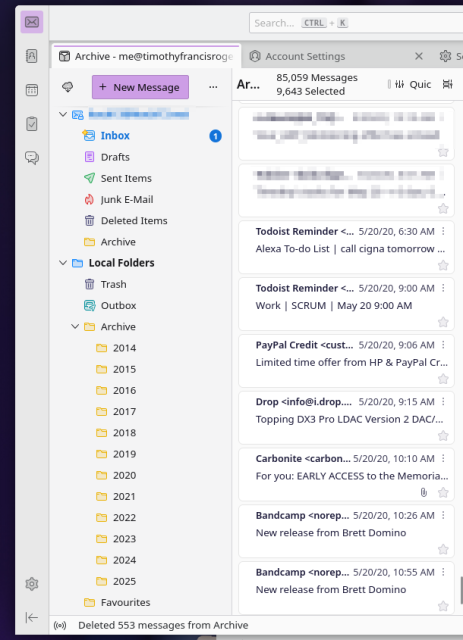
Doing some house keeping today, and moving my mail service again... this time however I am taking the time to move my archives offline. This way moving mail providers will not have to be as hard in the future. Major call out to @thunderbird for making this so easy

#email #selfhost #archive


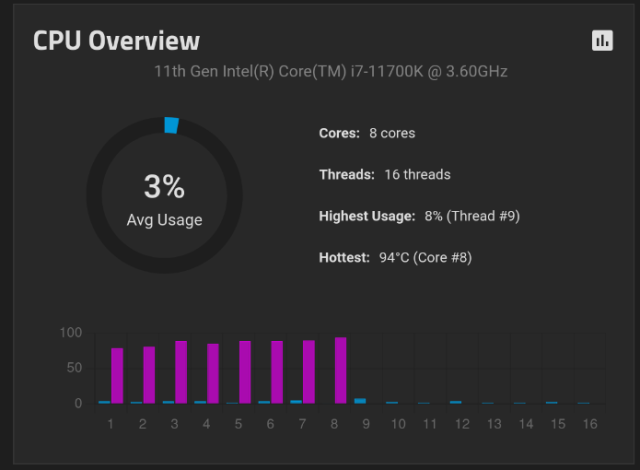
So among the various things i #selfhost is my NAS. It's just a desktop that I installed a nice disk controler and some 12K SAS drives and #TrueNAS. But it lives, like a lot of my kit, in the garage. And it's hot in the garage tonight. Ambient air temp is like 82F/28C at 23:00 at night.

Most of the time it's fine. CPUs tend to run around 45C just doin normal stuff. But when I do an scp of a film I've digitized on my laptop, it goes over gigabit ethernet and that seems to warm up the CPUs. For the whole like 45-90 seconds the scp is running, the cores get super hot. Then it calms down.

#selfhosting #nas


This Week in Self-Hosted (19 January 2024)

The latest news (ft. @matrix and @plex), software updates and launches (ft. @doncow #Immich, #Paperless, #PiAlert, and others), a spotlight on #wgeasy, upcoming events, and more in this week's self-hosted recap!

selfh.st/newsletter/2024-01-19…

#selfhost #selfhosted #selfhosting #homelab #homeserver #opensource #newsletter


I can't wait to use this, and I definitely will use it.

But, have you or @mozilla ever thought about turning Sync into an open protocol so people can #selfhost it? Just a thought! Would be cool...