
Loool, so people can already test out the updater and if it breaks, since I made a super minor revision with increasing comma pauses. Ha. Funny funny
#Eyedropper now supports the new session restore feature, so it will automatically restore picked colors across reboots.
Thanks to @AdrianVovk for the excellent guide!
#GNOME #GNOMEApps #GnomeCircle
So, random tip that some of you will probably find useful and others will be like, meh, I've known that for ages. Still I'm putting it out there because I'm literally ecstatic after learning this information, which I really should've looked up years ago.
So if I'm on a web site that has a lot of interesting links I want to check out, I will often open them in new tabs or windows, so that I can easily close them and return to the main page when done. To open a link in a new tab/window, I used to go to the context menu and hit the appropriate option. But in later versions of Brave (which is my primary browser), keyboard focus seems to have trouble staying in the context menu. Usually I have to open it, escape out of it, and open it again. Not sure why.
It turns out you don't even need to deal with that menu though, at least not for that. Shift enter opens a link in a new window, and control shift enter opens in new tab. I'll be honest, I don't enjoy learning random keystrokes because they're easy to forget, but these are two that are definitely going to save me time, and I will use them so much that I will remember them. As a third bonus keystroke, alt enter on a link will let you download the file it points to (it's the save link as option in the context menu). So yeah, hope at least one person finds this information useful.
Jonathan reshared this.
Great video about younger Singaporean food ‘hawkers’

Singapore’s hawker culture is world-famous — but behind the sizzling woks and iconic flavors lie the hidden struggles of families fighting to keep a nation’s...YouTube
I have seen this elsewhere and it's so good that I want to repeat it over"
Oracle is an acronym that stands for One Rich Asshole Called Larry Ellison.
And this is so accurate that it goes along with him naming his new yacht izanami.
(hint: spell that name backwards)
Monthly Active Users (MAU) latest figures (depending on who you believe for the other platforms)
Facebook 3.07 billion
Telegram 1 billion
Threads 400 million
twitter 353.9 million
Bluesky 12.23 million
Fedi 1,039,049
For every engagement (boost/fave) on Fedi, it is the equivalent to
3,000 on Facebook
1,000 on Telegram
400 on Threads
340 on twitter
12 on Bluesky
However! This also understates Fedi’s real engagement because Fedi users are far more active per capita, there is no algorithm and timelines are presented chronologically (and far less bot-driven than somewhere like twitter).
So when you think your interesting / clever / funny post *only* got 20 boosts or likes..... that would be nearly seven thousand on twitter or 60k on Facebook!


🇨🇦Samuel Proulx🇨🇦 likes this.

Yessir: fwoof.space/@starchild/1133582…

For those of you who are switching to #Thunderbird from #Outlook, do the following to ensure as seamless an experience as possible while using a #screenreader. Note, these do not have to be done in this order.
1. If preferred, add your account by filling in the form that is presented on the screen which appears for the first time you open Thunderbird. This will get your first Email account connected properly to TB.
2. Once you are presented with the main TB window and the various folders (inbox, sent, etc.), you know your account has successfully been added. Press F8 to disable the preview pane. This will reduce clutter and allow you to simply press Enter on a message to open it rather than having to navigate it in the main TB window.
3. Open the Tools menu with Alt+T, then press Uparrow until you get to Settings and press Enter. Note, this is not the same as Account Settings.
4. Once in Settings, find the following items and make sure they are set as shown below.
A. Under General heading. When Thunderbird launches, show the Start Page in the message area Alt+Shift+W check box not checked. This will prevent Thunderbird from showing its normal startup page and reduce the resulting clutter in the main TB window.
B. Under General heading, optional. When Thunderbird is minimized, move it to the tray Alt+Shift+m check box not checked. When this checkbox is checked, every time you minimize the application, Thunderbird moves to the system tray and consequently requires activation every time you want to quickly get back to it. I personally find this bothersome, so I have disabled this particular behavior.
C. Under General heading, optional. Hide system window titlebar Alt+Shift+H check box not checked. I personally like all the information I can get when reading my titlebar, so I prefer to have this disabled.
D. Under Incoming Mails heading, Optional. Show an alert Alt+Shift+S check box not checked. Note, do not disable this setting if you desire to change the setting below it. If desired, change the setting below first, then move back and change this one afterward if preferred. When this item is checked, the screenreader will automatically announce when each message arrives. This is a bit too chatty for my personal preference, so I have it disabled.
E. Under Incoming Mails heading, optional. Use the system notification check box not checked. Note, change this setting first if desired before changing the one above it, as this checkbox becomes unavailable when the setting above is disabled. This item allows Thunderbird to send a system notification to the Windows 10/11 Action Center. You get the system notification sound, as well as any accompanying speech and can view the notifications that way. I personally find this overkill, so I have disabled it.
F. Under Incoming Mails heading. Play a sound Alt+Shift+d check box checked. This will allow Thunderbird to play a sound whenever a new message arrives. You can either use the sound that has been set up for the default Windows notification sound for mail or choose your own by specifying the file you would prefer using the Browse option.
G. Under Reading and Display Heading. Set Open New Messages In to A New Message Window. This will exhibit the more familiar behavior of Outlook and open the message in its own window when you press Enter on it.
H. Under Reading and Display heading, optional. Close message window/tab on move or delete Alt+Shift+C check box checked. This tells Thunderbird to close the message window if you happen to move or delete it from the main TB window. I personally have this enabled for convenience.
I. Under Reading and Display heading, optional. Preferred Address Display Format set to Name Only. I prefer this because it cuts down on chatter. This way, as you arrow through messages, you will see only the name of the sender along with other header information, rather than both the name and Email address.
5. Once all the settings are to your liking, press Control+W to close Settings and return to the main TB window.
6. Open the View menu with Alt+V and press Rightarrow on the Toolbars menu. Uncheck all the items there except for Status Bar. This results in less clutter in the main TB window.
7. Return to the View menu with Alt+T and press Rightarrow on Layout. Press Enter on Classic View. This optimizes the view a little bit more for screenreader use.
8. From the main TB Window, Shift+Tab until you find the Message List Display Options button. Activating this will bring up a context menu. Once in this menu, make sure that Table View is checked. This will allow you access to message headers and the ability to order them how you would like.
9. Finally, from the message list in the main TB window, Shift+Tab once. You'll find a toolbar that consists of several buttons. These are your message headers. If you wish your screenreader to announce Read Status first, find the Sort By Read Status button, then press alt+leftarrow. This will move the header over. Note, this does not mean you will be sorting message by Read Status. Sort By is announced because if you click on these headers, you can sort the messages by the header that is selected. Use Alt+Leftarrow or Alt+Rightarrow to find the preferred position of the selected header. To check or confirm the order of your headers, press Tab and arrow through your message list. I have Read Status first, followed by attachments and so on. This makes the reader announce the read status of the message, then whether or not there are attachments, followed by whatever header (e.g. correspondents) comes next. Change the order of the message headers to match how you would like your reader to announce the associated items as you arrow through your message list. Press F6 and Shift+F6 to jump quickly between Email folders and message lists.Hope this helps, and enjoy your shiny new Email client! #A11y #Blind #JAWS #NVDA
> Jails not created with the allow.mount.nullfs option are unaffected.
I have never seen a jail need this permission anyway
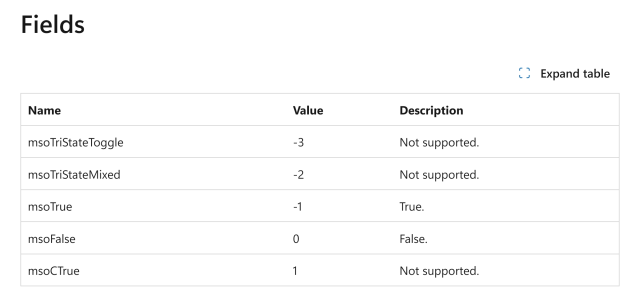
sometimes when i feel my code has too many confusing states, i like to stop, take a deep breath, and open the MSDN page for the MsoTrioState enum.
MsoTrioState is "a tri-state Boolean value". it has five possible values. only two of them are supported.
the only supported values are true and false.
TikTok now specifically tracks immigration status and gender identity
pastemagazine.com/tv/tiktok/ti…
#transgender #trans #LGBTQ #LGBTQIA

The latest privacy update in TikTok's terms of service now includes a carve out for collecting immigration status and gender identity.Matt Schimkowitz (Paste Magazine)
Look mom, we made it to LWN: lwn.net/Articles/1055996/
"Stenberg: The end of the curl bug-bounty program"
Curl creator Daniel Stenberg has written a blog post explaining why the project is ending its b [...]LWN.net
TIL that there is a very nice, free PDF book called “Conway’s Game of Life: Mathematics and Construction” that systematically introduces common structures and patterns and discusses how to reason about their behaviour.
It’s beautifully typeset with tons of diagrams. Well worth a look.
Jonathan reshared this.
Fediverse map nerds. I need your help.
I need to create maps that I can apply custom filter/styling to. My assumptions for doing this are:
- Export from OSM as SVG
- Import to Inkscape and apply styling
- Export to PNG
I have found a bunch of wiks and help pages, mostly centered around `josm` which does not work at all. (can't download large enough grids, can't import an OSM dump of "norway" due it being too much data).
I think I am pretty "good at computer" and literally nothing I've found works. At all. I can produce nothing.
How much one do what I'm trying to do?
wait a minute how the hell do you access Airplay from Android
is this really still impossible in 2026? Sonos devices don't do Cast, they only do AirPlay (or native Sonos app stuff which sucks)
@CapitalB Android QuickShare was already using WiFi Aware (the standard that I was thinking of) and the EU forced Apple to adopt it for AirDrop. Apple was apparently using "Apple Wireless Direct Link" previously. Maybe they could get Apple to adopt more standards next? 🤷♂️
They didn't reverse engineer anything. They didn't really even need to change anything.
feld likes this.
New essay: Blocking AI crawlers might be a bad idea - Disappearing from AI results won't make #AI go away
mkennedy.codes/posts/why-hidin…

Instead of blocking AI crawlers out of frustration, content creators should embrace deep AI integrations to ensure accurate recommendations and better user experiences. Disappearing from AI results won't make AI go away.Michael Kennedy's Thoughts on Technology
reshared this
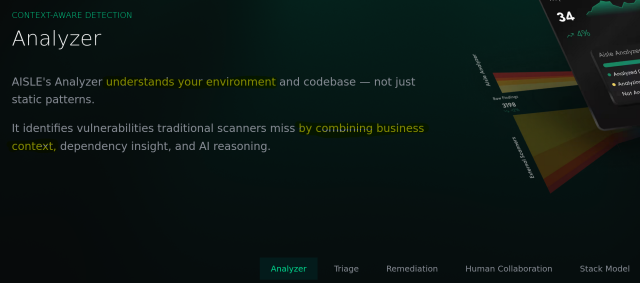
I'm a little amazed by the amount of CVEs released by OpenSSL today: openssl-library.org/news/vulne…
12(!) of them were reported by people at Aisle.
Aisle makes an AI-powered code analyzer. That's what they use to find these flaws.
I mean if you are curious what AI can do in Open Source security when used for good.
Most of "AI" is human labor misrepresented as something the machine did, to defraud customers and investors.
I wouldn't be surprised if we find out that their "AI-powered code analyzer" did little or nothing here, and that they spent a lot of money on actual labor for the sake of promoting their product.
@dalias I know that's not the case because I also have access to such tools (made by others) and as I can run them on my own code I can see what they do and what they can find.
AI powered code analyzers is a real thing, and they make better code analyzers than the ones without the AI component.
I don't think you're "lying".
I think you're giving undue credit to an industry that's vastly over-promising and that has extremely bad externalities. And that doing so lowers your credibility among folks who care about this.
@dalias I have not argued against them over-promising and doing all sorts of crap. They do. And will continue to most likely. That's certainly problematic.
What I *am saying* though, is that some of the AI (powered code analyzer) tools are better than most non-AI ones. And I think I've seen one or two in my days and I have written a line of code or two.
AI can be used to do good. Is it worth the cost? That's a separate question.
"AI can be used to do good." is a statement that lacks meaning without clarifying what "AI" means, and that excuses all sorts of other things under the umbrella of "AI" that fundamentally cannot be used for good. Because "AI" is and always has been a strategically vague marketing term not a technical category.
It's likely that statistical models of source code correlated with vulnerabilities can be used for good. I don't think they can be built without massive scale license infringement enclosing the commons, nor lots of other types of harm.
@dalias > It's likely that statistical models of source code correlated with vulnerabilities can be used for good.
Great. That seems to be roughly what I said too.
Thanks. When they say
> have been building an automated AI system for deep cybersecurity discovery and remediation
it does not sound like they are talking about slopbots being infosec employees, and does sound quite a lot like deep learning code static analysis.
I don't know, as a Malaysian, I have long been cynical about the freedom of speech online. Because it allows bad actors to act with inpunity.
malaymail.com/news/malaysia/20…
KUALA LUMPUR, Jan 14 — Malaysia is among 81 countries where the manipulation of public opinion through social media remains a growing threat to democracies around the world, a...G. PRAKASH (Malay Mail)

I went to pottery class today and opened by asking several of my classmates if they knew how to use the slab roller upstairs. Nobody did but everyone wanted to, so when the teacher got in I’m like “hey teach, do you know how to use the slab roller upstairs” and she’s like “no” (she’s a visiting artist who only got here a couple months ago so this is not very surprising) “but I’ve used a lot of different ones and I bet we can figure it out.” Me: “do you want to go on a Journey of Discovery?” Everyone: yes. YES. *cue sickos faces* so we all thunder up the stairs periodically shouting JOURNEY OF DISCOVERY and our teacher snags another person who uses the slab roller A Lot and this person gives us a very thorough lesson and demonstration and every so often someone else wanders through and asks what’s happening and we all go JOURNEY OF DISCOVERY at them and now everyone knows how to use the slab roller and honestly I cannot recommend this approach enough as a way to make learning new skills and life generally more exciting.
Tady potichu sleduju konverzace o MeshCore a protože kolem HK je to s repeatery docela slabota, tak jsem objednal jeden na náš dům. Nemáme 100% ideální polohu, na jih a západ jsou lesy a na sever dálnice. Ale určitě to v současné situaci neublíží. Pokud to bude fungovat bezúdržbově, tak se zkusím domluvit s někým, kdo má střechu položenou lépe.
aliexpress.com/item/1005009629…
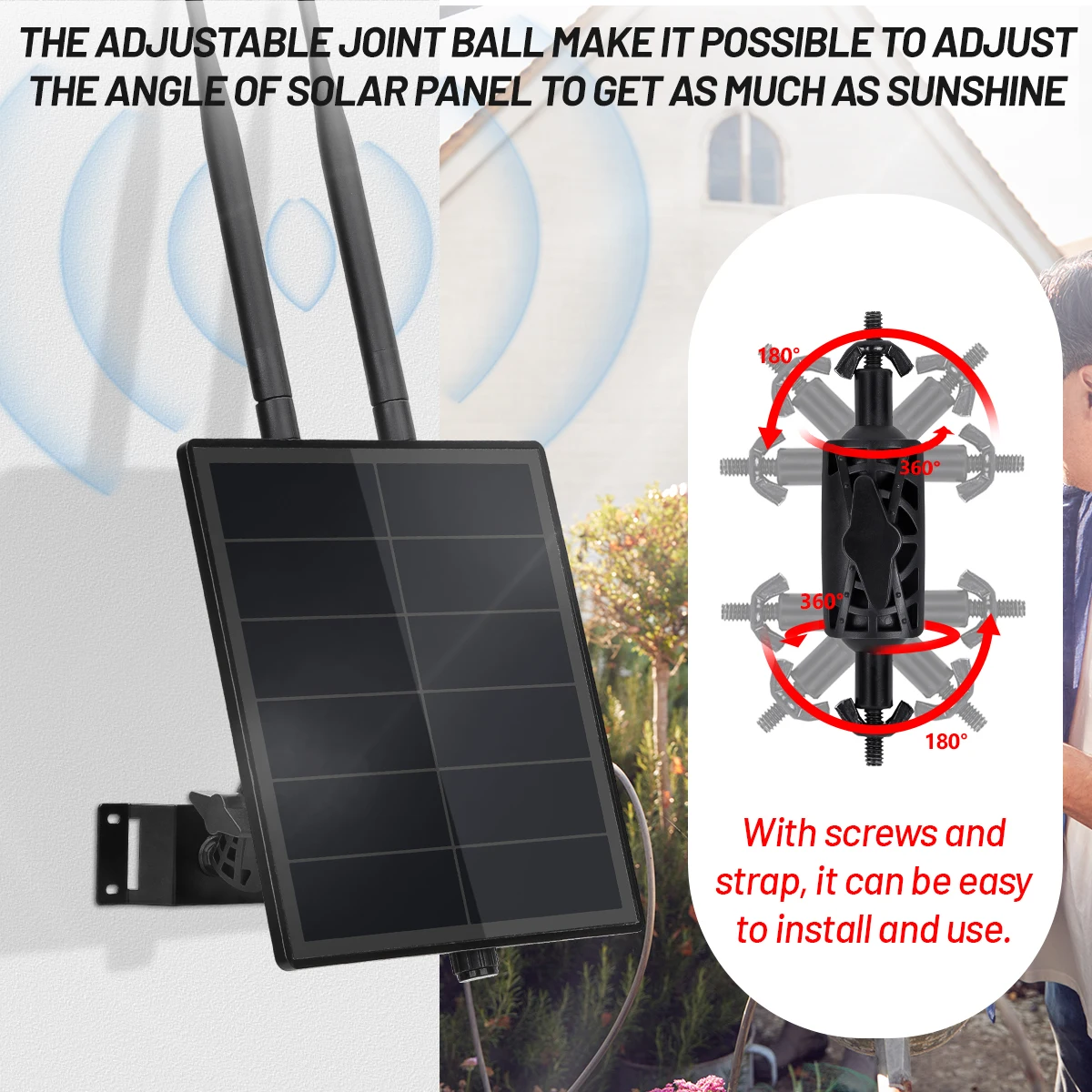
Smarter Shopping, Better Living! Aliexpress.comaliexpress.
@sesivany Ještě mě napadla střecha kde máme v Roští kancl. To je osmipatrová budova. Zkusím se tam zeptat. Tam by se asi dalo dostat v pohodě.
Ten SenseCAP P1 vypadá fakt dobře a ani není drahej. Ten čínskej bazmek, co jsme objednal, je za podobný peníze.

It is a solar-powered communication node that integrates the XIAO nRF52840 Plus main controller, the Wio-SX1262 LoRa module, and the XIAO L76K GPS module. It is specifically designed for areas without network coverage.www.seeedstudio.com


Sensitive content
Next time some politician tell they can't close tax loopholes that the rich exploit to pay less taxes than majority of Canadians, ask them why one can't save on PST anymore by ordering out of province?

For years, the payments industry was aggressive about cutting off access to websites accused of containing child sexual abuse material. Elon Musk changed that.Elizabeth Lopatto (The Verge)



Tyler Spivey
in reply to Tamas G • • •Tamas G
in reply to Tyler Spivey • • •Tamas G
in reply to Tyler Spivey • • •Tyler Spivey
in reply to Tamas G • • •Goemon Ishikawa
in reply to Tamas G • • •Tamas G
in reply to Goemon Ishikawa • • •Tamas G
in reply to Goemon Ishikawa • • •Once I checked it words like "pool" started to sound more like the start wasn't swallowed and "pitch" became clearer with it.