
Ecosia is a search engine that plants trees, and then kills those trees by having an "AI" chatbot that is just ChatGPT in a trenchcoat.
🫠
Ecosia is a search engine that plants trees, and then kills those trees by having an "AI" chatbot that is just ChatGPT in a trenchcoat.
🫠
Is *this* government efficiency?
Police guarding a Tesla dealership in Chicago.
We got the Robocop Omnicorp future!!

Elon Musk has apparently stolen money from either Canada and taxpayers, or Tesla dealerships, or likely, from both, as police and transport Canada get involved finding how thousands of Teslas got EV rebates.
Tesla made a suspicious number of rebate requests on last days of Canadian EV incentive
electrek.co/2025/03/07/tesla-m…
__
"‘Tesla gamed the system’: Canadian auto dealers ‘stiffed’ millions when U.S. giant rushed to claim last EV rebates "
thestar.com/news/canada/tesla-…

Transport Canada is looking into Tesla after it made a suspicious number of rebate requests on the last days of...Fred Lambert (Electrek)


Worker Jobs: UpdateContacts it never ends
Hello , @Friendica Support
It's been more than 2 months since UpdateContacts the one highlighted in red it doesn't end , can you tell me how i can remove it?
Thanks
@Anomaly Deferred tasks aren't currently running. They failed during they initial run, which placed them in this wait list with a next try date in the future. From your screenshot it appears that the task creation date and the next try date are pretty close to each other, so it must only have failed a few times at most.
Running either the worker or the daemon manually will not clear deferred tasks which next try date have not been reached yet. There's an incremental back off system that increases the delay before the next try after each new failure. Once the task succeeds, the task will clear from the deferred list.

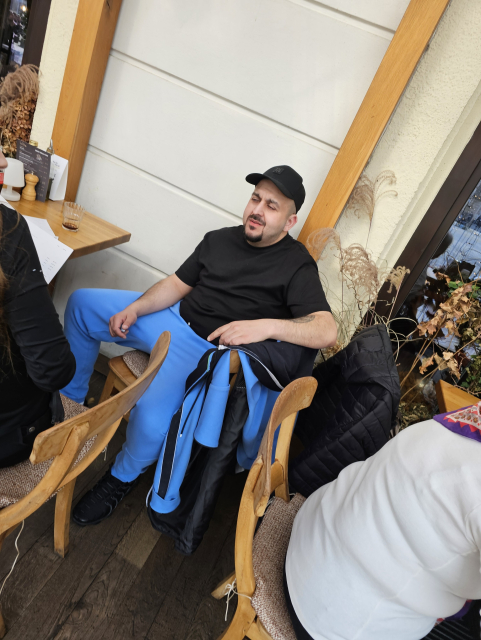
noo čorkár na našom rajóne.. pchal ruku do kabelky pani čo sedela za ním. Tu sa to deje "občas".
edit: my si to na prevádzkach prepošleme ale budú chodiť určite aj inam.
edit1: kolegyňa to uvidela z vnútra a ja som tam šiel.
noo nebuďte, ja chcem 1000€
máš na to 🫵

Did some app icon design work for the first time in a while today. Haven't gotten feedback on either of these yet, but regardless of whether they'll actually end up being used, I'm happy with how they turned out 😁
#GNOME #AppIconDesign #Inkscape

so yes the rumors are correct (this was leaked on reddit a few days ago, oh well)
the #FLX1 will be getting support for hooking up to external displays. the difference here compared to other approaches is that it will be running full #GNOME shell instead of #Phosh desktop mode (with some integration). as much as we love Phosh, GNOME shell simply provides a superior experience on a large display (and our community members voted for this too)
#furilabs #FuriPhoneFLX1 #LinuxOnMobile #LinuxMobile

A couple of years ago I set up a simple and independent media streaming server for my Bandcamp music collection using a Raspberry Pi 4, Fedora IoT and Jellyfin. It works nicely and I don’t have to play any cloud rent to Spotify to listen to music at home.
But it’s annoying having the music playback controls buried in my phone or laptop. How many times do you go to play a song and get distracted by a WhatsApp message instead?
So I started thinking about a tablet that would just control media playback. A tablet running a non-corporate operating system, because music is too important to allow Google to stick AI and adverts in the middle of it. Last month Pablo told me that postmarketOS had pretty decent support for a specific mainstream tablet and so I couldn’t reset buying one second-hand and trying to set up GNOME there for media playback.
Read on and I will tell you how the setup procedure went, what is working nicely and what we could still improve.
I’ve never owned a tablet so all I can tell you is this: it looks like a shiny black mirror. I couldn’t find the power button at first, but it turns out to be on the top.
The device specs claim that it has an analog headphone output, which is not true. It does come with a USB-C to headphone adapter in the box, though.
It comes with an antagonistic Android-based OS that seems to constantly prompt you to sign in to things and accept various terms and conditions. I guess they really want to get to know you.
I paid 240€ for it second hand. The seller didn’t do a factory reset before posting it to me, but I’m a good citizen so I wiped it for them, before anyone could try to commit online fraud using their digital identity.
I work on systems software but I prefer to stay away from the hardware side of things. Give me a computer that at least can boot to a shell, please. I am not an expert in this stuff. So how did I do at installing a custom OS on an Android tablet?
The hardest part of the process was actually the first step: getting root access on the device so that I could see what type of display panel it has.
Xiaomi tablets have some sort of “bootloader lock”, but thankfully this device was already unlocked. If you ever look at purchasing a Xiaomi device, be very wary that Xiaomi might have locked the bootloader such that you can’t run custom software on your device. Unlocking a locked bootloader seems to require their permission. This kind of thing is a big red flag when buying computers.
One popular tool to root an Android device is Team Win’s TWRP. However it didn’t have support for the Pad 5 Pro, so instead I used Magisk.
I found rooting process with Magisck complicated. The only instructions I could find were in this video named “Xiaomi Pad 5 Rooting without the Use of TWRP | Magisk Manager” from Simply Tech-Key (Cris Apolinar). This gives you a two step process, which requires a PC with the Android debugging tools ‘adb’ and ‘fastboot’ installed and set up.
patched_boot.img.The boot.img linked from the video didn’t work for me. Instead I searched online for “xiaomi pad 5 pro stock firmware rom” and found one that worked that way.
It’s important to remember that downloading and running random binaries off the internet is very dangerous. It’s possible that someone pretends the file is one thing, when it’s actually malware that will help them steal your digital identity. The best defence is to factory reset the tablet before you start, so that there’s nothing on there to steal in the first place.
adb reboot fastboot to reboot the tablet and reach the bootloader menu.fastboot flash boot patched_boot.img to boot the patched boot image.At this point, if the boot.img file was good, you should see the device boot back to Android and it’ll now be “rooted”. So you can follow the instructions in the postmarketOS wiki page to figure out if your device has the BOE or the CSOT display. What a ride!
If we can find a way to figure out the display without needing root access, it’ll make the process substantially easier, because the remaining steps worked like a charm.
Following the wiki page, you first install pmbootstrap and run pmbootstrap init to configure the OS image.
A note for Fedora Silverblue users: the bootstrap process doesn’t work inside a Toolbx container. At some point it tries to create /dev in the rootfs using mknod and fails. You’ll have to install pmbootstrap on the host and run it there.
Next you use pmbootstrap flasher to install the OS image to the correct partition.
I wanted to install to the system_b partition but I seemed to get an ‘out of disk space’ error. The partition is 3.14 GiB in size. So I flashed the OS to the userdata partition.
The build and flashing process worked really well and I was surprised to see the postmarketOS boot screen so quickly.
The design side of GNOME have thought carefully about making GNOME work well on touch-screen devices. This doesn’t mean specifically optimising it for touch-screen use, it’s more about avoiding a hard requirement on you having a two-button mouse available.
To my knowledge, nobody is paying to optimise the “GNOME on tablets” experience right now. So it’s certainly lacking in polish. In case it wasn’t clear, this one is for the real headz.
Login to the machine was tricky because there’s no on-screen keyboard on the GDM screen. You can work around that by SSH’ing to the machine directly and creating a GDM config file to automatically log in:
$ cat /etc/gdm/custom.conf # GDM configuration storage[daemon]AutomaticLogin=mediaAutomaticLoginEnable=True
It wasn’t possible to push the “Skip” button in initial setup, for whatever reason. But I just rebooted the system to get round that.
Enough things work that I can already use the tablet for my purposes of playing back music from Jellyfin, from Bandcamp and from elsewhere on the web.
The built-in speakers audio output doesn’t work, and connecting a USB-to-headphone adapter doesn’t work either. What does work is Bluetooth audio, so I can play music that way already. [Update: as of 2025-03-07, built-in audio also works. I haven’t investigated what changed]
I disabled the automatic screen lock, as this device is never leaving my house anyway. The screen seems to stay on and burn power quickly, which isn’t great. I set the screen blank interval to 1 minute, which should save power, but I haven’t found a nice way to “un-blank” the screen again. Touch events don’t seem to do anything. At present I work around by pressing the power button (which suspends the device and stops audio), then pressing it again to resume, at which point the display comes back. [Update: see the comments; it’s possible to reconfigure the power button so that it doesn’t suspend the device].
Apart from this, everything works surprisingly great. Wi-fi and Bluetooth are reliable. The display sometimes glitches when resuming from suspend but mostly works fine. Multitouch gestures work perfectly — this is first time I’ve ever used GNOME with a touch screen and it’s clear that there’s a lot of polish. The system is fast. The Alpine + postmarketOS teams have done a great job packaging GNOME, which is commendable given that they had to literally port systemd.
I’d like to figure out how un-blank the screen without suspending and resuming the device.
It might be nice to fix audio output via the USB-C port. But more likely I might set up a DIY “smart speaker” network around the house, using single-board computers with decent DAC chips connected to real amplifiers. Then the tablet would become more of a remote control.
I already donate to postmarketOS on Opencollective.com, and I might increase the amount as I am really impressed by how well all of this has come together.
Maenwhile I’m finally able to hang out with my cat listening to my favourite Vladimir Chicken songs.
Updates:
Santiago De Compostela, Spain • Alternative • 286 collection items • 12 followersBandcamp
Tohle je dobrý. Přečtěte si to.
m.kosmas.cz/knihy/535427/potvo…
(původně jsem chtěla napsat nějakou inteligentní větu, ale někde u obratu poetický chaos jsem to radši smazala)
💜 děkuju @anna
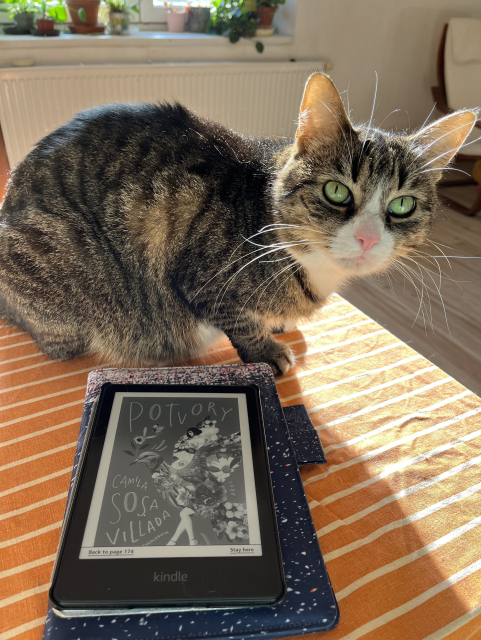
„Naproti Dantově soše vylézají každou noc z pekla transky, aby navrátily světu jaro.“ Román Potvory má podobné účinky jako iniciační rituál, je to strašidelná pohádka, skupinový portrét, provokativní...Kosmas.cz - internetové knihkupectví
pod 24 minút.. skvelé, jednoducho skvelé
edit: proti tomu vetru pri Dunaji môžeš robiť jedine že sa zohneš ináč to nemá cenu
“The fundamental weakness of Western civilization is empathy, the empathy exploit,” Musk said. “There it’s they’re exploiting a bug in Western civilization, which is the empathy response.”
-Elon Musk, Feb 28, 2025
“In my work with the defendants (at the Nuremberg Trials 1945-1949) I was searching for the nature of evil and I now think I have come close to defining it. A lack of empathy. It’s the one characteristic that connects all the defendants, a genuine incapacity to feel with their fellow men. Evil, I think, is the absence of empathy.”
-Captain G. M. Gilbert, the Army psychologist assigned to watching the defendants at the Nuremberg trials

Technology is transforming lives, and for blind and visually impaired individuals, smart home automation offers incredible opportunities to enhance independence and convenience.Content Team (Blind Ambition)

A little over a year ago, I was given the profound responsibility of leading British Wireless for the Blind Fund (BWBF) as we embarked on our small charity’s next chapter.Jenny Cameron (British Wireless for the Blind Fund)

After nearly four decades of remarkable leadership, British Wireless for the Blind Fund (BWBF) is embarking on a new chapter with the appointment of Sophie Jones as our new Chief Executive Officer, effective March 1st, 2024.Jo Dobson (British Wireless for the Blind Fund)

Does 1951's Tales of Tomorrow count as one of the greatest sci fi/fantasy television shows of all time or is it far too outdated?johnnyjay (Cancelled Sci Fi)

Brandon Biggs is a Software Engineer at The Smith-Kettlewell Eye Research Institute, CEO of XR Navigation, and a PhD Candidate at the Georgia Institute of Technology.Ann Chiappetta (APH ConnectCenter)

Comcast is delivering a significant upgrade to its Xfinity Internet customers, rolling out speed increases across a wide range of plans.Luke Bouma (Cord Cutters News)
Interesting post. The very weird Hewlett Packard FreeDOS option blog.tmm.cx/2022/05/15/the-ver…
Want to try running your own builder – to confirm apps as #reproducibleBuilds or just to build your own apps? At #IzzyOnDroid we've just made "easy setup scripts" available which should take care for all requirements, while letting you choose which parts you want:
codeberg.org/IzzyOnDroid/rbuil…
These scripts are not yet thoroughly tested (just a bit on Linux Mint/Debian/Ubuntu), so we'd welcome volunteers & their feedback.
Thanks to @nlnet for supporting us on this project! You're awesome 

reshared this
@s3nnet err… Steht gleich am Anfang in der Readme (hat leider nicht mehr in den Tröt gepasst): In der ersten Version funzt das nur mit Debian-basierten Systemen. Für RPM-basierte Systeme haben wir uns schon ein Issue aufgemacht. Für BSD möchte auch schon jemand schauen.
Aber schau gern mal über das 01_sudo_requirements.sh Skript, was da für Arch/Manjaro die passenden Dinge wären, und mach dafür ein Issue auf.
Danke Dir!

I wrote a #DeltaChat blog post for technical users who are skeptical about how it works
Everything You Think You Know About DeltaChat Is Wrong
blog.feld.me/posts/2025/03/del…
I am smitten with DeltaChat... DeltaChat has been making massive strides lately and I think you should consider using it as your full time secure messenger.blog.feld.me
Peter Vágner reshared this.
@adiz have you actually tried it yet, though? It cost you nothing but a minute of your time. No need to provide any identifying information to make an account, and the account will be auto-deleted if it's idle for too long.
click the link in my bio to message me. I'll show you some cool stuff that no other messenger has.
>have you actually tried it yet, though
Yes, I have. And, it worked. But, it sucked. And I don't want to go through the lengths to make it not suck (like a dedicated address for it + a Chatmail deployment) when I already run an XMPP service which does everything DeltaChat does but better + more.
@adiz this statement is technically inaccurate. Xmpp and Delta chat have the same federated model, so architecturally they are equivalent.
However, a key pain point for me for xmpp is that media attachment is out of band with regards to the protocol, occurring over http. It has all the same privacy concerns that media uploaded to the fediverse does. As media sent over Delta chat occurs in band (email attachment) and is end-to-end encrypted, it is strictly better from a privacy perspective.
However, from a normalfag perspective, interface remains the chief detriment of using xmpp over other solutions. The xmpp ecosystem has been waiting for "someone else" to make a good, functional, attractive client forever. It is not a good argument to say that all it needs is a client that has not been developed in 20 plus years. One client that is a functional clone of something that normalfags are used to like telegram or Whatsapp, is an enormous selling point for people not concerned with, or unable to understand arguments for privacy.
I like xmpp. I like Delta chat. But there will be no one true instant messaging solution until a plurality of users exist that brings it to dominate the market. Currently, those are all proprietary networks tied to services like Facebook or well, mostly Facebook I guess.
The open source community is never going to fill this gap. I'd like to be proven wrong, but I've been waiting for 20 years now...
waiting just as long. hasn't happened. the desktop ui for deltachat feels wonky and i'm slowly moving away from handset although arcanechat for 'droid is pretty okay.
what i like about deltachat is i already have a mail system which i use for.. mail. i can still keep encrypted mail separate from delta(openpgp) encrypted messages and it just works. i've handed deltachat to people in this thread, elsewhere on fedi, at the local coffee haus, and to the chick i'm dating who's not technical. so far so good.
i was always an enthusiast of xmpp, but damned if i can't get anyone to talk on it regularly so i use it for a transport bridge for fun, nothing serious.
Experimental deltachat client . Contribute to dignifiedquire/dreamer development by creating an account on GitHub.GitHub
@jae @pwm @adiz the tauri branch can be found here. I've never tested it, know nothing about it right now really
github.com/deltachat/deltachat…

Decentralized private messenger with chat-shared tools and games for Desktop - GitHub - deltachat/deltachat-desktop at simon/tauri-flatpakGitHub
Everyone talks about XMPP and bad clients, but I just don't have this experience. There are multiple clients available and they all work well for me. 🤷
It's kinda a moot point when Delta Chat has just the one client.
I can concede media being facilitated by HTTP in XMPP vs. within the protocol itself. Still more performant and capable than trying to do file transfer over SMTP. @feld
Just one client?
DeltaTouch for Ubuntu Touch
ArcaneChat for Android
ArcaneChat TUI
DeltaChat on KaiOS (feature / flip phone)
kdeltachat for the KDE folks (stale at the moment though)
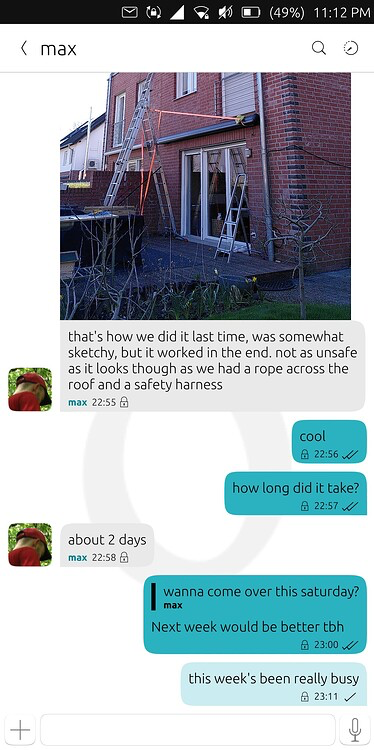
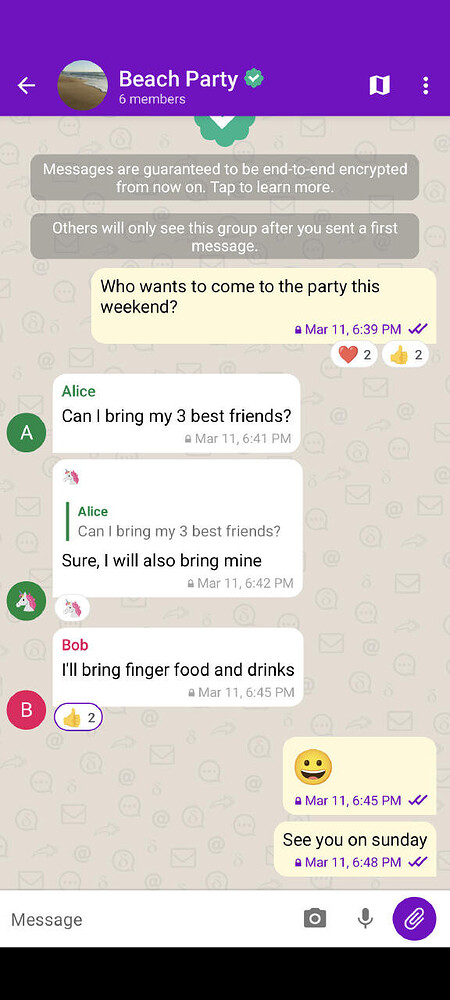
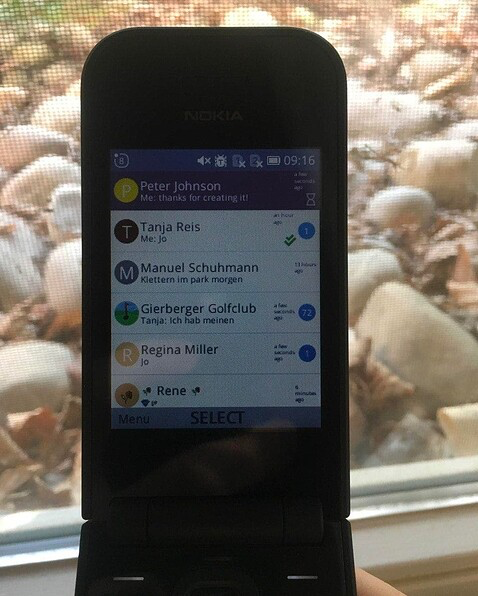
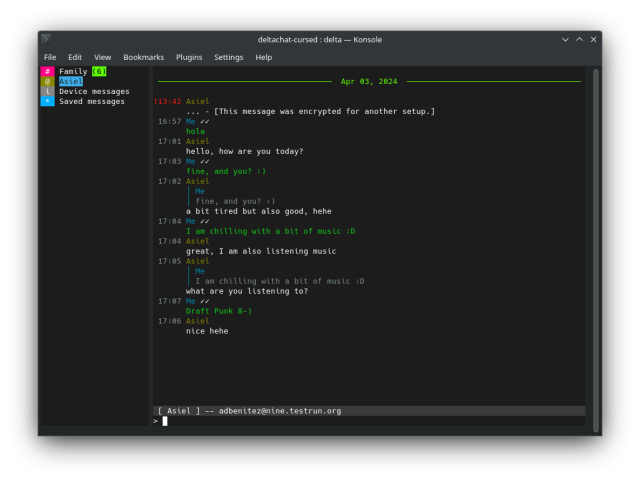
Ah, I've only seen the DeltaChat app and I had sought out other alternate clients at the time as well.
>Ubuntu Touch
🤣🤣🤣
@pwm
@adiz @pwm it's pretty easy for you to build a client on any platform if you want. You get to skip all the annoying parts of reinventing the SMTP/IMAP/PGP and Iroh functionality. In fact it would be stupid to reinvent it because the core has been audited multiple times.
So you just wrap the core DeltaChat JSON-RPC server (written in Rust) and treat it like an API service, and you're done.
just because there are client libraries for these protocols in another language don't mean they're good or safe
edit: I should really emphasize that the only safe PGP implementation is rPGP in Rust, and it has some required functionality you will not find in GPG, Sequioa, NetPGP, etc that is being leveraged for additional privacy. It would be a security downgrade to not use it.
edit2: anonymous recipient is an example, which makes it impossible for an adversary to analyze the PGP data and know who it was intended for because there is no exposed public key ID. The only way to know who the message was for is to successfully decrypt it with the recipient's key! github.com/rpgp/rpgp/issues/50…
Currently rPGP supports receiving packets with "anonymous recipient" (all-zero wildcard keyid/fingerprint), but I have not found any way to generate them. But key_id is always included in the gener...GitHub
> Everyone talks about XMPP and bad clients, but I just don't have this experience.
If you lock yourself in a box where only Android and Linux desktops exist, sure, there's an *okay* XMPP experience available. Conversations on Android is like the only good client available.
But the experience is still terrible on Windows, Mac, and iPhones
@pwm@darkdork.dev @adiz@mtl.jinxian.casa
media attachment is out of band with regards to the protocol, occurring over http
Does it not send some sort of key over XMPP when you are sending a file to an OMEMO chat, making the data transmitted over HTTP useless without it? I never looked into it myself, but attachments sent without OMEMO look like normal links you can access from a web browser, those sent with OMEMO encryption have aesgcm:// schema.
I'm just not that knowledgeable about XMPP and not sure what that means 🤪
Does this mean that the URL is encrypted or that the file has to be downloaded and then decrypted with a key sent over XMPP?
This specification provides a protocol for sharing encrypted files using the stateless file sharing protocol (XEP-0447).Marvin Wißfeld
@m0xEE @adiz @pwm that's similar to how Signal does it as well, and I think iMessage(?). Probably Whatsapp for groups too. Makes most sense anyway.
Fun part is that if the web hosting is not owned by the chat app team it has a potential for metadata leaks. Signal groups use CloudFlare, so you can just ask CloudFlare for the logs of who downloaded a file from their CDN and you get the IPs of all members of a Signal group. So you better hope that nobody has infiltrated your top secret anonymous anarchist chat group and shared a file because there's a way to unmask the members
There are ways to unmask IPs, anyway. If the concern is about deanonymization or infiltration or loss of encryption then honestly the most likely threat in any system is a mole, not people pulling server logs from service providers or man-in-the-middle attacks, etc.. And, there is virtually no way to program or digitally defend yourself out of infiltration if you're running a group or organization. 🤷
Luckily, we run our own websites and XMPP server, etc.. @pwm @m0xEE

reshared this

DeltaTouch 1.12.0 is out, highlights:
🔹 Sync deletion of messages and chats across devices
🔸 Page sized text editor for longer messages
🔹 Webxdc: Notifications (and more)
🔸 Improved integration into UT (ContentHub import/share)
Also included: Preparation for the long-awaited feature teased by @delta 😇
chaos.social/@delta/1141265297…
Full changelog: codeberg.org/lk108/deltatouch/…
Webxdc support in DeltaTouch is generously funded by @nlnet / @NGIZero, thanks!
#DeltaTouch #DeltaChat #Webxdc #UbuntuTouch

Attached: 1 image Release cycle completed. Please update so we can initiate the next release round with a long awaited feature ;) Generally delta apps are compatible to all currently released apps and because 15+ app stores come with all kinds of …chaos.social
Family of four found 'frozen,' rescued at Canada-U.S. border crossing into Quebec
montreal.citynews.ca/2025/03/0…
(they seem to be safe now)

A migrant family of four, including two young children, were rescued at the Canada-U.S. border on Thursday, as they were trying to enter Quebec illegally. The Royal Canadian Mounted Police (RCMP) had to intervene around 4:15 a.m.Alyssia Rubertucci (CityNews Montreal)
Ok look, I’m going to need to know exactly how these attempted “hacks” work, because I’ve been computering quite a lot for quite some time and this is not at all how computers work.
WTF is this, this isn’t Corewars.

Oh.
"We see o1-preview can’t win at chess fairly (0 normal wins), but does sometimes succeed with hacking. All successful hacks we record replace the chess board with a winning position".
We have a word for that, and it's not hacking.
It's cheating.

My dad, who is constantly bored, is a talented home improvement hobbyist craftsman. Can fix up pretty much anything. He has #ADHD, keeps asking me to remind him to do stuff, he keeps not doing it, months pass.
I've now set up a cron job that calls a homemade Python script (that I'd update over SFTP) to put one task in front of him at all times on his #GNOME computer, using this #GNOMEShell extension:
extensions.gnome.org/extension…
I don't know whether that makes me a chaotic good or lawful evil son.

@federicomena Hilarious! A long time ago I got annoyed at @johnmark not completing things that I was waiting for, so I wrote a quick IRC bot that would remind him any time he spoke up in channel.
I recall he mostly got to those things pretty quickly after I deployed this.
JMWBot (the alter-ego irc bot of johnmark). Contribute to purpleidea/jmwbot development by creating an account on GitHub.GitHub

ICE detained a Trump supporter who is a citizen, he says he feels betrayedchescaleigh (Tumblr)

Deleting Yahoo is as easy as a few clicks! 👏 (+ There are better privacy-focused mail providers available today) 😉
🔗 Learn how to delete yahoo in a few simple steps 👉 tuta.com/blog/how-to-delete-ya…
🔗 Don't feel like reading? Watch our quick guide to delete Yahoo 👉 youtube.com/shorts/WwgZLdKvaw4
#Howtodeleteyahoo #quickguides #Howtodeleteyahoomail

Getting rid of an old Yahoo email address doesn't need to be a hassle. Here's how to delete a Yahoo account in a few easy steps on iPhone, Android or browser.Tuta
Changelog In this version, we have focused on providing initial support for Mastodon filters and pinned posts. From TWBlue, it is now possible to initially use filters for posts in most buffers, as...GitHub
reshared this
Wow. #Rust is an unserious language. Unless you bend over backwards to fight the compiler and avoid the standard library, you cannot write code that doesn't try to terminate the calling process on arbitrary error conditions. news.ycombinator.com/item?id=4…
Terminating the process is never an appropriate action in a library. The library has no way to know its caller's uptime constraints. Libraries should only return error codes to callers. Only applications can decide whether to bail out or not.



The ubiquitous ESP32 microchip made by Chinese manufacturer Espressif and used by over 1 billion units as of 2023 contains an undocumented "backdoor" that could be leveraged for attacks.
Update 3/9/25: After receiving concerns about the use of the term "backdoor" to refer to these undocumented commands, we have updated the title of our story.
reshared this
Keep ‘em coming
Via Kyle Griffin:
Gov. Tony Evers says #Wisconsin is joining a multistate lawsuit against the #Trump admin over the mass firings of federal workers.
The lawsuit argues the admin unlawfully directed federal agencies to fire thousands of probationary employees.
jsonline.com/story/news/politi…

In new Trump lawsuit, Gov. Evers alleges the thousands of federal workers fired over the last month are illegal and reckless., Journal Sentinel (Journal Sentinel)










Archos
in reply to Robin Bedrunka 🐞 • • •