What's new in Joplin 3.3? 🚀 Improved accessibility, multiple app instances, audio recording on mobile, a better voice typing experience, and much more! Update today and discover all the new features. ✨ joplinapp.org/fr/news/20250428…
Desktop application Accessibility improvements The Joplin 3.3 release introduces significant accessibility enhancements designed to make the application more inclusive and user-friendly. Users can ...
Accessibility matters! ♿✨ Joplin 3.3 improves keyboard navigation, screen reader support, focus management, and contrast enhancements. A smoother and more inclusive experience for all users!
Manage your notebooks in one click! 📚🔽 Joplin 3.3 adds a "Collapse/Expand All" button to quickly organize your notebook hierarchy. Find what you need faster!
One Joplin, many instances! 🖥️📄 Joplin Desktop now allows you to open multiple independent instances. Work, personal, or project-specific spaces your notes, your way!
Linking notes just got easier! 🔗✨ Search and link to notes in seconds. A new shortcut is emplemented to quickly find and link a note to another with a simple search dialog.
Accessibility improvements on mobile too! 📱♿ Better focus management, improved contrast, screen reader support navigating Joplin Mobile is now easier for everyone.
Mastoart.social is a friendly creative Mastodon server that welcomes all skill levels of visual art, crafts, music, writing and more. (AI is not allowed.)
mastoart.social is a creative space for you to share your art and be part of a friendly creative community. A Mastodon instance that's hosted in Germany and runs on 100% green energy.
Welcome Fedi Friends to the episode 9 of Fireside Fedi! I'm your host ozoned. Fireside Fedi is a show about folks within the Fediverse. If you're seeing this, you are a part of the Fediverse.
With me today is Robert Kingett! Robert is a writer of fiction and nonfiction as well as a technical writer and accessibility specialist. Robert has been helping with disability access improvements in the Fediverse. His biggest contributions have been to the open source and federated book review application Bookwyrm. Robert is blind and has a stutter. He has very deep thoughts on old people, taxes, and animals. And finds Santa Claus to be very rude that he never responds to children's letters. So Robert I'm not disabled and haven't really worked around anyone that's been disabled, so if you have any suggestions for me going forward, please do not hesitate to help me learn.
A slightly older demo I did of Ear Hockey for Windows wherein I play one game on extreme mode, showing how both blind and sighted gamers can play without sighted people needing the same accessibility features I need to play the game.
49 Years Ago Today Paul Harvey’s “The Rest of the Story” Premieres on ABC Radio Networks, Captivating Listeners for Decades cordcuttersnews.com/49-years-a…
Forty-nine years ago today, on May 10, 1976, the iconic radio broadcaster Paul Harvey launched his daily syndicated program The Rest of the Story on the ABC Radio Networks, a show that would become a cornerstone of American radio and continue until h…
@robini71 I once found a huge archive of those Paul Harvey Rest of the Story broadcasts and I now can't locate it. @Bruce do you happen to have a URL for such an archive?
Everything you need to know to start printing your photographs perfectly today! Whether you’re using a lab or you’re own printer I’ve got some tips to really...
Also why did who ever made this track feel the need to put clearly autotuned vocals in there anyway? Like what is the point. If the intent is for use as background music, I don't get this decision.
Gaming while blind is the highest difficulty. I like challenging experiences with intense naratives. Like The Last Of Us, or Alt Frequencies!Specs: I5-13600K, RX 3050, 16GB DDR4, Keycron K4 keyboard, PS5 controller and Madcats fightstick.
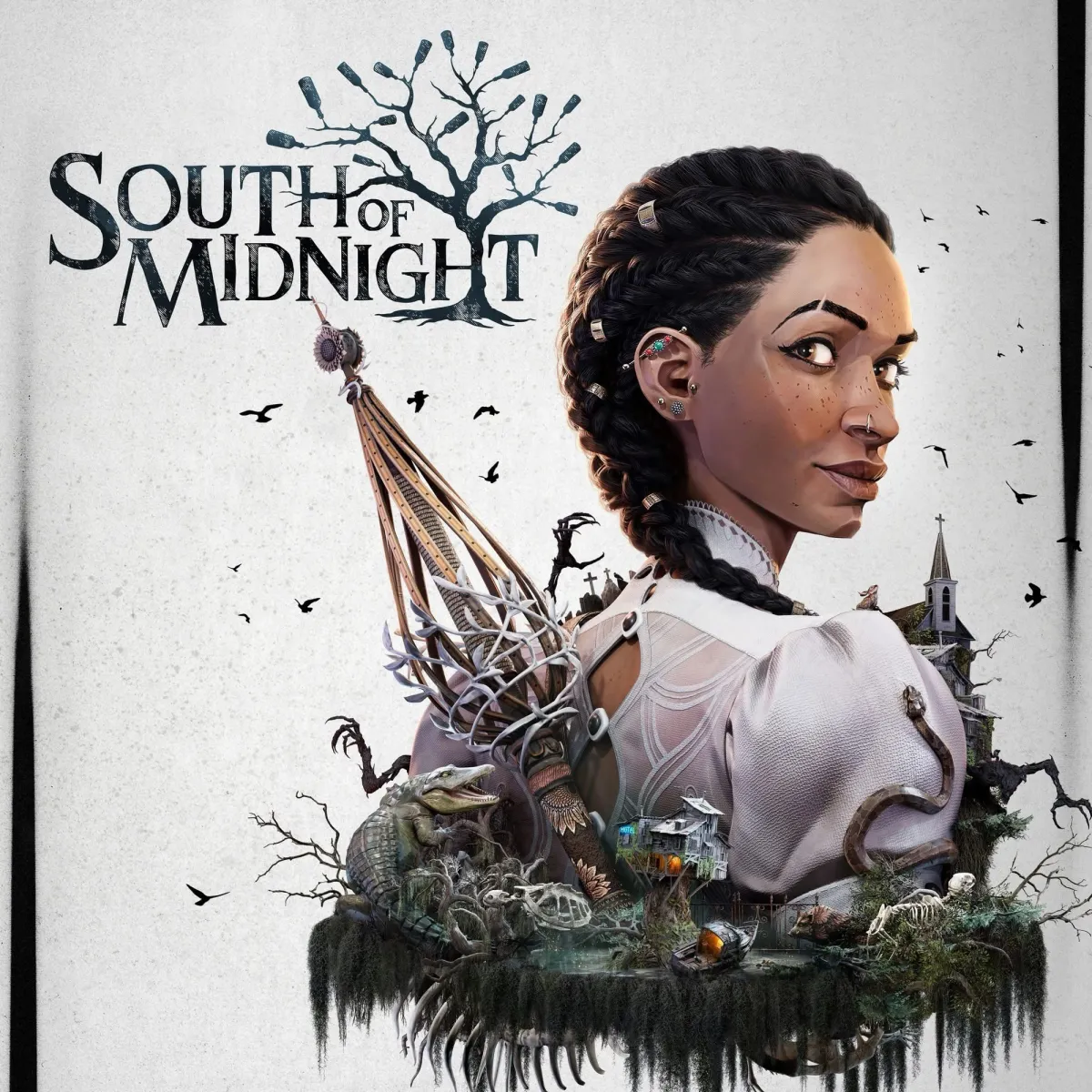
Despite clear effort , South of Midnight was not accessible. The pathing for the navigation gets you killed, the game does not audibly prompt you for when to jump, and you cannot avoid taking fall damage even on the lowest difficulty. Played for three hours and didn’t even get to any combat. It’s now refunded and I would advise not purchasing it.
On a related note, I no longer trust Victor Dima, and you shouldn’t either. I could sure use whatever crack he is smoking though, it’s clearly working for him. victordima.net/south-of-midnig…
There are games that entertain, games that impress, and then there are games like South of Midnight, titles that reach into your chest, grab hold of your heart and stay with you long after the cred…
Let’s get one thing clear: South of Midnight is perfect. Yes, even though there are a few barriers that make the experience difficult for totally blind players, the game itself, on every other front, is flawless.
How deeply must you hate yourself to write something like that, leave it in your review, and then–this is the part that really gets me–publish it on the internet? People read that stuff, you know.
Also like, nothing is ever perfect. I'm not a gamer but when someone unequivocally says something is "perfect" or "flawless" I just think they're being payed to write the review.
once I encountered precise platforming segments, I started to struggle. That’s when Alina joined in. I continued to handle exploration and combat, while she assisted with platforming and tricky navigation. This shared play experience didn’t take anything away from the game, it actually enhanced it. We felt like a team. And the game supported that dynamic effortlessly. Still, there’s one more feature that could take South of Midnight across the finish line in terms of full blind accessibility: a “Skip to Next Checkpoint” option. It’s already possible to skip boss fights, chase sequences, or entire combat arenas. But when a puzzle, traversal section, or spatial challenge becomes a roadblock, the experience can come to a halt.
“Game is perfect! 10/10! Well, unless you’re blind, but that’s only a problem if you’re me. I solved it by… not playing the game. My one request to the developers: if you could allow me to not play the entire game, rather than just most of the game, that would make it an even more perfect game. Then I’d give it eleven stars! Out of five.”
What a deeply disturbed individual. Hope no one in the industry takes him seriously, but we’re probably not that lucky.
I don't like the fact that he's promoting sighted assistance gameplay as being totally accessible. SK does the same thing but points out that ideally we need these features to be better for a more accessible experience. Victor saying that sighted assistance enhanced the gameplay honestly sounds like something AI would say if you prompt it to make a blog post better and paste your first draft into it.
Victor seems like he's just clout chasing at this point, whatever will get him more views. SK I think is doing the same thing but don't have hard evidence to point to.
@Orinks LOL one time I asked sightless if I could be on his sea of thieves crew and he said that he didn’t allow more than one blind person to play with him because of the extra burden it would place on the sighted members of the crew to manage the extra blind people.
These people hate themselves and their blindness. They are ashamed of it. It’s honestly quite sad.
Yeah, I'm down with @shaysters re: SoT over anyone else. She wanted to introduce the game to as many of us as possible and make the experience plesent. That's the kind of consultant I want in our corner. Sightless got angry with me on stream when someone asked about SoT's playability for solo players, and I was honest about it, saying that it's not, but has accessibility helper features that a sighted crew could support you with. They were appreciative of this answer, but Sightless was not for whatever reason. What answer did he expect me to give? Anyway, I'm an aspiring consultant so probably shouldn't be this way, but I'll never clout chase for it. I wonder why Victor hasn't reviewed SoT yet.
@Orinks @shaysters Yep, I like the way she handled it when I tried the game as well. It wasn't for me because I really wanted to play solo but I appreciated what she did.
@blindndangerous @Orinks @shaysters Same!! I was on her crew a few times, basically all we did was puke on each other, play music and launch ourselves out of cannons, but it was fun! And there was no issue with managing multiple blinds.
He also doesn’t allow any sort of promotion on his stream whatsoever, like, I was doing gears with him and said what I was going to stream next and he was like, please don’t do that.
@Orinks @blindndangerous not everyone is fortunate to have people to help them. So if I can help, or can offer, I'll do it. I believe in the truth, even if people don't like it. You ask me a question about the game, I'm not gonna lie about it. I'm glad y'all appreciate me enough. We need more consultants doing great things. We might be few, but we are many
I have always enjoyed the Hot AC radio format. Mix 101.9 was a personal favorite of mine growing up. I always wanted a station that captured that sound. So I put this together. it is fully automated, and there is a lot of work still to do. I hope you enjoy it. I'll be getting this thing upgraded over the coming weeks. radio.l-works.net/
Apple unveils the $599+ iPhone 16e, with an A18 chip, a 48MP camera, Apple Intelligence, and an Apple-designed 5G cellular modem, the C1, shipping February 28 (Chance Miller/9to5Mac)
A listener's perspective on what he calls a 'crisis' when it comes to #blind people accessing kiosks and payments terminals in stores and restaurants. Read the thoughts of Derek here: doubletaponair.com/the-growing…
Listener Derek has raised a pressing concern about the increasing use of self-service kiosks and digital payment terminals, highlighting how their inaccessibility continues to create significant barriers for blind and visually impaired individuals.
I want to say a big thank you to everyone who works on free and open-source accessibility projects. Your work helps many people and makes technology easier for everyone. I can't list all the great projects here, but I want to mention a few:
NVDA (NonVisual Desktop Access) – A free, open-source screen reader for Windows. It allows blind and low-vision users to navigate and use their computers without needing expensive commercial screen readers. NVDA supports many applications, including web browsers, office software, and media players. It also has an add-on system for extra features.
Orca Screen Reader – A free and open-source screen reader for Linux. Developed by the GNOME Project, Orca allows blind and low-vision users to interact with graphical desktop environments.
OSARA (Open Source Accessibility for the REAPER Application) – A REAPER extension that provides full accessibility for blind users. Like most DAWs, REAPER does not natively support screen readers. OSARA bridges this gap by allowing screen reader users to access almost all functions in reaper, including track management, editing, effects, and automation.
ReaHotkey – A small auto hotkey tool that makes some virtual instruments accessible inside REAPER. It does not make REAPER itself accessible but helps interact with specific plugins.
REAPER Accessibility Hoard – A collection of scripts, resources, and other misc stuff that improve accessibility/usability for blind and low-vision users working with REAPER. It includes various scripts/tutorials/resources that help navigate plugins, edit audio more efficiently, and add missing accessibility features.
Pokémon Access – A project that makes Pokémon games playable with screen readers. Initially focused on Pokémon Crystal, it now supports multiple titles, allowing blind and visually impaired players to enjoy the classic series with text-to-speech support. Links: NVDA nvaccess.org/ OSARA osara.reaperaccessibility.com/ ReaHotkey github.com/MatejGolian/ReaHotk… REAPER Accessibility Hoard hoard.reaperaccessibility.com Orca Screen Reader help.gnome.org/users/orca/stab… Pokémon Access github.com/nuive/pokemon-acces… There are many more projects out there, each playing an important role in making technology more inclusive. To all the developers, testers, and contributors—thank you for your hard work!
#Ubuntu 25.04 will be released today (maybe it already is), so here is my look at this new update!
The TLDR is: I thought it wouldn't have that much, but it turns out that between #GNOME 48, APT 3.0, Nvidia dynamic boost, and a new default app, there's a lot to cover!
Also, props to Xubuntu for the move to XFCE 4.20, that's going to be a big change for Xubuntu users!
Check out TuxCare's Custom kernel Development and Maintenance services: https://tuxcare.com/custom-linux-kernel-development-and-maintenance-services/?utm_cam...
Two years ago, we started working on a plugin that brings Discourse and the Fediverse closer together. Discourse communities are online spaces that facilitate open collaboration and communication.
Local liberal Brian Mullins who is now boycotting any company that he sees as supporting a fascist regime spends all of his free time staring at a wall with no idea what else he could be doing.
March was rough! We fell way short of our goal and only made rent bc of a miraculous tax refund (which we'd hoped to put toward lawyer fees). Setting a $7k goal this month to get my head above water again.
I don't wanna flood your feed but I also need to eat. Trying to strike that balance—which means I need your help w boosts & donations.
Fun times, I've raised less than $50 this month but already spent $390 supporting two housing insecure folks. When I'm presented with the choice of helping the elderly couple who are still working retail into their 70s keep their hotel room until payday vs paying my phone bill or comfort, my phone bill and comfort tend to loose out.
I wish I didn't have to make choices like that but I'm also grateful to be able to help when I have cash on hand.
Lots of shares—ty! No new donations 🥺 I have a handful of monthly patrons totaling $317 in ongoing gifts, and if you can swing it, this is an amazing way to help.
My partner and I both have a ton of work projects that we can support ourselves with however we desperately need childcare but we can't even cover rent.
Not to sound like a Dem text or anything, but this is me... begging. It's one thing when it's just me but I've got a partner and kid and another kid I'm trying to reunite with. I truly need your help, I'm trying to be creative and not hit y'all over the head, I just don't know what else to do.
Super appreciate how this community has gotten me this far, hope we can keep it going.
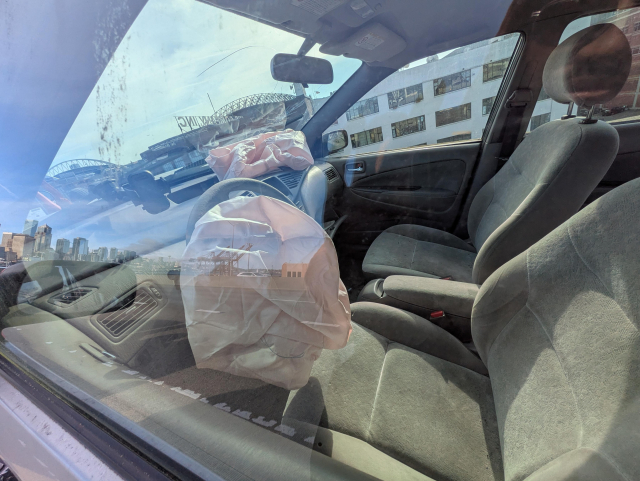
So the bad news is the car didn't survive my plan to get an early start at the hacker space, but the good news is I did 😤
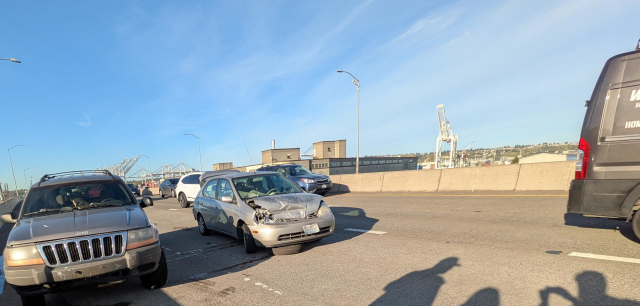
SR99 got a good one today, I just replaced the front suspension myself this fall 😭 Thankfully the crash wasn't my fault, I don't have any graphic injuries and insurance will help some but this is a setback for sure.
If you're able to pitch in I'd appreciate a little love
The force of the crash knocked the spare tire loose from the car in front if me, which then got lodged under me, struck the engine from the underside and punctured all sorts of stuff, RIP.
Anyway, the second I'm finally settled with the cops, tow truck and getting tf off that cursed viaduct, the guy's insurance calls, every question they had felt like entrapment or some setup to get out of paying the claim 🥴
My brain was a lil scrambled and they seemed hella ready to take advantage.
This is a roller-coaster, ok so the insurance company promised a rental car and the plan does cover 30days of a free rental.
BUT the reservation number they keep getting from the rental car companies isn't actually attached to a car and all of the companies are booked out for days.
Kinda seems like its not actually a reservation tho and the rental companies seem to not actually want to commit a vehicle to insurance claim reservations.
If the insurance run around weren't bad enough, I just found out that if the guys insurance pays out a settlement beyond basic medical costs due to owing child-support I would never see any settlement cash.
Unclear what happens to the value of the vehicle, but thankfully the car was still in a family friends name and hadn't been transfer to my partner and I yet. So hopefully I don't need to get a family lawyer for that part.
Recently, I shared about the devastating, life-sapping experience of losing custody of my 6-yr-old, who I haven't seen in >3 years. Being erased from her life is a great tragedy for me and for an innocent kid being deprived of a loving, present dad. Racism constantly creates generational trauma.
I've found a lawyer I trust to help reunite us. I’ll need $3k for the retainer and quite a bit more to go the distance. THANK YOU for your support!
Really love how ex who makes 5x what I do can literally just take settlement money from injuries that don't involve them and they don't actually need to raise our child.
So anywho... I feel like I'm on some 3x way rock-hard place brain teaser.
Need car to work, live and play. At every step car is stolen by thieves and the state ffs.
On day one of the divorce the state took my home & car before we ever stepped foot into a court and years later they can still do that.
Recently, I shared about the devastating, life-sapping experience of losing custody of my 6-yr-old, who I haven't seen in >3 years. Being erased from her life is a great tragedy for me and for an innocent kid being deprived of a loving, present dad. Racism constantly creates generational trauma.
I've found a lawyer I trust to help reunite us. I’ll need $3k for the retainer and quite a bit more to go the distance. THANK YOU for your support!
A family friend had given us a car, which has been a MASSIVE help for my partner and I as we raise an soon to be 9month baby.
But this month the car got totaled in the middle of a 3 car pile up. Insurance isn't covering enough to buy a new(to us) car and what they are paying out hasn't arrived yet.
So very much in need of some support this month if you're able to help out.
As a cyclist of 15 years... it pains me to admit we're kinda car dependent for a bit.
My knees aren't what they used to be and worse covid isn't over.
In a world without covid, I'd be love to take our tiny human on the bus and train, but it's pretty much impossible to get a 8 month to wear a mask and its even more challenging to keep unmasked strangers out of their adorable lil face.
Hey, it's sadly rent day and we're short by quite a bit (around $1200).
That whole "the average American can't afford an unexpected $400 emergency"... really bit us hard this month with the car crash. We're still waiting to get reimburst from car crash expenses and we've had a ton of unexpected bills this month on top of it.
We're still inching along towards our rent goal, we have until the 5th to pay without late fees or threats from our landlord. Can you help us get over the finish line?
ICE might have just elected New Jersey's governor. ICE releases N.J. mayor after dramatic arrest at immigrant detention facility protest nj.com/essex/2025/05/nj-mayor-…
Does anyone that I know run an Immich server? I haven't had a chance to deploy one yet but wanted to test the app. Ping me if you'll give me an account to test with for a day
Official Video for “More to Lose” by Miley Cyrus Listen to & Download “More to Lose” out now: https://MileyCyrus.lnk.to/MoretoLoseSomething Beautiful - Albu...
The post about using Linux while blind (fireborn.mataroa.blog/blog/i-w…) contains a sentence that really stood out to me as being true in so many aspects of my life.
"We’re not waiting on unknowns. We’re waiting on maintenance."
There's so much interest in "innovation." Anything can be fixed with apps, AI, wearables. Right?
But when I've asked blind people what makes it hard for them to walk in their neighborhoods, it's broken pavements and overhanging greenery. Councils can't afford maintenance.
Warning: Tim O'Reilly of O'Reilly Media now wants every human programmer to be replaced by Gen AI. Tim O'Reilly/company policy on book editing and writing went from "avoid Gen AI" to "you must use Gen AI as much as possible, we will monitor you through KPIs to use it as much as possible. So avoid O'Reilly books. Support an indie author. Plenty of them out there who write and sell books. No need to support corporate overlords. Source reddit.com/r/programming/comme… #ai
Warning: Tim O'Reilly of O'Reilly Media now wants every human programmer to be replaced by Gen AI. Tim O'Reilly/company policy on book editing and writing went from "avoid Gen AI" to "you must use Gen AI as much as possible, we will monitor you through KPIs to use it as much as possible. So avoid O'Reilly books. Support an indie author. Plenty of them out there who write and sell books. No need to support corporate overlords. Source reddit.com/r/programming/comme… #ai
@ChanceyFleet That's somewhat funny to hear from the comany whose main income is from publishing books for programmers. If all the programmers are replaced by Gen Ai, you get the rest.... :)
These days when I set up a computer and want to create a local user account, I just invoke that screen from the command prompt. You can do this with an internet connection, but it needs to be one of the first things you do. 1. In the Windows first-run setup (after it has been installed), press shift f10 to open command prompt. 2. Type this: start ms-cxh:localonly
This should pull up the old "Who's going to use this PC?" screen. Seems to work in Windows 11 24H2. When you get done answering security questions, the computer (or at least the out-of-box experience) will restart. I also use this cmd trick to launch a portable copy of NVDA sometimes. A lesser-known shortcut in Windows setup is ctrl-shift-f3. This puts you into audit mode, where you're logged into the desktop of the administrator account even though you haven't completed Windows setup yet. A dialog will automatically start, giving options to restart into the out-of-box experience or restart normally. In this mode, you can install drivers and make any other changes that need to be made before the setup process completes. Example: When giving someone a Surface tablet with an attached Bluetooth keyboard cover, you might want to go into audit mode so you can pair the keyboard, but still retain the setup process for the recipient. You can, of course, also use this trick to completely bypass Windows setup in order to reinstall Windows on a brand new system.
Expected. That's what you get from algorithms that are based on probability. One cool thing the article points out though is that the wrong information can be found in the original content on which the models are trained on. Ah, how come we didn't think of that? (shit in, shit out)! :) AI hallucinations are getting worse – and they're here to stay | New Scientist newscientist.com/article/24795…
An AI leaderboard suggests the newest reasoning models used in chatbots are producing less accurate results because of higher hallucination rates. Experts say the problem is bigger than that
It's sad that even after so many years, there are still Russians who hold some sort of mental control over certain part of the Estonian population. I hope the numbers are small though. Correct me if I'm wrong, of course. I will always remember Estonia as the first Soviet republicthat was brave enough to stand up to Russiaback in 1988. :)
Validating because it speaks to the lie that generative models are "the worst they'll ever be."
One popular leaderboard...indicates some “reasoning” models – including the DeepSeek-R1 model from developer DeepSeek – saw double-digit rises in hallucination rates compared with previous models from their developers.
The myth of incessant improvement needs to die.
Infuriating because it concludes that "We may have to live with error-prone AI." We really, really don't. This technology has one primary purpose: driving the data and compute hoarding of the oligarchy. It should be considered a tool of the oppressor, and as such should be resisted, confounded, and broken.
An AI leaderboard suggests the newest reasoning models used in chatbots are producing less accurate results because of higher hallucination rates. Experts say the problem is bigger than that
Straight and curly quotation marks may look largely similar. But when it comes to deciding between the two, there’s a “smart” choice and a “dumb” choice to be made.
I’m down south in Iqaluit this week, taking a wilderness first aid course. I went out for coffee this morning with an old troopmate and ordered a triple shot Americano (the cookie is his, lest you think me indulgent). When I got the receipt I see it has been renamed. #ElbowsUp
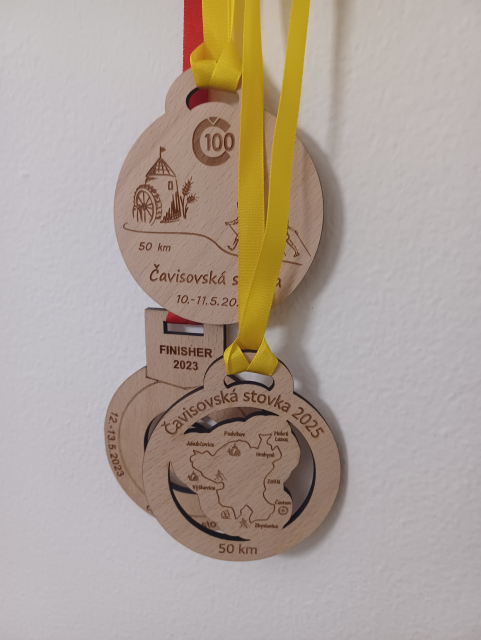
#Cavisovska100 Jak to celé dopadlo? (Protože za rok budu hledat... 🤦😁) Došli jsme. 9:08 h, 8:41 h čistý čas. Jsme spokojení. Na startu nám ale všem spadla brada, když jsme se dozvěděli, že vůbec poprvé v historii na 100 km vyhrála žena, s časem 10:33 h! Hluboce smekám. 🤠
🫡🇺🇦 On May 10, 1980, Hero of Ukraine Matsievsky Oleksandr Igorovich was born, who was shot by russian invaders on December 30, 2022 in eastern Ukraine. A warrior who died with the words "Glory to Ukraine" on his lips. Honor and glory and bright memory to the Ukrainian hero!











































Joplin
in reply to Joplin • • •Joplin 3.3 improves keyboard navigation, screen reader support, focus management, and contrast enhancements. A smoother and more inclusive experience for all users!
Joplin
in reply to Joplin • • •Joplin 3.3 adds a "Collapse/Expand All" button to quickly organize your notebook hierarchy. Find what you need faster!
Joplin
in reply to Joplin • • •Joplin Desktop now allows you to open multiple independent instances. Work, personal, or project-specific spaces your notes, your way!
Joplin
in reply to Joplin • • •Search and link to notes in seconds. A new shortcut is emplemented to quickly find and link a note to another with a simple search dialog.
Joplin
in reply to Joplin • • •The Rich Text Editor has been upgraded to TinyMCE 6 with new Markdown auto-replacement.
Joplin
in reply to Joplin • • •Better focus management, improved contrast, screen reader support navigating Joplin Mobile is now easier for everyone.