
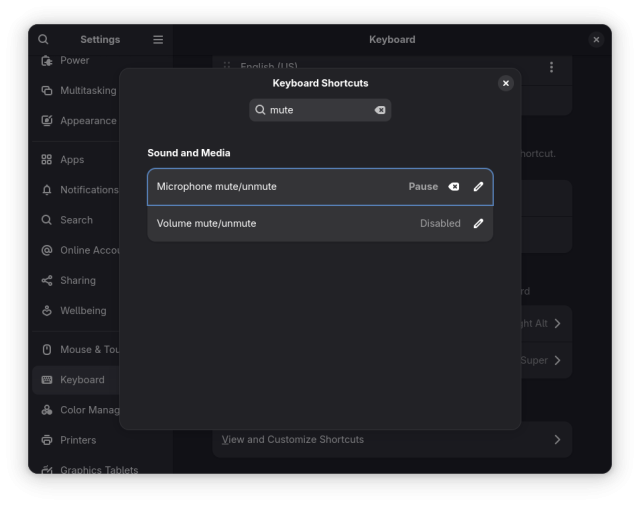
My pro meeting audio tip for #GNOME users: map an unused top-right corner keyboard key as global shortcut for (un)muting the microphone, then paper-sticker-label it.
Now no need to have the meeting browser tab focused (or to remember each conferencing app's shortcuts) to toggle your microphone input.
The recording indicator in the top-right of your screen in GNOME reflects that change, although a bit too subtly. Up for grabs for newcomers: gitlab.gnome.org/GNOME/gnome-s…
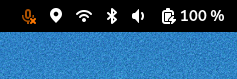
Microphone recording muted status icon is hard to distinguish from unmuted status (#8077) · Issues · GNOME / gnome-shell · GitLab
Testing with GNOME Shell 47.1 on Fedora 41, and setting a global keyboard shortcut to mute/unmute the microphone, I noticed that it...GitLab
This entry was edited (5 months ago)


















Алёшка
in reply to NV Access • • •NV Access
in reply to Алёшка • • •@kingoffire This is a good suggestion. We do have an issue requesting this here: github.com/nvaccess/nvda/issue…
As well as one specifically for add-ons (if you have two with conflicting keystrokes): github.com/nvaccess/nvda/issue…
And this issue requesting the ability to generate a list of gestures on the fly: github.com/nvaccess/nvda/issue…
Add function to generate current list of input gestures
Qchristensen (GitHub)Алёшка
in reply to NV Access • • •Hello,
I am writing to inquire about a feature for the NVDA screen reader. Currently, NVDA has a speech dictionary. Would it be possible to add the functionality to mark specific letters within a word to indicate the proper pronunciation, specifically for emphasis or stress (i.e., to denote the stressed syllable)?
Thank you.
NV Access
in reply to Алёшка • • •@kingoffire You can use the dictionary to "correct" how a synthesizer reads a particular word, is that what you mean?
There will always be issues such as the difference between "live" in "We are broadcasting live" and "I want to live while I am young". That could be something an AI pronunciation add-on could address in future, but otherwise, we wouldn't want to start asking document authors to change how they write the word in each context.
I'm not sure I understood your question?
Алёшка
in reply to NV Access • • •NV Access
in reply to Алёшка • • •@kingoffire You asked this question yesterday - mastodon.ml/@kingoffire/114902… - And I did reply to that post. Beyond creating a dictionary entry to change how a particular word is read, there really isn't a way I can think of. If you are using eSpeak-NG, and notice an issue consistently, you could create an issue for them, or submit a fix: github.com/espeak-ng/espeak-ng…
espeak-ng/espeak-ng
GitHubАлёшка
2025-07-23 12:40:20
Squish
in reply to NV Access • • •NV Access
in reply to Squish • • •@randomuser Press NVDA+control+d to open NVDA's document formatting settings, tab to "Link Destination" and press spacebar to uncheck then enter to close (be sure to save your settings with NVDA+control+c).
This was something new we added in NVDA 2025.1.
Squish
in reply to NV Access • • •NV Access
in reply to Squish • • •Squish
in reply to NV Access • • •