Braille is literacy.

Many people think it can be substituted by speech synthesis, by audiobooks, by other things. It can't.

Voice is serial, it unfolds in time. It requires working memory. Braille is static. It unfolds in space, remains stable in time. It backs working memory, does not consume it. For things that require pinning down relationships (mathematics, music, programming) braile has clear advantages.

This is not to say people can't manage without it. I don't always use a braille display. But it makes things better: learning, accuracy, performance, speed.

Witholding braille from blind people is withholding literacy, it's denying capacity.

Don't fucking do that.

reshared this

in reply to modulux

@lerven I agree with this 100%! Even as someone who more or less exclusively listens to audio books for pleasure and use mostly speech on my computer, I am very thankful for my Braille display. Especially given my job at a Braille production facility, it's scary when I hear about blind folks who are either never given the opportunity or outright refuse to learn Braille. I can understand if someone loses their sight later in life and doesn't want to learn Braille, but in far too many instances I've heard about, that doesn't seem to be the case.

Happy World Braille Day. It is a day that fills me with gratitude every year. Braille has given me true literacy, the ability to write something down, and read back what I have written.
Despite numerous predictions by a few professionals in the education field of its imminent demise as technology has evolved, the Braille code is an ingenious system that has kept pace with technological change. From computerized embossing, to refreshable Braille displays, to the exciting new world of multiline devices, Braille is as vibrant and relevant as ever.
But for me, reflecting on World Braille Day which we celebrate on the anniversary of Louis Braille's birth, is also about celebrating Braille the man. He taught us that we, the blind, are uniquely placed to devise solutions that move us forward. His story teaches us that sometimes, we will face stiff opposition from vested interests who are challenged and threatened. In Louis Braille's case, he even endured the heartbreak of seeing books in his code burned. But he gave us hope that when people temporarily stand in the path of progress, the evidence will be so overwhelming that progress will prevail.
It is critical that all of us, but particularly young blind people, are taught that Braille the code was devised by Braille, a blind man. That is why it is right and respectful that when we refer to the code, we should always do so with a capital B, just as we do for Morse code, Celsius, Fahrenheit and other codes.
In 2024, marking the 200th anniversary of the invention of the Braille code, it was my great honor to deliver the keynote address to the International Council on English Braille. I provide a link to the text and audio of that address, which traces the history of the code, the opposition it has faced over the years, and the blind people who have safeguarded his legacy. It is now our turn to safeguard that legacy and invest the inheritance left to us by Louis Braille.
mosen.org/iceb2024/

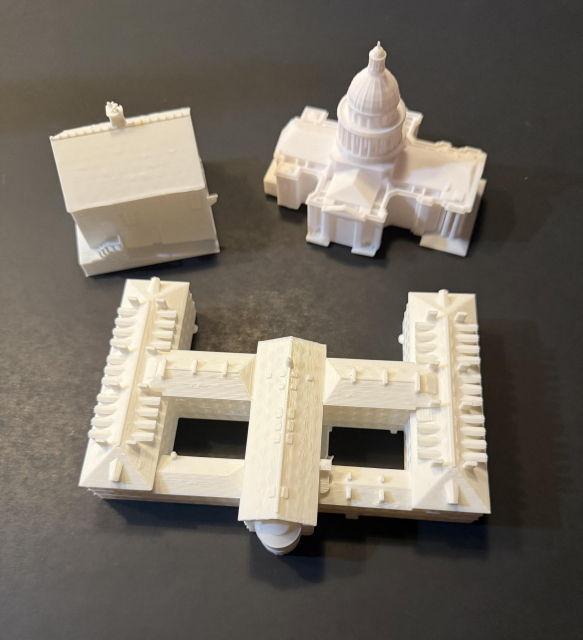
Remembering the birthday of Louis Braille, a reminder that the 3D printed buildings related to his life, his childhood home, the school where he studied and the Pantheon where he is resting is freely available, just contact me and I'll send you the file.
#LouisBraille
#France
#Braille
#ReplicaBuildings

reshared this

AdGuard Home: domácí ochrana nejen před reklamou
Jak na blokování reklamy a rodičovskou kontrolu ve vlastní režii? AdGuard Home je na to výborné řešení. Používám ho už půl roku a v článku jsem se podělil o praktické zkušenosti z instalace a provozu, popsal jeho nejdůležitější vlastnosti a taky se trochu věnoval srovnání se známějším Pi-hole.
#Adguard #AdguardHome #blokování #Pihole #reklama #soukromíblog.eischmann.cz/2026/01/04/a…(reakce na tento příspěvek se může zobrazit jako komentář pod článkem)
This entry was edited (1 week ago)

Tip: if you have multiple #Audible accounts, you can switch between them in the iOS app and play all downloaded titles regardless of which account it's currently signed into.

For example if your main account is with the US marketplace but you've purchased some titles on the UK site, you can switch to the UK account, download those titles, and then switch back to your main US login. The UK titles will still be playable under the Library tab alongside your US ones.

Welcome to the RB family, APlayer 🥳

apt.izzysoft.de/packages/remix…

APlayer is a beautiful and powerful music player with lyrics support, a built-in equalizer, sleep timer, tag editor, and more.

Thanks to some help by its developer, this app can now be built reproducible :awesome:

#ReproducibleBuilds #IzzyOnDroid

in reply to Tim Ward ⭐🇪🇺🔶 #FBPE

@TimWardCam @mort Anything that requires someone(the manufacturer) to maintain a digital copy on a functional server somewhere is an inevitable locus for enshittification. Doubly so, if that was an intentional choice by that particular someone(the manufacturer). You definitely know they don’t care at best, and at worst they’re looking for a rug to pull.
in reply to su_liam

@su_liam @mort Another one is a textbook I've got which contains URLs for additional online study material.

Which doesn't exist.

I emailed the author and he said that the original publisher sold the label to another publisher, who carried on selling the stock of books containing the URL, and then the original publisher simply deleted the web site.

Thinking about forgiveness lately and wondering if it's such a good thing. If we forgive bad people (certain politicians, CEOs, misogynists, racists, criminals, etc.) while they refuse to change, where does that get us? OTOH if we use e.g. ostracism as a tool, does that improve the problematic thoughts & behaviour, or entrench it? In other words, how do we best convince people to be less rubbish?

Any resources would be appreciated, whether regarding individuals or societies.
#BoostsWelcome

in reply to Bennolius 😷⚡

I don't have any resources at hand either. My current thoughts: in many cases forgiveness can be a lever to shape or improve behaviour. It's not exactly the same, but it's why in criminal law you don't go after people who attempt a crime but give up; or reduce the penalty if they cooperate with justice. Because, if they have nothing to gain from correcting their behaviour, they might as well continue being maximally bad. I also think people can and do change.

Contre #Trump on voit bien l’impact limité des #rassemblements et #manifestations… Il est temps de boycotter sérieusement les produits US :
🔸 #CocaCola, #MacDonald : c'est pas un gros effort, ça nous manquera pas !
🔸 #Apple, #Microsoft : go #Linux !
🔸 #Google : degooglisons-internet.org avec l'aide de @Framasoft
🔸 #Whatsapp : go #Matrix !
... liste à compléter ...

#boycott #BoycottUSA #impérialisme #Venezuela #Palestine #BDS

in reply to x0

@x0 @jdking92 We'll have to do something about this, sooner or later. Resumes basically worked because there was friction when sending them, now companies are inundated with bullshit resumes. Most people I know of are falling back to networks, referrals and OSS contributions (which can also help bootstrap networks and referrals if you're strategic about which projects you contribute to).

Can screen readers translate alt text? Text in general? If not, do they at least read the language correctly?

Sight reading, I can pick my way through a lot of not-English; German, Spanish, even a bit of Russian, and from that I can puzzle out a bit of related languages.

Does that work with a screen reader? Or does it read out the eg. German text with English phonetics and make a total hash of it?

This entry was edited (1 week ago)
in reply to Mx. Eddie R

It depends. If the user speaks both languages, and the lang attribute on the HTML has been set correctly, then the screen reader will read the correct text in the correct language. If the HTML lang attribute is not set, the user can change the language manually using a screen reader hotkey. However, these things assume the user has installed and configured voices that speak both languages. For example, I currently do not have a Russian voice installed (because I don't understand Russian anyway), so my screen reader will just read out unicode character codes, because it has no way of pronouncing the Russian alphabet. There are also addons that can recognize the language text is written in, and change the screen reader language automatically even if the language attribute isn't set, but most folks don't bother with these. As for translation: there are third party addons that can take all the text spoken by a screen reader, translate it into another language, and then speak it. However, this introduces lag, and sends everything the screen reader says off to a third party translation service. I would only use something like this if I was, for example, playing a Japanese game where I knew all text would be in Japanese, so my screen reader would just translate to English before speaking. I wouldn't just leave it on all the time.
in reply to 🇨🇦Samuel Proulx🇨🇦

Also, if it's not a western, colonial European, or east-Asian language, screen reader support for it will be terrible. As far as I'm aware, there is zero support for any indigenous languages spoken by the people living in what are now Canada and the United States, in any screen reader or text to speech voice, anywhere. Same goes for many middle-eastern and African languages, as well as stuff like Irish Gaelic. If you speak those languages and are blind, your only real choice is...learn a different language and never use your phone or computer to read anything in your native language. Somehow, I doubt anyone on the fediverse is surprised by this.
in reply to Jakob Rosin

@jakobrosin I am using a local NVDARemote server on a Raspberry Pi on my Tailnet. I don't like the idea of NVDA hosting the connection, because I've seen instances where clients dropped. Restarting NVDA would fix it, but you can't, because it broke. So I use an external controller that can be restarted separately over SSH if it breaks like that, and it has. So I'm glad I did that, or I'd have lost access to my machines.

If you use #eloquence in #NVDA, an extremely uninteresting bugfix is now available. Previously, automatic language switching in NVDA didn't work for any language with a dialect specified, like English United States. This is now fixed. It literally just changes from calling languages en-gb and en-us to calling them en_gb and en_us to make NVDA happy. But if you need that, you can get the bugfix here: github.com/fastfinge/eloquence_64/releases/tag/v6

johann reshared this.

Unknown parent

mastodon - Link to source

Sean Randall

I've not had chance to play with my hardware project with the baby, but I occasionally still kick the monologue system from 1993.
I'd love a software-based doubletalk, but ... well. not making too much progress. This is the raw audio data and that's about as far as I've gotten.

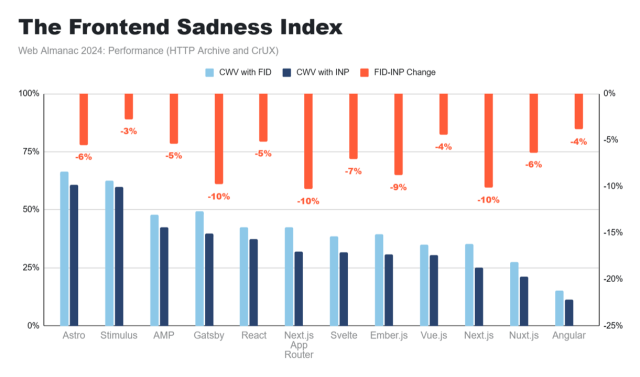
The Curious Case of the Shallow Session SPAs

calendar.perfplanet.com/2025/t…

I bought myself a new keyboard with Christmas money, and after just a day of using it, I'm honestly kind of stunned by how much of a difference it's making.
I picked up a Keychron K10 Max from Amazon and got it yesterday, and I don't think I ever want to go back to a membrane keyboard again.
For context: before this, I was using a Logitech Ergo K860. It's a split, membrane keyboard that a lot of people like for ergonomics, and it did help in some ways — but for me, it was also limiting. My hands don't stay neatly parked in one position, and the enforced split often worked against how I naturally move. It also wasn't rechargeable, and the large built-in wrist rest (which I know some people love) mostly became a dirt-collecting obstacle that I had to work around.
Another big factor for me is that I often work from bed. That means my keyboard isn't sitting on a perfectly stable desk. It's on a tray, my lap, or bedding that shifts as I move.
The Logitech Ergo K860 is very light, which sounds nice on paper, but in practice it meant the keyboard was easy to knock around, slide out of position, or tilt unexpectedly. Combined with the split layout, that meant I was constantly re-orienting myself instead of just typing.
The Keychron, by contrast, is noticeably heavier — and that turns out to be a feature. It stays put. It doesn’t drift when my hands move. It feels planted in a way that reduces both physical effort and mental overhead. I don't have to think about where the keyboard is; I can just use it.
For a bed-based workflow, that stability matters more than I realized.
With chronic pain, hand fatigue, and accessibility needs, keyboards are not a neutral tool. They shape how long I can work, how accurately I can type, and how much energy I spend compensating instead of thinking.
This new keyboard feels solid, responsive, and predictable in a way I didn't realize I was missing. The keys register cleanly without requiring force, and the feedback is clear without being harsh. I'm not fighting the keyboard anymore. It's just doing what I ask.
What surprised me even more is how much better the software side feels from an accessibility perspective. Keychron's Launcher and its use of QMK are far more usable for me than Logitech Options Plus ever was. Being able to work with something that’s web-based, text-oriented, and closer to open standards makes a huge difference as a screen reader user. I can reason about what the keyboard is doing instead of wrestling with a visually dense, mouse-centric interface.
That matters a lot. When your primary interface to the computer is the keyboard, both the hardware and the configuration tools need to cooperate with you.
I know mechanical keyboards aren't new, but this is my first one, and I finally understand why people say they'll never go back. For me, this isn't about aesthetics or trends. It's about having a tool that respects my body and my access needs and lets me focus on the work itself.
I'm really grateful I was able to get this, and I'm genuinely excited to keep dialing it in. Sometimes the right piece of hardware, paired with software that doesn’t fight you, doesn’t just improve comfort. It quietly expands what feels possible.
#Accessibility #DisabledTech #AssistiveTechnology
#ScreenReader #NVDA
#MechanicalKeyboards #Keychron
@accessibility @disability @spoonies @mastoblind

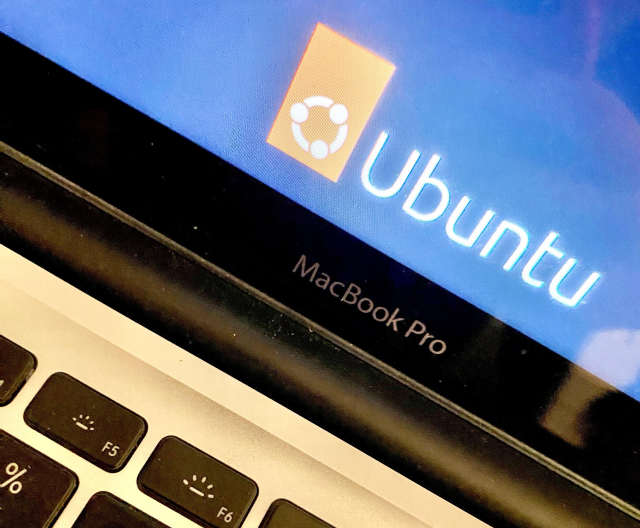
To celebrate the first official Digital Independence Day - with some help of other #opensource enthusiasts - we convinced someone from my family:
✅ to install #Linux on their Mac computer,
✅ created a #Mastodon account for them,
✅ and assisted them in the transition.

It worked out!

Thank you to the anonymous supporter! ;)

#unplugtrump #didit #diday #dutgemacht #foss

This entry was edited (1 week ago)