I can never remember the braille symbol for the hash tag, but Perplexity just came to the rescue. I find I'm using AI more and more lately.
#accessibility #a11y #braille
#accessibility #a11y #braille
Mantis Q40 question: when using the onboard applications, I can switch between QWERTY and #braille input by pressing F12. Is there a way to achieve the same thing while connected to an external device in terminal mode?
In other words: I want to use the FDS and JKL keys as simulated Perkins-style input while connected to NVDA, VoiceOver, etc. without using any software-based simulation features built into the #screenReader itself.
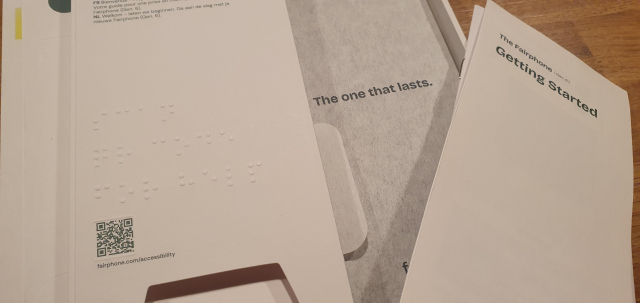
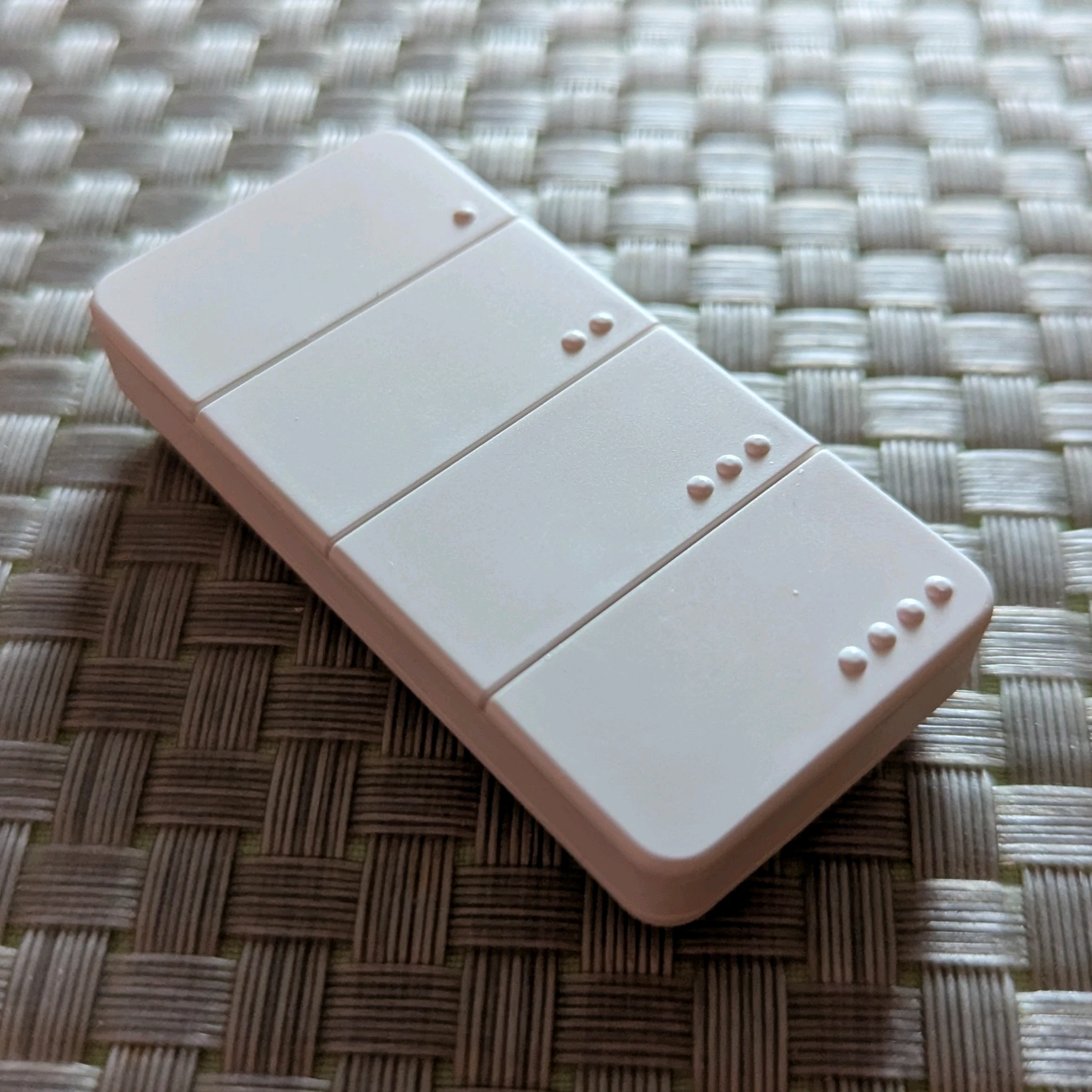
The packaging of the Fairphone and it's accessories has braille! I have never seen any packaging other than medicine have braille. I'm so impressed. Even the location of the qr code is highlighted with embossing. It seems to say "scan qr code for help".
#fairphone #braille #phone #smartphone #packaging #accessibility #a11y #blind
Today being World #Braille Day, I acknowledge that to most, it's a series of random-seeming dots on elevators or ATM's. To me, and other #blind people, it's the gateway to literacy, education, and success.
My parents made me learn it and print simultaneously, suspecting my usable vision wouldn't last forever. They were right.
But thanks to Braille, I'm functionally literte, and I attribute much of my life's personal and professional success to this dotted code.
Whack a Braille is a braille-first arcade game where fast fingers, sharp ears, and solid braille skills win tickets and prizes.marconius.com
RE: mastodon.stickbear.me/@Lynn/11…
Hail to #Braille, both the inventor and the script! :)
Happy World Braille Day, 2026. Braille literacy has been and always will be fundamental to me. I read it and write it, daily! It enriches my life in countless ways.The Bear's den
Happy World Braille Day!
Each January 4th, the birthday of Louis Braille, the day aims "to raise awareness of the importance of Braille as a means of communication in the full realization of the human rights for blind and partially sighted people."
un.org/en/observances/braille-…
#WorldBrailleDay #WorldBrailleDay2026 #Braille #Blindness #Accessibility
The purpose of the day is to raise awareness of the importance of braille as a means of communication in the full realization of the human rights for blind and partially sighted people.United Nations
I’ve built a few Braille-related apps, and I’m learning the hard way how difficult this space really is.
Discoverability is hard, onboarding takes time, and even motivated users often need practice before the apps become useful. Some software concepts are innovative, powerful, but slower compared to hardware tools.
I’m still iterating and listening carefully to feedback.
I normally use my computer with a regular qwerty keyboard. But since it's a seven-inch Toughpad, I wanted to try it with my Orbit Writer, due to the size. I bought it to use with my iPhone, which it does very well (better than with Android,). I read the manual and even saved the HID keyboard commands so that I could refer to them quickly. But I don't understand a few things.
1. It is missing the Windows key. Due to this, I can't get to the start menu as I usually do. I also can't get to the desktop in the regular way.
2. I created a desktop shortcut which I put on the start menu, but I can't type ctrl+escape at the same time, so that method of getting to the start menu is also blocked, meaning that I still can't get to the desktop.
3. I can't type NVDA+F11 or F12 for the system tray or the time and date, respectively. I was able to create new commands for both under Input Gestures. But I also tried NVDA+1 for key identification, with both caps lock and insert, and that didn't work either. Fortunately, I was able to create another gesture to get into the NVDA menu.
4. On a qwerty keyboard, I can type alt+f4 to switch between windows. If I hold the alt key, I can also continue pressing f4 to switch between more than two windows. But with the Orbit Writer, while the command works, it seems to only work for two windows i.e. I can't hold alt and continue pressing f4.
Am I missing something here or is this a half-implemented system? How can they say it works with Windows when basic commands can't even be performed? If there are ways around these problems, please let me know.
#accessibility #blind #braille #NVDA #OrbitWriter #technology #Windows
Reposting. Slots available.
After a short break, I’m returning to accessibility training services.
I provide one-on-one training for blind and visually impaired users across multiple platforms. My teaching is practical and goal-driven: not just commands, but confidence, independence, and efficient workflows that carry into daily life, study, and work.
I cover:
iOS: VoiceOver gestures, rotor navigation, Braille displays, Safari, text editing, Mail and Calendars, Shortcuts, and making the most of iOS apps for productivity, communication, and entertainment.
macOS: VoiceOver from basics to advanced, Trackpad Commander, Safari and Mail, iWork and Microsoft Office, file management, Terminal, audio tools, and system upkeep.
Windows: NVDA and JAWS from beginner to advanced. Training includes Microsoft Office, Outlook, Teams, Zoom, web browsing, customizing screen readers, handling less accessible apps, and scripting basics.
Android: TalkBack gestures, the built-in Braille keyboard and Braille display support, text editing, app accessibility, privacy and security settings, and everyday phone and tablet use.
Linux: Orca and Speakup, console navigation, package management, distro setup, customizing desktops, and accessibility under Wayland.
Concrete goals I can help you achieve:
Set up a new phone, tablet, or computer
Send and manage email independently
Browse the web safely and efficiently
Work with documents, spreadsheets, and presentations
Manage files and cloud storage
Use social media accessibly
Work with Braille displays and keyboards
Install and configure accessible software across platforms
Troubleshoot accessibility issues and build reliable workflows
Make the most of AI in a useful, productive way
Grow from beginner skills to advanced, efficient daily use
I bring years of lived experience as a blind user of these systems. I teach not only what manuals say, but the real-world shortcuts, workarounds, and problem-solving skills that make technology practical and enjoyable.
Remote training is available worldwide.
Pricing: fair and flexible — contact me for a quote. Discounts available for multi-session packages and ongoing weekly training.
Contact:
UK: 07447 931232
US: 772-766-7331
If these don’t work for you, email me at aaron.graham.hewitt@gmail.com
If you, or someone you know, could benefit from personalized accessibility training, I’d be glad to help.
#Accessibility #Blind #VisuallyImpaired #ScreenReaders #JAWS #NVDA #VoiceOver #TalkBack #Braille #AssistiveTechnology #DigitalInclusion #InclusiveTech #LinuxAccessibility #WindowsAccessibility #iOSAccessibility #AndroidAccessibility #MacAccessibility #Orca #ATTraining #TechTraining #AccessibleTech
Sooooo... thinking about the possibility and feasibility of big life changes, namely studying opera seriously in Europe. Would love to connect with other #Blind language learners, especially those using #braille as a component of their learning. Currently learning #French. Am particularly interested in chatting with people who have taught themselves grade 2 French Braille as well as those who are either conversational or fluent and/or who have worked in or currently live in a Francophone European country. If this is you or you're in any way adjacent to this world, please reach out. Would love to talk to you. Would also love to chat with people who use #MusicBraille / #BrailleMusic in Europe.
#ClassicalMusic #Opera #LanguageLearning #Languages #Français #LowVision #VisuallyImpaired #BlindMasto #BlindMastodon #BlindFedi @mastoblind
This is a real long shot, but does anyone happen to have any documentation for the Papenmeier Notex 40P? I bought one because old gadgets are cool, but even Papenmeier don't have any documentation for it (I emailed them and everything).
Please boost for reach :)
#blind #assistiveTechnology #assistive_technology #braille #brailleDisplay #braileNoteTaker #Papenmeier #notex #madeInWestGermany #retro #vintage #fedihelp
Connecting anyone who is blind, has low vision, or has a print disability to Jewish life.JBI Library
Generate YouTube transcripts instantly with our free tool. Extract and download video transcripts effortlessly. Perfect for accessibility, SEO, and content creation.YouTube Transcript
Calling all braille readers and braille providers! Bookshare is conducting an anonymous survey of both Bookshare members and non-members to learn more about how digital braille is used and how we can better support braille readers through Bookshare improvements.
Complete the survey and help us improve Bookshare: nam02.safelinks.protection.out…
BudgetBraillerBlog: BudgetBraillerBlog Intro. “A manual brailler costs a little under $1,000 and electric braillers cost significantly more. Given that I was just at a 3D printing festival and you can build a 3D printer for under $200, I decided to try to design one.”
Add tech to a manual Perkin's Braille writer with Paige Connect! Great for teachers and students- It's a board with optical sensors that attaches via USB-A for power. Connects to smart devices (phones, tablets, laptops) via Bluetooth, enabling instant digital output & audio feedback
aph.org/blog/bring-new-life-to…
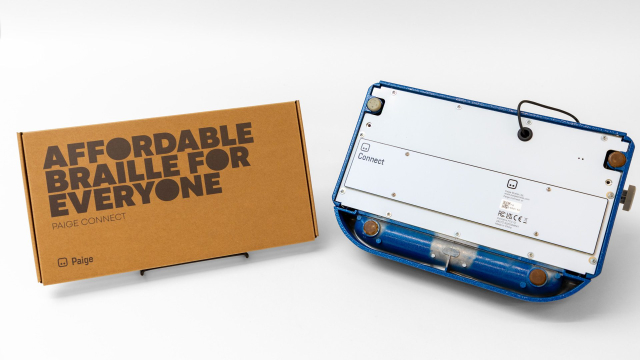
An innovative way to turn your traditional braille writer into so much more, Paige Connect is a physical board with optical sensors that screws into the bot ...Devon Price (American Printing House)
Please boost for reach, for any OnePlus users or staff:
I wrote a review of my OnePlus 13 on OnePlus' community site. If you're a member there, please like it to show support for the accessibility issues I brought up. I'd really like to get these fixed, since this is a powerful phone that's got Google's TalkBack, not Samsung's moldy fork, and is great overall, besides the accessibility issues. I'd love to be able to recommend this phone as an all-around great phone for blind people.
community.oneplus.com/thread/1… [A review of the OnePlus 13, from a blind person's perspective]
#android #OnePlus #OnePlus13 #blind #accessibility #Braille

Introducing our new OnePlus Community experience, with a completely revamped structure, built from the ground-up.community.oneplus.com
Ooo lookie! Not sure when this version will be released, but...
The topic for the Tuesday, May 27, That All May eRead online program will be NLS Braille eReader software Version 3.0. In the remaining time, we will answer any questions you have about the NLS Braille eReader.
The meeting will begin at 7 p.m. eastern time and will last for one hour. The meeting will be recorded. To access the meeting, go to loc.zoomgov.com/j/1609330620?p…
It bothers me quite a lot that in the `ariaNotify` explainer, relating to a more robust mechanism for web apps to fire #screenReader messages, #braille is demoted to a "future consideration". Even there, it's listed under a heading of "Braille and speech markup", as though it doesn't even warrant a devoted section of its own.
Braille being treated with the same priority of speech is long overdue. We're clearly not there yet.
github.com/MicrosoftEdge/MSEdg…
#accessibility

Home for explainer documents originated by the Microsoft Edge team - MicrosoftEdge/MSEdgeExplainersGitHub

Technology expert Scott Davert from Helen Keller National Center reports on the latest assistive technologies showcased at CSUN 2025, offering insights on innovations for blind and DeafBlind users.Helen Keller Services
Anyone who is blind, or who has worked with the blind, knows how expensive our technology can be. This couldn't be more true with relation to braille displays. Even the cheapest costs at least $799, and it's already behind the newest in that line, at $899. This is the Orbit Reader 20 and 20+. Now, a student in India wants to change that by creating a display that is truly affordable (under $50)! Please pass this on, so that we can give him greater recognition within the blind community. Even if it costs a bit more than he initially suspected it would, there is no excuse for the $2,000 to $5,000 average price of such technology when cheaper alternatives can be designed! He is determined to bring this to market, so let's help him do it and show our appreciation for his hard work on this life-changing project!
forbes.com/sites/kevinanderton…
#access #ACB #accessibility #affordability #blind #braille #BrailleDisplays #children #education #employment #independence #India #learning #NFB #ocr #parent #reading #science #school #students #teachers #technology #work #writing

Brailliance is a puzzle game where you guess the word by adding up braille dots. This game has been carefully crafted to be playable by everyone, and it includes multiple accessibility features for people with blindness and other disabilities.App Store
Hmm, encoding #braille into music tones has recently been featured in the #braille200. I think it's nice for fun. Still I'm wondering if some of you might be able to understand it in real time.
If anyone uses Android with TalkBack and the onscreen Braille keyboard, please try to reproduce and report this issue:
In Talkback, if onscreen keyboard echo is set to words, and a word with punctuation after it is typed, TalkBack does not read the word when Space is typed. Similarly, if an emoticon is typed, like ":)" nothing is spoken when Space is typed.
Steps to reproduce:
• Turn on TalkBack, and open TalkBack settings by tapping once with three fingers. Set up the TalkBack Braille keyboard under the Braille section.
• Go to Verbosity settings, then the keyboard echo option for onscreen keyboards, and set it to "words."
Now, open a text box, turn on the TalkBack Braille Keyboard, and type something like "this is a test." Note the period after test. Then, swipe right with one finger to enter a space.
Expected results:
TalkBack should read "this" "is" "a" "test period."
Actual results:
TalkBack reads "this" "is" "a" and is silent after test is written.
I also put it up on Google's issue tracker if anyone wants to start it.

Welcome to Unmute Presents Where Technology Meets Community At Unmute Presents, we connect blind and sight-impaired individuals through engaging podcasts and live discussions.Unmute
2/2
But today, we really wanted to put the focus on YOU, our dedicated Braille users, for all YOU do spreading awareness, and promoting use of Braille, not just with NVDA on the PC, but in all aspects of life.
Learn more about World Braille Day from the UN: un.org/en/observances/braille-…
#Braille #WorldBrailleDay #WorldBrailleDay2024 #NVDAsr #Literacy #LiteracyMatters
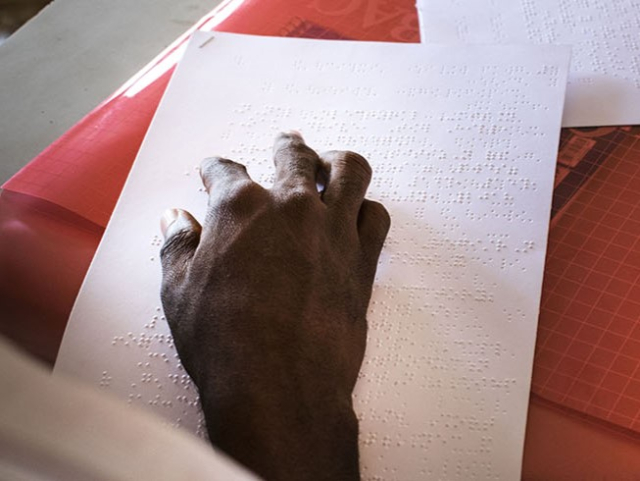
The purpose of the day is to raise awareness of the importance of braille as a means of communication in the full realization of the human rights for blind and partially sighted people.United Nations