Search

Items tagged with: Blind


it's odilia, the odilia screenreader! finally, the long awaited by some, version 0.1.0 is out, it has been for afew hours now, but as they say, the news are only old if you heard them at least once, so for most people they should be fresh. If you want to check it out, feel free to do so, dropping bug reports as you find them, never hesitate to pop things in that issue tracker, or come talk to us in our matrix space, #odilia:stealthy.club, or irc, #odilia:libera.chat, #odilia-oftopic:libera.chat and #odilia-dev:libera.chat
the releace announcement can be found at odilia.app/news/release_0-1-0/
finally, we're here! A big thank you to the community who waited patiently for this release, as well as everyone who contributed, in one way or another, to the project's growth, we're here, we hear you, and we'll never forget our community! let's show the world it can indeed be done, make linux great again!
#accessibility #screenreader #screenreaders #blind #linux #odilia


Many folks seemed to like my demonstration of the mod for the #gothic #game by #piranchaBytes that allows #blind players to play! So now we have a little follow-up, maybe not something as exciting as the previous time, but no less important. The Smart Map feature allows the blind player to observe the 3D game surrounding in a 2D environment. Since the world of Gothic is pretty complicated with all kinds of polygons living inside it, we needed to make the map a bit simpler but no less functional. And so the Smart Map feature was born; it cuts the world to little squares, 500 X 500 in size, which can be navigated by the player allowing them to see what is going on in nearby sectors. Since Gothic uses the so called Waynet which is used for NPCs to know where we're going, we have a seemingly free pathfinding as well which, thanks to the limitations of #ZenGin is not as simple as I initially thought. Spread the word about YAGA! Thanks the great modders who contributedt his feature. #gaming #accessibility #a11y #gothic #rpg


Staying still in the land of open source projects, this slipped yesterday through my Reddit reading:
FeedGears is a web-based, self-hostable RSS client with particular attention to accessibility. According to the dev, it was tested against the WCAG 2.1 guidelines on the AA level, has integrated shortcuts, consistent keyboard navigation and automatic announcements for system events. It's pretty new so a lot of features might be missing but that's for the contact mechanisms and the feedback. :)
I haven't tested this myself yet but the landing page looks definitely alright.
feedgears.com/
#Accessibility #OpenSource #RSS #Blind #ScreenReaders


Nice nice. Even though I don't listen to any form of radio now a days except to get traffic updates, I want the #blind to have options.


Browsing Github last night, I came across two interesting, potentially accessible open source projects related to radio.
1. Salamandra Radio - an automation software for station in its early development. Screen reader specific fixes have been mentioned in the release notes and so were hotkeys, although these do not seem to be documented anywhere; the app starts in Portuguese by default but a change to English is possible in the settings; also buttons in the toolbar do not seem to be labelled but upon focusing them, a tooltip is read out so we can go by those to tell what the buttons are doing.
github.com/ocarolino/salamandr…
2. Axios - a simple radio player supporting the Radio Browser API. It is accessible in a similar way as Salamandra, allows for searching the directory, playing whatever is found, and controlling the volume.
github.com/z1lvis/Axios
Feel free to explore, hack, spread the word or do whatever else you usually do in such cases.
#Accessibility #Blind #ScreenReaders #Radio #OpenSource


Inspired by the creative use of some nifty JAWS scripting and the power of iOS shortcuts as demonstrated by @IllegallyBlind, I have decided to try my hand at creating something similar for NVDA and I think I've succeeded. Note that I'm fairly new at this and by no means a coder so this is the simplest of simple, in fact, I'm still quite amazed that it works, actually.
What we need:
1. The NVDA Speech Logger addon available at:
github.com/opensourcesys/speec…
2. The following iOS shortcut:
icloud.com/shortcuts/999808bd1…
How to use:
1. Install both: the addon in your NVDA and the shortcut in your shortcuts respectively.
2. In NVDA's settings head over to the Speech Logger category and set the output path to your Dropbox root (that's what the shortcut assumes you're using, feel free to modify as needed);
3. Start logging the local speech with the assigned gesture (by default NVDA+alt+l);
4. Assuming the shortcut is configured properly (Dropbox authorized and all that jazz), launch it and a viewer will pop up with the fresh version of the log file at the time.
One nuissance I've found with this is that the viewer overlay will not surround the VO gestures so you need to focus it first through exploration before you can start reading the log. Also the gestures for the first and last item on the screen will move you to whatever else should be on your screen right now so you have to explore again to close the viewer. I assume that's a VO bug.
Also bear in mind that, while logging, anything your PC says will ultimately land in a regular text file and nothing apart from your Dropbox account is protecting it. Use with caution.
Feel free to suggest feedback.
#Accessibility #Tip #VoiceOver #NVDA #iPhone #iOS #Windows #Blind


Any of you #blind #linux nerds know what kind of Vudu I have to do to get #Java #accessibility to work on #ArchLinux? Currently using #openjdk 19 but can switch to whatever JDK, as long as I end up with an accessible GUI.


If you're using OSM, either as a blind individual profiting from the available mapping data with one of the navigation apps or as a an OSM contributor, this OSM wiki article could be interesting as it explains how to map the world with blind users in mind. It explains specialty tags, some of which I had no idea existed, suggests tools for data entry and introduces the Blind OSM project. #OSM #GPS #Navigation #Mapping #Accessibility #Blind OSM for the blind – OpenStreetMap Wiki wiki.openstreetmap.org/wiki/OS…


The #scrcpy utility is super useful. It is open source and available for free.
Connect your phone to your PC with USB or Wi-Fi:
✅ mirror the phone's screen to your PC
✅ use Windows Magnifier to zoom in on the phone
✅ copy paste text in both directions
✅ use the PC keyboard and mouse with your phone
✅ record the phone's screen while mirroring

Download `scrcpy` from...

github.com/Genymobile/scrcpy

#blind #lowvision #visuallyimpared #andoird #a11y


So interesting how this happens. We have a #blind character in this game, a blind accessibility consultant was consulted to get the #representation right .... but the blind can't play the game they're supposedly properly represented in because it's not #accessible to them. Curious how that meeting went :)
From birdsite:
It is done. Here is my post on Hogwarts Legacy. For those interested, please read. This is the best I can offer everyone. Thank you again all. brandoncole.net/?p=547


These magnetic USB C adapters are truly fantastic! Recommended for anyone blind or visually impaired.
Available from Amazon, eBay, and AliExpress.

✅ Makes fitting a USB cable easy - the magnet pulls the cable into place.
✅ Saves wear and tear on the USB C port.
✅ Can be used with chargers, wired earbuds and data sync cables.
✅ Acts as a quick release if the cable gets yanked.
✅ They work well with phones, laptops, and tablets.

amazon.com/Magnetic-Adapter-Co…

#blind #lowvision #visuallyimpaired #a11y


Currently pouring over a sample exam sheet set for Finnish highschool students in German as foreign language in 2020 to assess the accessibility of the exam solution. It's got everything an accessible test needs: a table of contents, a good heading structure, native HTML 5 media player with almost perfect accessibility, native controls such as radio buttons and edit fields to give the answers.
The students were to pass the test by connecting their computers with an Ethernet cable to the examination machine running a special OS, presumably a fork of Debian. The test was taken by tunneling into the examination machine through the web browser and handling the exam in an accessible HTML from there.
Sadly, the audio recordings for the listening part do not seem to be available. Pity, as they reference Whatsapp voice messages. Would be fun to check for their authenticity based on the sound quality.
On that note: Do language exams in your countries reference modern communication methods or is it still a telephone? When I took my final in German, "Social media: pros and cons" was just a subject of the mini essay I had to put together as part of the writing assignment.
web.archive.org/web/2020012122…
#Accessibility #Blind #Finland #Education #Languages #German


Don't ever #donate to CNIB's guide dog program, or to CNIB ever, for that matter. What a fraud, but for those of us who are blind, yes I said blind and not non-sighted or whatever garbage language they are using, this is nothing new. #blind #charity #guideDog cbc.ca/news/canada/saskatchewa…


@BlindGordon this is funny coming from the verge. Their website and blog posts are awful about adding alt text for their images. Irony aside, it’s nice to see a main stream publication encouraging people to write image descriptions for the blind. #Blind #Social #ImageDescription


My feature article on "Visualization for the Blind" was just published in the new Jan/Feb 2023 issue of @ACM Interactions. This is a high-level overview of making #visualizations #accessible for #blind individuals, sprinkled with my own personal experiences from beginning in the #a11y space. I even squeezed two Latin quotes in! And thanks to my close collaborator Jonathan Lazar for his mentorship. DOI: 10.1145/3571737 Read the fulltext here (no paywall): interactions.acm.org/archive/v…


So since this does not seem to be widely disseminated knowledge, the RH Voice speech synthesizer engine allows for training your own voice models by associating sets of sentences in a text file with their corresponding recordings as wav files. There is a tutorial about this on the project's Wiki at:
github.com/RHVoice/RHVoice/wik….
I haven't tried it myself yet so can't answer possible questions, others have though so it surely works.
Happy hacking, creating SAPI, NVDA, Android voices or whatever else you imagine! ##SpeechSynthesis #Accessibility #NVDASR #Blind


With a delay, we arrive at the last window of the accessibility for the blind advent calendar.
This one might be known to some of you as the news has reached quite some peak in media outlets worldwide. Accessible Christmas was an app developed to let blind people enjoy the Christmas lights of Madrit through a geolocation-based audiodescription experience. The great thing about it was, you could also access these descriptions wherever you were. Many blind people do not have the privilege of worldwide mobility so bringing bits of the world closer to them is what I call an extension of accessible tourism. Describing the world you experience through textual blogs, social media postings, audio recordings and sharing interesting highlights of life in different countries is what you can do next year to make others travel even if they physically can't. If you're the one unable to travel, here are a couple of things that help me personally when I wish I could be elsewhere but can't:
1. Play a random radio station in a language you understand nothing of or find the music that you like coming from somewhere obscure or far away. I enjoy checking out local charts in other countries just to see how different languages fit into the music trends of today.
2. Try to find recordings of places on sites like Freesound or Soundcloud; close your eyes and imagine.
3. Read travel blogs, watch or listen to content on the Internet of others travelling where descriptions are abundant; research how topics that interest you are managed elsewhere.
4. Try to find penpals, somebody to exchange occasional packages with and simply make friends; if that's possible, try to find a local language conversation group, groups for people who have moved to your city etc. meet, ask questions but most of all, listen!
5. Maybe one day make your own advent calendar.
coolblindtech.com/this-app-all…
#Accessibility #Blind AdventCalendar #Spain #Travel #Tourism


So Apple did flip the switch at last and today's window is ready for all of you to try out.
Zuzanka is an app made by Zatoichi, a Warsaw-based startup with one of my blind friends as a tester and head consultant. It reads out the expiry dates on products so it's perfect to run through everything in your fridge before Christmas to see whether your supplies are still safe to be consumed. Once you start it, it will beep continuously to tell you it is ready. Then, once something that it may consider to be a date is found in the camera, it will start beeping faster until it finally recognizes and speaks the date outloud. There is a handy tutorial added telling you where expiry dates are commonly found on different products. The app gives you a 24-hour trial period and a handful of subscription options which I believe should be affordable. There is a lifetime license option too capped at around 30 €.
The AI models for this app have been predominantly trained on products found in Polish supermarkets and I was successful using it on a pack of German Balsen chocolate biscuits so it is interesting to see whether this could work in other countries.
apps.apple.com/pl/app/zuzanka/…
#Accessibility #Blind #AdventCalendar #Poland #Mobile #Startup #Shopping


I did not manage to post the window for yesterday, so it's double act time today.
All good things come in threes and as it happens, one of the things I did yesterday was taking part in the Clubhouse meeting of the Czech blind community where 2022 was summed up and different good things that happened in terms of assistive technology were named.
One of the solutions somebody pointed out was the ability to operate an ATM using the banking app of Ceska Sporitelna, one of the leading Czech banks.
Developed with the Covid pandemic in mind, the feature happened to also benefit blind users. The way it works is, every ATM supporting the feature displays a QR code on its screen by default. The user scans it using the dedicated feature in the Sporitelna app, confirms whether the ATM number detected is the same as the one written on the machine itself and once the connection is made, all of the operation: defining the amount of money to be withdrawn, confirmation, authorization etc. is being handled using the app. The money comes out, the operation is successful and everyone is happy.
The number of the machine can be verified either through the list of nearby machines in the app or via an accessible spreadsheet that either the bank or the community have put together, I'm not sure.
#Accessibility #Blind #AdventCalendar #CzechRepublic #Banking


If you would like to be up-=to-date with happenings in Europe in regards to blind and partially sighted people, the European Blind Union has just launched a new podcast today called EBU In Action.
It is a bit of shameless promo as yours truely is one of the hosts so I hope you don't mind me and we look forward to the feedback.
In our pilot, we go over the current campaigns and initiatives the EBU is involved in, we find out about the expectations and fears of blind people regarding Connected and Autonomous Vehicles and we finish off with our correspondent's section where we go to Italy to check what is new for blind people there.
If you have suggestions of topics that should be brought up in future episodes, feel free to share.
euroblind.org/publications-and…
#Accessibility #Blind #Podcast #Europe #CAVs #AutonomousVehicles #Disability #Inclusion


Today let's go to Spain where a system allowing the blind to control elevators using a smartphone app has been developed.
The way it works is by detecting a Bluetooth beacon near a supported elevator using the dedicated app and calling the elevator almost as if we pressed the physical button. We can then choose the floor where we want to go and, once we board the elevator, notify the app about it and wait until we reach the destination. We will be notified about the arrival through a notification in the app. The developers have even thought of Siri support so you can set shortcuts for favourite elevator +floor combinations. The solution is presented within the following session of the Zeroconf conference in Vienna:
youtube.com/watch?v=_PcPk3BcUL…
#Accessibility #Blind #AdventCalendar #BuildEnvironment #Spain


And so we arrived in the last week of advent so this calendar has only six windows left. To finish it off nicely, from now on I'll try to post some smaller projects that nevertheless have an impact on the quality of life for the blind and partially sighted people somewhere. Let's start with another Polish invention:
Totupoint is an in-door navigation system created by Jan Szuster, a blind engineer from Warsaw. It revolves around Bluetooth beacons placed at key points in a building or at a points of interests such as bus stops, administrative buildings or other venues that are key infrastructure. Those can be discovered through the Totupoint mobile app or an additional module attached to the user's white cane. As soon as you find yourself within the range of a beacon, it is triggered and plays the assigned recording so that you exactly know where it is located. You can repeat the message as many times as you need to locate the point you're looking for or in case of the mobile app read the attached information such as opening hours or address and phone number of the place you're at.
The system also supports tiny interactive HTML apps that can be operated from within the app so it can be adapted to turn on the traffic lights or request line number on public transport. Many successful installations happen at an increasing number of venues in Poland. You can learn more and see the complete list of active locations at:
totupoint.pl/
In other news: as soon as Apple flicks the verification switch, I will have something to share that potentially all of you might find useful so watch this space.
#Accessibility #Blind #AdventCalendar #Poland #UrbanEnvironment


Back to the Czech Republic we go, where remote assistance of blind and partially sighted people was in operation years before AIRA was founded.
The navigational center of the Czech Union of the Blind assists their customers in many ways:
- by delivering help through the user's smartphone's camera via Skype;
- by looking up information on public transport routes and general information on places of interest;
- best of all: by researching routes that the user would like to take bearing in mind everything that is of importance when travelling independently with a white cane or/and a guide dog, including possible hazards or characteristic waypoints and landmarks.
It comes as no surprise that the service is available throughout the entire country. Pricewise, it works in two models: it is possible to buy packages of single uses of the service starting at less than six dollars for ten single uses; or a periodic subscribtion starting at around 13 dollars for three months.
portal-pelion.cz/aplikace-a-sl…
#Accessibility #Blind #AdventCalendar #CzechRepublic #Mobility #PublicTransport


Today's highlight is not strictly accessibility-related but it is in itself accessible and definitely makes electronic payments in Poland quick and painless for everyone.
Blik is a Polish payment system that is based on six-digit codes entered as a confirmation of payment on the website where you want to make a transaction. The way this is used is the following:
1. You open the app of your bank on your phone and press the Blik button. Sometimes banks will place this feature under the app's shortcuts so starting straight from the homescreen or through a shortcut you yourself created is definitely possible.
2. A six-digit code is generated and it is read out to you. You can remember or copy it and from that moment you've got 120 seconds to finish the transaction.
3. You enter the code on the website or in the app where you're trying to complete a transaction.
4. You return to your banking app to confirm the amount to be paid through the biometric authorization method of your choice or a PIN code. In my banking app the time limit is counted down with each second being marked with a chaptic feedback of my iPhone.
Note: meanwhile regular payment terminals already support Blik and more and more shop assistants know how to activate it so the phrase "Poproszę Blikiem" ("By Blik, please") is more commonly heard.
Another component of the system are the P2P micropayments to a mobile phone where it is enough to enter the other party's phone number to make or request a payment straight from the banking app.
I believe similar systems function in other countries but are mostly QR-code based and require a separate app. I find this way much handier. Also, it is universal across all major Polish banks.
blik.com/en/how-to-use-blik
#Accessibility #Blind #AdventCalendar #Shopping #Banking #Mobile #Poland


Polska drużyna Mistrzami Europy w #Showdown!!! 🇵🇱
W finale 31:27 pokonujemy Finlandię 🇫🇮
Co za mecz! Co za emocje! 😱

Zobaczcie to!
youtu.be/KXzOCM6I4Pc?t=7832

#sport #IBSA #Poland #Finland #Polska #Finlandia #POLFIN #Champions #European #Paris #blind #niewidomi #visuallyimpaired


Staying in the spirit of ticket machines accessibility, France is doing it right, at least in the city of Metz, not sure about other places.
Have a recording of a ticket machine that speaks three languages: French, English and German. Upon pressing a dedicated button above the card read we activate the speech component. Everything that is displayed on screen is read back to us. On starting, the machine greets us in the language of our choice, tells us to insert our travel pass if we have one and reads the minimum and maximum amounts for card and cash payments. The upper part of the touchscreen acts as a navi pad with the left corner taking us to the previous option and the right one to the next. In the lower part, the left corner is "Cancel", while the right is "Confirm". This way we can choose our desired ticket, the preferred payment method and complete our transaction.
The recording is a montage of different clips from the machine indicating a chosen ticket in English, through its welcome message in French and German with the latter going through some ticket options, coming back to the full welcome message in English. The recording is peppered with occasional Polish from me as it was originally recorded for our Polish podcast. It was taken using the built-in mikes of my Motorola One smartphone. Now that I listen back, it sounds kinda condensed.
#Accessibility #Blind #AdventCalendar #France #Metz #PublicTransport #Audio #recording #FieldRecording


Welcome to Innsbruck, Austria again. This time we go to the main train station where I spent a part of my mobility training. Through this training I have learnt that there is a semi-independent way for blind passengers to operate the on-site ticket machine. How come semi, you might ask?
Well, on the front of the machine, there is a dedicated customer service number embossed in Braille where you can call and tell the representative where you would like to go. They are able to remotely operate the machine, find your connection, choose the right ticket options for you and bring you to the payment screen. Once the payment is complete, the ticket comes out as usual. Kind of makes me wonder: if the railway staff are able to access these machines remotely, why isn't this possibility open to those who might need it for accessibility reasons?
I am not sure whether this works in other Austrian cities, I haven't also heard of this implementation in any other place.
Unfortunately, I have never had a chance to use this so no recordings or first-hand experiences this time.
#Accessibility #Blind #AdventCalendar #Railway #Transport #Trains #Austria #Innsbruck


Since some time I have been drawn to research Minitel, a French Videotex-based system for accessing information that predates the Internet. It was a revolution in terms of digitalization which made activities such as buying train and plane tickets, signing up for classes and reading newspapers digitalized as early as the 80's. You can read more about it in the following Wikipedia article:
en.wikipedia.org/wiki/Minitel
There were many devices invented to make Minitel accessible to the blind, although the system itself wasn't designed with this target group in mind. Mostly, they were external speech synthesizers like in the case of Lectel:
lemonde.fr/archives/article/19…
or the Valentine text-to-speech card for the Apple II:
blog.atalan.fr/valentine-carte…
The history of the Eurobraille company, the makers of the popular Esys, Esytime and B.Note Braille displays, starts also with a speech synthesizer for the Minitel terminals.
eurobraille.fr/notre-histoire/
As I found out, however, most of France's blind community at that time did not have access to this kind of technology and Minitel only became accessible on a global scale in the 90's when regular PC's did but then it was almost the time of the Internet so it never gained the same momentum as it did with the society at large. Pity as this could have been an opportunity to push the inclusion of blind and partially sighted people to whole new levels.
Always design with accessibility from the start!
#Accessibility #Blind #AdventCalendar #France #Internet #Minitel #Videotex #RetroTech


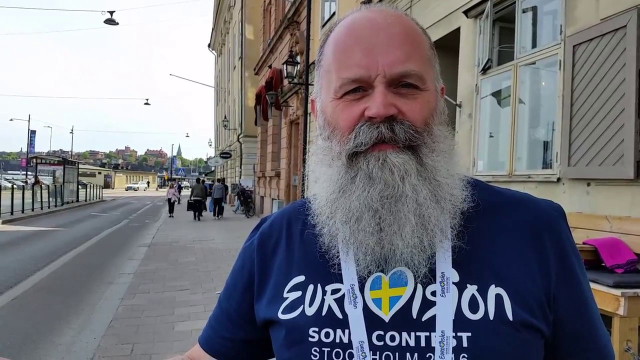
Today's one might be familiar to some of you as this has received a bit of media attention bacccccccccccccccccback in 2016 when Sweden hosted the Eurovision Song Contest.
To celebrate another win, for the time of the contest's duration, the audible traffic lights at some of Stockholm's locations have been revamped to play Loreen with "Euphoria" (winner of the 2012 ESC) when the lights are red, then when they turn green, they ticked to the beat of Mans Zelmerlow's "Heroes", the song that brought the contest back to Sweden in 2015. What a fun twist on an accessibility feature!
youtube.com/watch?v=pj3V06Thvo…
#Accessibility #Blind #AdventCalendar #Sweden #Eurovision #ESC #UrbanEnvironment #Music #SoundDesign


Somehow we made it through the first half of this calendar. Thank you for all of your interactions and encouragement. It's very motivating to see how far these little posts can reach.
So I realized that all the time I have been doing this calendar, I haven't mentioned Poland, where I come from, once. Shame on me! Let's try to make it right.
Inpost is the pioneer as the provider of parcel locker technology in Poland. It's quite common to order something and, instead of requesting that the package is delivered directly to your door, have it dropped at one of the lockers which are often located quite centrally, at a post office or another place of significance in a given city, town or village.
Inpost have come up with quite a clever way of allowing blind people to open these lockers and find the right door. Not only is the app itself accessible so you can track your delivery all the way through but once your order arrives, all you have to do is go to the place where your locker is located, open the door for your parcel from within the app and read the instruction telling you which door is yours E.G. third up, sixth to the left of the touch screen. The system has become so useful for the general public that in order to become more sustainable, Inpost have begun installing screenless lockers so that everything has to be done with the app. This way, it is also possible to send a package somewhere without the need to stick a physical label on it. Other accessibility accommodations include the "easy access zone" as per the link below.
inpost.pl/en/help-easy-access-…
What are you ordering this Christmas and how is it delivered to you?
#Accessibility #Blind #AdventCalendar #Poland #Shopping