Peter Vágner reshared this.

#Conversations_im is now available for free on Google Play until August 18th.

Whenever there is a conference with a strong #XMPP presence, I like to make the app available for free to make it easier for attendees to install the app and give XMPP a shot.

I'm attending #FOSSY and #FrOSCon this weekend and next.
play.google.com/store/apps/det…

reshared this

Peter Vágner reshared this.

This is neat. A handy demo of how you can be identified and tracked across the Internet without a single cookie ever being set in your browser.

#privacy

I didn't set a cookie. kuber.studio/cookie/

reshared this

in reply to RockyC

I always run browsers in a VM to protect core system security, and connect via a VPN. This site didn't make a very good fingerprint.
🙂

The typing fingerprint is impressive, though.

This entry was edited (Sunday, August 9, 2026, 5:52 AM)
Peter Vágner reshared this.

Jan Švankmajer's Alice (1988), a Czech stop motion version of Alice in Wonderland

The Lure (2015), a Polish horror musical version of the Little Mermaid

What other slavic versions are there of popular tales that Disney turned into children's movies?

reshared this

Peter Vágner reshared this.

The Amiga "module" music format was hugely popular in the 1990s, with tens of thousands of songs written in "tracker" tools, often used in games and demoscene productions. Mostly on the Amiga, of course, but PC games like Jazz Jackrabbit and the original Deus Ex used music based on the same technology.

The very first "tracker" composing tool was The Ultimate Soundtracker by Karsten Obarski in 1987, a commercial release with one disk containing the program and some example songs, and a second disk containing a selection of instrument samples composers could use.

In the very early days of tracker modules, those were the only samples available, and they were heavily used by just about everyone. Even once people started making their own samples, they were still heavily used, and to a certain extent became the unofficial Amiga soundfont.

Today I learned that despite its significance, this first sample disk is lost media. All the samples survive in thousands of modules, but every sample has a bunch of variants from accidental disk corruption or intentional modification, and it's not always clear exactly which one is the original. Even among things *claiming* to be images of the original sample disk, different images have different sets of samples, or different versions of the same samples. We don't even know if Obarski kept the same sample disk for each release of his software, or if he updated it over time - and if he did, which versions shipped with which samples.

#retrocomputing #preservation #amiga

reshared this

in reply to Screwtapello

that was just in the UK. I suspect the German sales were stronger.

I'm pretty sure a friend of mine has an original copy of The Ultimate Soundtracker he'd sell me for not much. If so, I'll image the disks and you'll get *an* ST-01:

Peter Vágner reshared this.
So, curious: is there anything besides SSML support that people would like to see in Prism? SSML will take a substantial amount of time and I honestly don't know if I want to hold off v1.0 for SSML given just how annoying that entire thing is going to be (it's practically going to be a subproject of it's own), but other than that I think we (might) be close to 1.0? I think? If anyone wants me to add anything (other than SSML) feel free to post about it on the GH tracker at https:://github.com/ethindp/prism/discussions.

Peter Vágner reshared this.

in reply to Ethin Probst
@x0 It's a shame NVDA doesn't tell you whether it is your text it is speaking. For all you know it might be speaking a very long completely unrelated notification that interrupted your text, and then using that for syncronizing scenes and such for your game isn't reliable. Ssml with marker callbacks can be much more reliable, but very little screen readers support that. Even with NVDA, I wonder if it always supports that or if it depends on the chosen engine
@x0
in reply to The Programming Linguist
@meatbag It actually does support that, although it probably relies on indexing support from the underlying synthesizer, but a synth that doesn't support indexing at all would basically be non-functional in say-all. I think Jamy ran into it just, not working sometimes though.
Peter Vágner reshared this.
The media in this post is not displayed to visitors. To view it, please go to the original post.

A to jste věděli, že jeden z největších českých básníků, Karel Šiktanc, byl žena, totiž hádankářka? Už od konce 40. let vymýšlel krátké rýmované hádanky, které pod pseudonymem Lenka Tršická publikoval v hádankářských časopisech. Vtipné je, že je tiskl i v době, kdy byl jako spisovatel na indexu.

Peter Vágner reshared this.

Peter Vágner reshared this.
Our kid has reached the age of pushing every button on all devices.
Our supersmart washing machine does a cool startup animation on power on. Kid loves it and immediately learned which button makes this animation.
So she presses the power button every time she passes the washing machine. No matter if the machine is already running.
Yeah. Our kid is constantly shutting down the washing machine in the middle of running program. 😅
Then I realized, that there is a child-lock button combination.
Relieved, I set the program, started washing machine, enabled child lock and hapilly left the bathroom. Few minutes later, I noticed the machine is off.
The child lock locks everything except the power button. 🤦‍♂️
Ok plan B. I am going to lock the bathroom.
#Kids

Peter Vágner reshared this.

Peter Vágner reshared this.
The media in this post is not displayed to visitors. To view it, please go to the original post.

I recorded a quick audio demo comparing Dolphin Easy Reader and Paperback head-to-head on screen reader accessibility and general app performance. In the attached recording, I walk through Easy Reader’s clunky UI, duplicate speech readouts, tabindex quirks, and much more, followed by showing how Paperback blows it completely out of the water by opening massive EPUB's instantly and just being generally much easier to navigate.

reshared this

in reply to Quin
@kaveinthran I have noticed one thing though, If I load a large .epub file like 200000 words or more into Paperback, and try to jump from the top to the bottom of the file, it freezes for some time, 20 or 30 seconds. This is on an m1 mac mini with 16gb ram.
in reply to Andre Louis
@FreakyFwoof I feel like I do remember seeing this, but I saw it right in the middle of work or something else that distracted me, meant to come back to it later, and then never did because Fedra's DM buffer is slightly janky. If you wouldn't mind, please remind me? Sorry!
in reply to Quin
@kaveinthran it might be more a problem of not being -native, the Itext app which uses native controls has no problems with jumping from the top to the bottom of 500000 word files. The Quill app has the same problem with even smaller files like between 100000 and 150000 words.
in reply to Quin
so while you did slow your speech down? slower in this case is better, 40-50 percent is actually a better rate for public demos like this. and believe me *I've* been yelled at for this specific issue myself, and your not the only one I'll squalk at for issues like this, demos, 60% sure I can understand it, I think you had rate boost on, but for demos, rate boost off, yes that matters, and below 50%, usually 45% is what I aim for. I enjoyed the demo, but more would have enjoyed it if your speech rate was slower and rate boost was off.
Peter Vágner reshared this.

Well y'all, Linux stuff is happening fast. Cthulhu is a fork of Orca with like lots of stuff. Wine runs Windows programs on Linux.

If Cthulhu is running, the Wine Accessibility plugin is enabled, and the helper package is installed, you should only need to launch the Wine or Proton program normally.

Cthulhu will automatically:

- Detect the active Wine/Proton prefix.
- Start the helper inside that prefix.
- Read supported standard Windows controls.
- Accept speech requests from programs using NVDA Controller or Tolk.

It won’t automatically make custom-drawn or DirectX game interfaces accessible. Those need built-in self-voicing through NVDA Controller/Tolk or future game-specific support. There might also be a short delay of up to roughly two
seconds while Cthulhu discovers a newly started Wine process.

Cthulhu’s Git repository: git.stormux.org/storm/cthulhu

#accessibility #foss #linux #blind #wine #tech

reshared this

Peter Vágner reshared this.
If you're a blind Claude Code user, put the following line in your settings.json:
"axScreenReader": true
with any necessary trailing comma depending on where you put it, restart Claude Code, and have your life changed forever. I can now properly review and resume old claude sessions, I don't get endless Unicode symbols spammed at me, I can review the output with my review cursor much easier... OMG this is so nice!

reshared this

in reply to aaron
@fireborn The app is still a bit shite. I've bullied it into adding more markup to responses and making some beeps here (one for the end of a turn, another pattern when there are choices, another for a question where it's not presenting multiple choice). That all helps some. Means I can usually switch back in and have some idea of what I'm looking for.
Peter Vágner reshared this.

TeamTalk NG is an accessible TeamTalk client for iPhone and iPad that lets you connect to TeamTalk servers, join channels, exchange messages, and communicate with voice.

The app is designed with VoiceOver users in mind, with clear spoken feedback, customizable text-to-speech events, sound event support, sound packs, user details, subscriptions, interception controls for administrators, broadcast messaging, and efficient channel navigation.

TeamTalk NG supports saved servers, channel joining, private and channel text messages, broadcast messages, audio controls, user volume and mute settings, and configurable notification behavior so you can tailor the app to the way you use TeamTalk. testflight.apple.com/join/1xat…?

reshared this

Peter Vágner reshared this.

I've just released version 0.3.0 of Taskmon, my lightweight, no frills replacement for the modern, bloated mess that is Windows Task Manager. Changelog:

  • Added Ctrl+Q as a shortcut to exit Taskmon completely.
  • Added 11 new columns: Service, GPU, GPU Memory, CPU Time, Elevated, Path, Window Title, File Version, Product Version, Session Name, and Package Name.
  • Added File > Restart as administrator to relaunch Taskmon elevated.
  • Added a hierarchical Process Tree view (Ctrl+T) that groups processes under the parent that launched them, with an End process tree action that terminates a process and all of its descendants.
  • Added an option to start Taskmon already minimized to the tray.
  • Added a Windows installer alongside the existing portable version, with an option to replace the system Task Manager with Taskmon.
  • Fixed a stack overflow that could occur when sorting by CPU usage.
  • Fixed Ctrl+A not selecting all text in the Run dialog's edit box.

Download links:
ARM64 portable: github.com/trypsynth/taskmon/r…
ARM64 setup: github.com/trypsynth/taskmon/r…
X64 portable: github.com/trypsynth/taskmon/r…
X64 setup: github.com/trypsynth/taskmon/r…
Cheers, enjoy, and may you be free of a 5+MB application to manage your computer being unresponsive!

reshared this

Peter Vágner reshared this.

Great piece of software for whom needs or wants to explore. Thank you, kirk!


Interview with @baffled the Creator of the Speakup Screen Reader

In this interview, Kirk Reiser, creator of the Speakup screen reader for the #Linux console, shares the history, design, and motivation behind one of the most important #accessibility projects in the free software world.

youtube.com/watch?v=FTIG0aVTSI…


reshared this

Peter Vágner reshared this.
All right, English teachers, copy editors, lovers of the language and fellow grammarians, this song’s for you!
Every so often on the podcast I used to run, Living Blindfully, I would ask people to tell me about their grammatical pet peeves. It was a fun conversation. I was pleased to note that many shared my frustration about how many people are using passive voice these days. It seems to me that it’s a major problem in the software industry, but perhaps it feels that way to me because I am hanging out in that arena a lot.
So rather than just whine about it, I thought I would produce a song about using active voice rather than passive voice, a song that teaches the difference and why it matters.
I got the inspiration for this song from all the great old tunes I used to hear on Sesame Street as a kid that taught me all kinds of things, and from the Village People, who I always thought of as the public service announcement band.
So, you are welcome to take a trip back with me to the 70s. You can dance to this one, and if you’re a teacher or you in any way try to encourage people to write well, I would be honored if you’d use it as a fun way to teach the lesson.
Now, in the 70s, it was very common to have an album version, which was longer, and a single version, which was shorter. I tried to imagine what it would be like if the Village People performed this live, so you should definitely consider this the album version.
Hope you enjoy it, and if it helps just one person to switch away from passive voice in their writing, well then, it’s been worth it.
youtu.be/8Nt8iJ5k6Og

reshared this

in reply to Jonathan Mosen
Oh, this is priceless! I sang along on the choruses and it was so catchy. My cat loves it when I sing and she meowed at least once to join in. :-) I just love this! Thank you so much for creating and sharing!
Peter Vágner reshared this.
The media in this post is not displayed to visitors. To view it, please go to the original post.

alright. another Hungarian singing synthesizer. This is Beethoven's Ode to Joy, have fun listening to it. This is PC Robot, a Hungarian synthesizer that used an original Multivox formant synthesizer.

Peter Vágner reshared this.

Peter Vágner reshared this.
The Multivox-8 text-to-speech synthesizer was the first multilingual text-to-speech converter system at the end of the 1980-ies that spoke 7 languages in addition to Hungarian: German, Dutch, Spanish, Finnish, Italian, Arabic and Esperanto. The speech-generating unit of the system was an external hardware that contained the circuit with the PCF 8200 chip, and the loudspeaker. This is the PC-Robot you all heard singing. To listen to demos of the other voices, click this link. magyarbeszed.hu/en/tts-multivo…

Peter Vágner reshared this.

in reply to Martin
@mcourcel I'm not sure! The Echo 2 is the only one I know of through Mame, which come to think of it, this PC-robot proves could be done with the right vibe-coder. What would hurt is that boot-up time, like with PC-robot you have about 2-3 seconds without speech and you hear the beep of Dosbox launching. So like, the more ideal way is certainly Unicorn or something similar as a library because those don't launch another process to pipe speech through.
Peter Vágner reshared this.

Using BestSpeech on Linux right now with Orca. Got a lot of the other voices working too. Amiga narrator is broken kinda but like I'm sure I'll get it working soon. Then gonna see if Double Talk's Emacspeak speech server can work with the emulator.

#blind #tts #linux

Peter Vágner reshared this.

Peter Vágner reshared this.
After BookAmp comes BookBar — the same features, this time for foobar2000: tempo adjustment, pitch adjustment, both at once, a limiter, and audio smoothing with filters.
github.com/michaldziwisz/bookb…

reshared this

in reply to Michał Dziwisz
Any chance you could dual build this for x86 and x64 foobar2000? The component structure has a means to distribute such. I'm still on a 32-bit foobar because of certain components, especially chiptune components, and would love to give this a shot, potentially over speedy. Speedy for some reason behaves badly with foo_youtube.
in reply to x0
@x0 You asked for it, you got it! The new version now works on both x86 and x64 architectures. Download it here:
github.com/michaldziwisz/bookb…
Be sure to let me know how it works for you!
@x0
Peter Vágner reshared this.
The blind and low vision community is starting to learn to build apps for Apple platforms. One of the difficulties in developing apps is the process of distributing your app since App Store Connect isn't the most accessible. The good news is that there is an amazing tool called the App Store Connect CLI or ASC CLI by @rudrank. It works extremely well for most of the difficult things you may need to do to submit to the App Store, and more. Check it out and get started at asccli.sh

reshared this

Peter Vágner reshared this.

This repository provides independently loadable Emacspeak speech interfaces for packages that are not fully supported in Emacspeak itself. The current extensions cover Corfu, Vertico, Which-Key, Markdown Mode, Helm, and agent-shell. The repository also provides optional native Windows speech and auditory-icon support for Emacspeak running under WSL.

github.com/bartbunting/emacspe…

#emacs #emacspeak #foss #wsl #accessibility #blind

reshared this

Peter Vágner reshared this.
Not sure how usable and accessible is it but maybe it is useful for someone: IZotope Japan is giving away VEA, the Voice Enhancement Assistant plugin, for free until July 31st at 23:59 Japan time. The giveaway is part of the Japan-limited iZotope Mix & Master Sale 2026, which celebrates iZotope joining Boris FX. bedroomproducersblog.com/2026/…

Peter Vágner reshared this.

Peter Vágner reshared this.
It's getting closer and closer to Paperback 0.9.0 release time, which of course means Paperback mobile! However, mobile app stores are mobile app stores, and in order to get the Android version into the Play Store, I'll need 12 testers to install it on their device and use it for 14 days. Not necessarily every single day for hours on end, but please don't just install it and let it sit there for two weeks, Google actually tracks if people do this unfortunately. I've got a couple friends with Android phones and I think I myself will count as one of the 12, but would anyone be interested in helping me out here? Please send over a google play email in a DM if so. Cheers!

reshared this

Peter Vágner reshared this.

Time to make the top-menu on curl.se better? more keyboard and mobile-friendly.

github.com/curl/curl-www/pull/…

Peter Vágner reshared this.

Peter Vágner reshared this.
The media in this post is not displayed to visitors. To view it, please go to the original post.

Happy Friday! If it is your birthday today, or you know of someone who has theirs, maybe it's their lucky day. you want to hear an old Hungarian formant synthesizer sing like it did in 1991? Listen no further.

Peter Vágner reshared this.

Peter Vágner reshared this.
I try to fill out the WebAim screen reader survey every year, and anyone else who uses a screen reader should fill it out too! I think it will generate very useful data so that we know where we're at with the use of screen readers. webaim.org/projects/screenread…

reshared this

Peter Vágner reshared this.

Fairphone 6 + PostmarketOS working audio calls!!!


The media in this post is not displayed to visitors. To view it, please go to the original post.

At first, man thinks he controls the modem.

But after the 20th reboot, man learns the modem controls him.

— Epictetus


So here it is! working VoLTE calls with audio on linux!

What a rollercoaster it has been i'll tell you that.

The frequency between my previous posts was only a few days, as you can see from the time since my last post this has been a far harder project.

But a successful one!

Now fully powered trough my new imsd project:

forgejo.catcrafts.net/Catcraft…

As i said in a my previous comment no matter what i did the regular modem route wasn't working, so i had to come up with my own.

This has several advantages however, call audio is now just routed trough wireplumber & pipewire, so its integrated much better.

Both inbound and outbound calls work.

How do i get this???


The patient route is waiting until my patches get accepted upstream, a few already have and are coming in 7.3 probably (pmos runs 7.0 currently still oof), a few will probably take longer, 7.4 or beyond.

but for the ones that want to jump right on ive published everything on my forgejo:

forgejo.catcrafts.net/Catcraft…

I will soon be publishing a shell script that does the entire installation soon for easy installation.

Sadly there is no way to just plug in an android and do it, so there are still a few manual steps needed, but i believe the path to adoption is reducing friction as much as possible, so ill do my best to make it as easy as possible to use.

imsd


So what is an "imsd"?

its a full userspace implementation of the IMS protocol, which drives VoLTE (4G) calls.

Normally the modem firmware drives this, but this is quite difficult to work with, now it runs fully via a standard daemon on linux!

Along with several d-bus helpers that integrate it with standard plasma-dialer.

if made a APKBUILD for pmos that is mutually exclusive with 81voltd, and loads imsd instead. so installation should be easy.

Now will this actually work?


That's where you come in!

I am just one guy with one phone with one carrier.

I can say it works on the Fairphone 6 with KPN. it might work with other carriers and other Qualcomm phones aswell, so potentially this could work for the entire linux phone ecosystem, but i have no way to test that.

If you end up trying it, no matter if it works or doesn't work, please send me a message or open a PR, then we can make sure it works for everyone!

donations
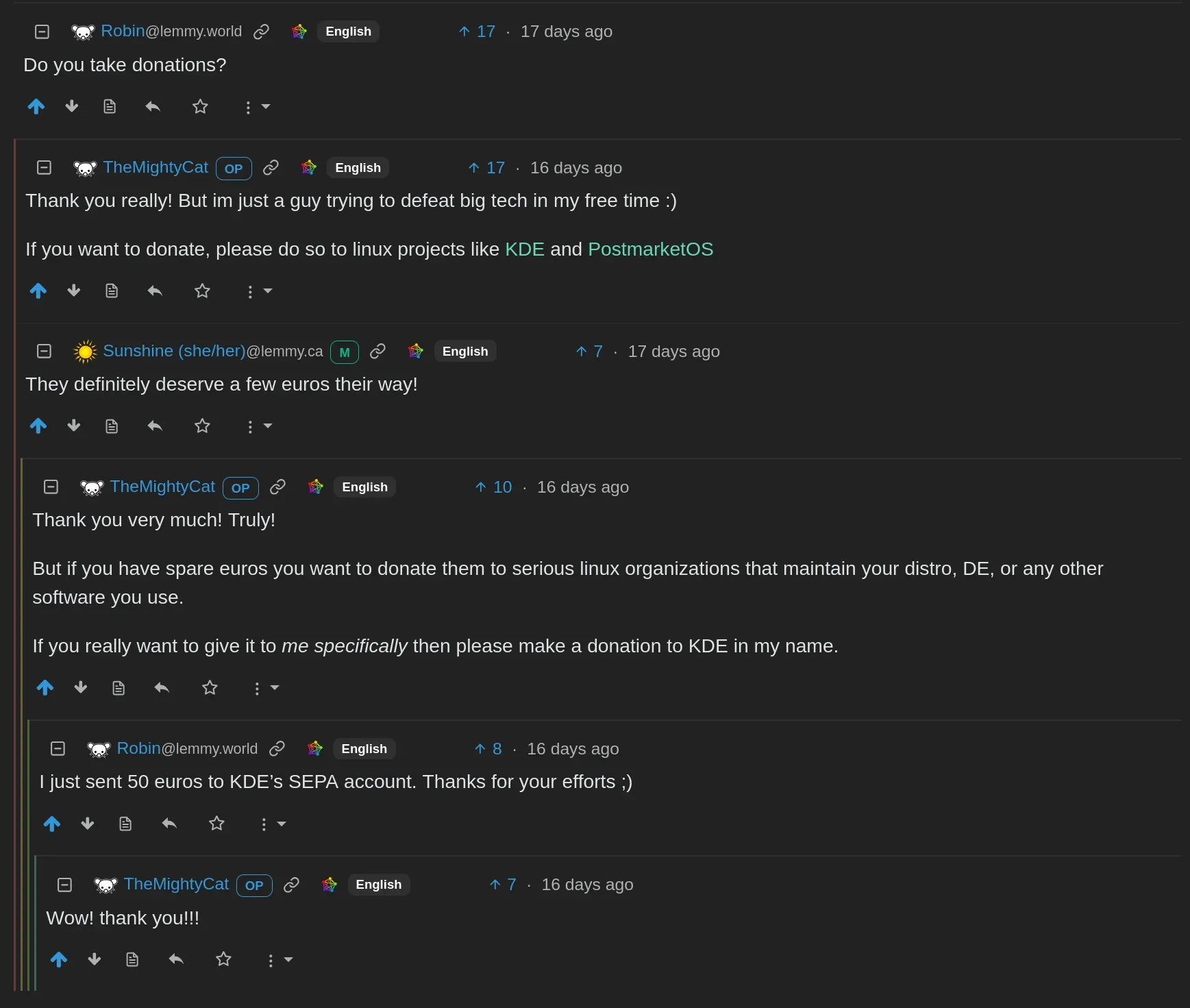

I really was surprised when people asked me this, i just see myself as a guy doing this in his free time, "why would people want to send donations to me?" i thought.

I still stand by my previous point, i have a job, and this project costs me nothing except for time, i don't have any costs. So i felt kinda guilty receiving money from people.

But i would much rather spend my time making software that benefits society instead of the B2B stuff i do at my job.

I really feel greedy for saying this, but if you want to send me a thank you then that is now possible at:
bunq.me/catcrafts

Please don't feel any pressure to do this, doesn't matter what i get im still continuing with this bring-up. And if you don't want to donate to me there are many linux organizations that could really use the support! In my eyes we are all in the same boat with the same goal.

If you do decide to, and i cannot express my gratitude enough if you do, please write in the description that it's a donation, as this makes tax easier.

What's next?


Ive got a bunch more stuff coming soon, while i haven't posted here in quite a while i've been plenty busy on the mailing list:
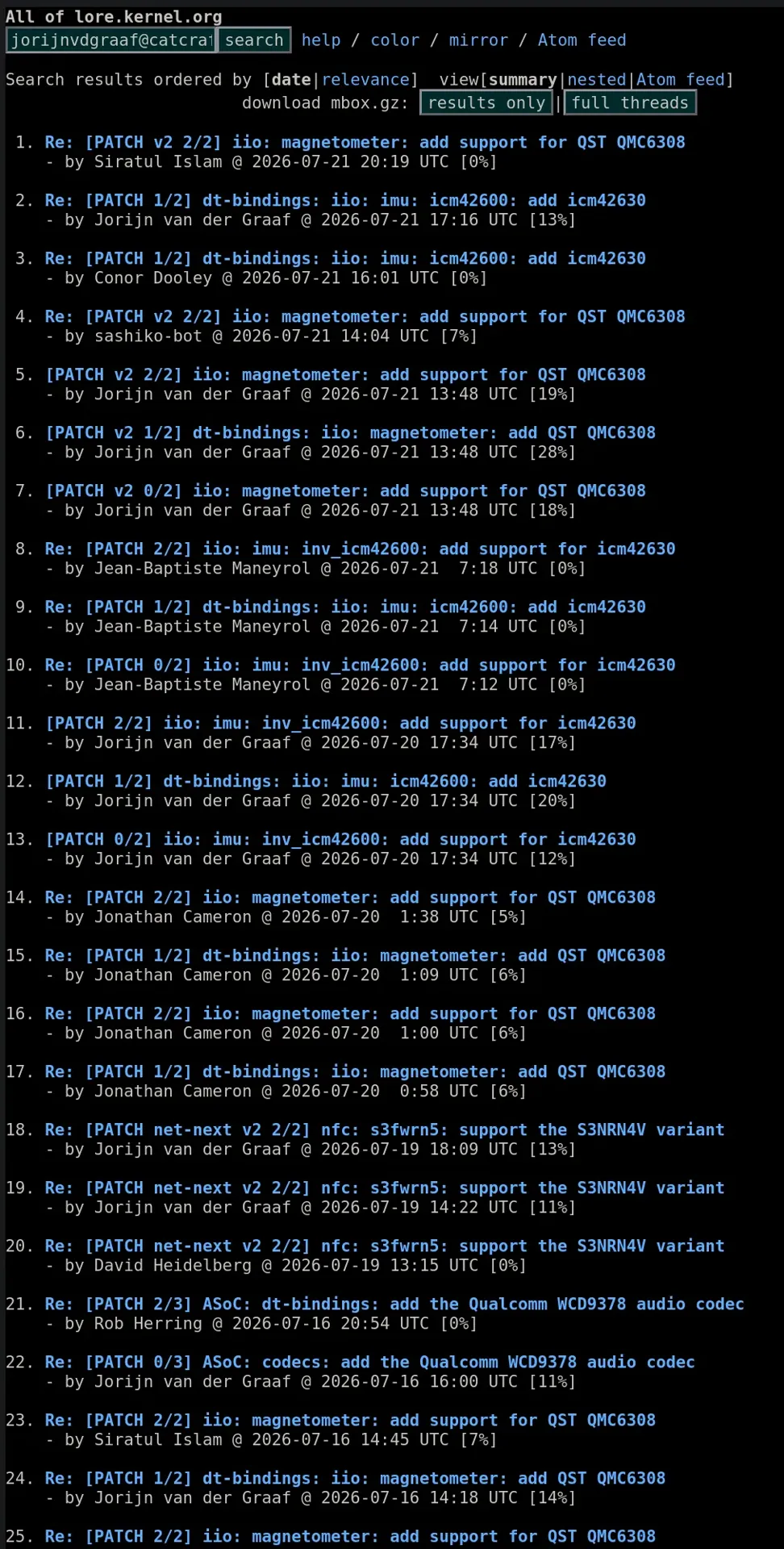
So except some more posts soon.

Bonus round


Having fully working hardware is great, but a phone that has no apps is pointless for most people, so i would like to start a discussion in the comments.

What apps do you need that are preventing you from switching to mobile linux?

reshared this

in reply to TheMightyCat

@TheMightyCat Oh yes, thanks for your interest and a nice comment.

A somewhat simplified explanation of linux accessibility stack from an advanced user (not developer) looks like this:

Standard linux screen reader running alongside graphical desktop environments such as gnome or KDE is called orca. It uses a dependency called at-spi2-core for delivering and interpreting accessibility events from different toolkits such as GTK4, QT6 and similar.

Thus at-spi2-core has clients on both the sides. Orca usually consumes events and GUI toolkits and other standalone apps generate them.

For the full picture there are apps that communicate to at-spi2-core directly to provide its accessibility for example web browsers (Firefox, Chromium and webkit-gtk) and libreoffice are doing this.

The fact screen reader is interpreting accessibility events delivered to it through at-spi2-core is a nice thing and it's a huge part of the puzzle however screen reader has more functionality than dealing with the stream of accessibility events.

For example screen reader needs to be able to review the content by words, by lines and provide different navigation actions.

For that it needs to react to user key presses.

On wayland reacting to keypresses without having a control focused is a security risk thus a protocol extension has been developed which allows screen reader to ask at-spi2-core to coordinate grabbing the keys with the compositor. I don't fully understand this part so it may be a very rough explanation. However it's key point to understand that for touch screen operated device it's not enough to read what has happened in response to some touch screen gestures. We need an ability to review the screen content before executing actions. On different platforms such as android, IOS or Windows it's implemented in a way so touch interaction model works a bit differently when screen reader is running. This is not yet implemented for linux no matter which form factor.

Technically speaking if I would have an USB keyboard connected to the phone I would certainly be able to use parts of its graphical interface but that would not be practical enough.

Please excuse me for commenting on your announcement thread even adding such a long attempt at explaining my situation. I do really appreciate all the work and advancements you are releasing to the public.

It's just that I am partially saddened by the fact I can't experience this linux mobile movement on my own.

in reply to Peter Vágner
Please excuse me for commenting on your announcement thread even adding such a long attempt at explaining my situation. I do really appreciate all the work and advancements you are releasing to the public.


No need to apologize! Thank you for the detailed explanation!.

I was planning on working for Fcitx5 support too, and this might be somewhat in the same neighborhood? I don't want to make false promises so take this with a grain of salt but I'll see if I can maybe get spi2 to work.

Peter Vágner reshared this.
with the help of claude, I put together an NVDA Addon for enhancing the audio ducking with two new modes.
Duck inactive applications lowers the audio of every application that is not currently focused, so the app you are working in stays at full volume.
Duck the active application lowers the audio of the application that is currently focused, leaving background audio (for example, music) at full volume.
As focus moves between applications, the add-on continually updates which audio sessions are lowered, and it restores every application's original volume when you leave the mode or disable ducking. NVDA's own speech and sounds are never lowered.
github.com/Glowing-Radiant/enh…
#blind #accessibility #nvda

reshared this

Peter Vágner reshared this.
I just learned the hard way that Chromium doesn't support role="treeitem" on a <summary> element, so you can't use <details> to create a tree widget. That's... irritating. Oh well, I guess my NVDA profiler thing will only work in Firefox for now.

reshared this

Peter Vágner reshared this.
Step one for my audio-only setup is done. I can have audio (and speech-dispatcher) running without a graphical session. Next I'll either keep banging my head trying to get these TTY screen readers to work or make my own one.

Peter Vágner reshared this.

in reply to Mauve 👁💜
what screen readers have you tried? My personal favorite and the one I use every day is TDSR, github.com/tspivey/tdsr
in reply to Mauve 👁💜
Hit alt c, then r, and type a new rate value. My config is honestly pretty much entirely stock, I turn off line pause, alt+c then l, but the most customization I do is with the speech server. I have TDSR running on a beelink mini pc sitting over on my desk, hooked up to tailscale. I ssh in with putty, run tdsr, which is an alias to uv run my tdsr with -s socket.sh, where socket.sh is just: exec -a tdsr-server socat - TCP4:"$(echo "$SSH_CONNECTION" | awk '{print $1}'):10001",nodelay. I have a custom port to deal with Windows weirdness, the default is 64111. Then, I run a little Rust server I and a friend wrote, and TDSR is speaking to NVDA over the tailnet!

Johann reshared this.

in reply to Mauve 👁💜
Not quite, tdsr has its own little text-based protocol that every speech server uses, and there's a speech dispatcher python server in the repo. I also tend to describe it as s/fancy/janky/, but it definitely works and is how I do the majority of my work, both paid and not.
Peter Vágner reshared this.
Well, the Prism project needs your help! I would like community input about how to proceeed with SSML, because my digging revealed that the SSML landscape is way, way worse than I feared. As such, I'd like to spark a community discussion, at github.com/ethindp/prism/discu…, about how Prism should approach this problem, instead of me making a unilateral decision on the community's behalf. I've done my best to describe just how annoying this is and an idea I've had, but I'm curious what other ideas people have. This discussion originally was started by @mikolysz, and it turned into this after I dug into things and discovered just how insanely fragmented and disjoint the landscape is, because I definitely want to add this feature! :) Any thoughts from the community would be greatly appreciated; I cincerely hope that together we can arrive at some sort of community consensus!

reshared this

in reply to Ethin Probst

There's not much you can do to directly address everything being broken and inconsistent. Trying to ignore the fact that everything is broken and inconsistent by letting the caller handle it would remove most value from the feature being present in Prism in the first place, and so your proposal to let each backend adapt an abstract representation seems sound.

This is what basically every web framework and library has to do to be compatible with different browser engines.

in reply to James Scholes
@jscholes Assuming that we can even figure that out to begin with! Some engines (speech dispatcher, I'm looking at you) secretly support SSML or some XML thingy but don't provide any direct way of using it (so I think for speechd in particular you have to use the raw SSIP protocol... Ugh...)
in reply to James Scholes
@jscholes Yeah, I feared that. Which is why I fear Prism may need to do some kind of AST construction, conforming to SSML 1.1, and then internally transpile that into whatever the backend actually supports and is capable of.

I am trying to contribute slovak translation to some projects using #transifex for coordinating translator work.

Transifex has an editor where the screen reader accessibility could be improved, however most of the functionality can be used by combining the keyboard shortcuts with advanced screen reader features.

For navigating to previous / next string there are keyboard shortcuts alt+down / alt+up.
To copy the source string there is shortcut alt+g / ctrl+g.

What I am unable to figure out is how to fill all the variants when translating strings that have plural forms such as one / few / many / others.

Do you know someone who is also using transifex and can possibly try to assist with this?

Thank you

in reply to Zvonimir Stanecic
@Zvonimir Stanecic My personal choice for linux distro is @Arch Linux however I think if you choose #fedora for your daily work or #gnomeos for testing which I haven't used yet, they will also have up to date packages when it comes to accessibility. What I like about arch linux is its rolling release nature, getting apps very soon after they are released.

Zvonimir Stanecic reshared this.

Peter Vágner reshared this.
Okay, blindy braille readers, what was the weirdist item or place where you found braille and didn't expect it. For me, it was a shampoo bottle. It said shampoo on it. I know, not very informative, but there you go. My friend brought back some cold medication from China and it had braille on the carton. Now that was cool! No idea what it said though.

reshared this

Peter Vágner reshared this.
@LeonianUniverse OK here are the directions. First clone the gh repository github.com/westbrookc16/btmast…. Now if you have downloaded winscp like Martin suggested, you'll need to make sure ssh is enabled. On your btspeak, go to options, btspeak management, advanced btspeak management, system services, and then select ssh and follow the prompts. Make sure you hit y when asked if ssh should start now. Then... we're almost done... in the options menu go to information about this btspeak and get the local ip address of your btspeak. In winscp, enter this ip in the right field, enter pi for the username and blz-tech for the password. Just click ok at the prompt and you should be logged in, you'll have two lists one for the btspeak and one for the computer. Now, in the btspeak list navigate to the btspeak directory, then btcode, then projects. Inside there you will see the project you created. Inside that project directory, copy the .py files from the github repo you cloned. After you do that, go to btcode again on your btspeak, and go to my projects. Select your project, then select __init.py. You can pin this file to your user menu for easier access, or you can just click run __init.py. You'll see a menu with the first item being log in. Congratulations. Select this option and follow the prompts. You'll be taken to desktop mode to log in and authorize the app. The rest should be self explanatory. Let me know if this is too overwhelming and maybe we can get on a call and I can walk you through it.

reshared this

Peter Vágner reshared this.
I updated the accessible image placement tool to allow you to pick a solid colour for your background, tighten screen reader feedback to be more concise, updated text to clarify that images are processed locally and added a tips section for success. Check it out here: tender-gazebo-ntwz.here.now/

reshared this

Peter Vágner reshared this.

They made PGP for your smartphone keyboard lol

useekko.app/

Peter Vágner reshared this.

Peter Vágner reshared this.
Since I'm celebrating my 35th birthday today, I wanted to give you a little birthday gift. 🎉
I've launched a brand new interface for my music library! You can now download tracks in both FLAC and MP3, or grab the entire collection as a FLAC or MP3 bundle.
Hope you enjoy it! I would like also thankt to all who donated. The content is the same, I will add more stuf later. ondrosik.sk/music #cc #freemusic

reshared this