Search

Items tagged with: accessibility


🚨 NEW VIDEO: The Windows Exodus Has Begun.

2025 was the breaking point. Forced hardware retirement and intrusive AI have sparked a mass migration to GNU/Linux. In this video, I explore:

📈 The data behind the 3.20% Steam high.

🇪🇺 How the EU is saving millions by ditching Microsoft.

🛡️ Why 2026 is the year of Digital Sovereignty.

Stop fighting your OS. Start owning it.

🔴 Full Video: youtube.com/watch?v=dLzdTgCXyR…

#TerminalTilt #WindowsExodus #Windows10 #Windows11 #Microsoft #WindowsEOL #Recall #Copilot #DigitalSovereignty #Privacy #DigitalPrivacy #NoAI #HumanMade #DeGoogle #EthicalTech #Autonomy #DataSovereignty #AntiSpyware #Telemetry #SurveillanceCapitalism #RightToPrivacy #Encryption #SoftwareFreedom #ExitWindows #Migration #LinuxGaming #GamingOnLinux #SteamDeck #Valve #Proton #Bazzite #SteamOS #HandheldGaming #PCGaming #ROGAlly #LegionGo #GamingCommunity #SteamHardwareSurvey #EWaste #Sustainability #RightToRepair #PlannedObsolescence #CircularEconomy #GreenTech #SaveThePC #Hardware #Environment #EUtech #PublicMoneyPublicCode #OpenStandards #SchleswigHolstein #GermanyTech #GovernmentIT #DigitalRights #Linux #GNUlinux #Debian #Trixie #FOSS #FLOSS #OpenSource #LibreOffice #Thunderbird #Nextcloud #SelfHosted #HomeLab #CLI #CommandLine #Terminal #Bash #FishShell #Dotfiles #SysAdmin #QueerTech #TransInTech #DisabledInTech #Accessibility #Queer #LGBTQIA #LGBT #HumanContent #ContentCreator #SmallYouTuber #SmallStreamer #YouTube #IndieCreator #SupportIndependent #LinuxUser #Tech #TechNews #OperatingSystems


Getting very grumpy with people ghosting me over several #Accessibility fails I gave feedback for over the last month or so.

Emailed Winchester Christmas Market organisers because despite the event being listed as fully accessible, there was no way for a wheelchair user to actually approach 95% of the stalls there because they were up a step. Got an auto-mail stating the inbox was regularly monitored and they aim to respond to everything within 1-2 business days. No response. 3 weeks and waiting.

Emailed Showcase cinema because of poor quality viewing despite paying extra for fancy seats, the wheelchair accessible ones were right at the front and the image was warped and weird and the audio was atrocious. Plus one of the seats was broken and wouldn't recline.
One response from a manager asking if the staff member we'd spoken to about the broken seat offered us anything (they didn't), no response since. 2 weeks and waiting.


I bought myself a new keyboard with Christmas money, and after just a day of using it, I'm honestly kind of stunned by how much of a difference it's making.
I picked up a Keychron K10 Max from Amazon and got it yesterday, and I don't think I ever want to go back to a membrane keyboard again.
For context: before this, I was using a Logitech Ergo K860. It's a split, membrane keyboard that a lot of people like for ergonomics, and it did help in some ways — but for me, it was also limiting. My hands don't stay neatly parked in one position, and the enforced split often worked against how I naturally move. It also wasn't rechargeable, and the large built-in wrist rest (which I know some people love) mostly became a dirt-collecting obstacle that I had to work around.
Another big factor for me is that I often work from bed. That means my keyboard isn't sitting on a perfectly stable desk. It's on a tray, my lap, or bedding that shifts as I move.
The Logitech Ergo K860 is very light, which sounds nice on paper, but in practice it meant the keyboard was easy to knock around, slide out of position, or tilt unexpectedly. Combined with the split layout, that meant I was constantly re-orienting myself instead of just typing.
The Keychron, by contrast, is noticeably heavier — and that turns out to be a feature. It stays put. It doesn’t drift when my hands move. It feels planted in a way that reduces both physical effort and mental overhead. I don't have to think about where the keyboard is; I can just use it.
For a bed-based workflow, that stability matters more than I realized.
With chronic pain, hand fatigue, and accessibility needs, keyboards are not a neutral tool. They shape how long I can work, how accurately I can type, and how much energy I spend compensating instead of thinking.
This new keyboard feels solid, responsive, and predictable in a way I didn't realize I was missing. The keys register cleanly without requiring force, and the feedback is clear without being harsh. I'm not fighting the keyboard anymore. It's just doing what I ask.
What surprised me even more is how much better the software side feels from an accessibility perspective. Keychron's Launcher and its use of QMK are far more usable for me than Logitech Options Plus ever was. Being able to work with something that’s web-based, text-oriented, and closer to open standards makes a huge difference as a screen reader user. I can reason about what the keyboard is doing instead of wrestling with a visually dense, mouse-centric interface.
That matters a lot. When your primary interface to the computer is the keyboard, both the hardware and the configuration tools need to cooperate with you.
I know mechanical keyboards aren't new, but this is my first one, and I finally understand why people say they'll never go back. For me, this isn't about aesthetics or trends. It's about having a tool that respects my body and my access needs and lets me focus on the work itself.
I'm really grateful I was able to get this, and I'm genuinely excited to keep dialing it in. Sometimes the right piece of hardware, paired with software that doesn’t fight you, doesn’t just improve comfort. It quietly expands what feels possible.
#Accessibility #DisabledTech #AssistiveTechnology
#ScreenReader #NVDA
#MechanicalKeyboards #Keychron
@accessibility @disability @spoonies @mastoblind


Question to my #Blind fellow devs and tech people: Has anyone ever used #Zammad? What are your impressions? #Accessibility


Happy World Braille Day!

Each January 4th, the birthday of Louis Braille, the day aims "to raise awareness of the importance of Braille as a means of communication in the full realization of the human rights for blind and partially sighted people."

un.org/en/observances/braille-…

#WorldBrailleDay #WorldBrailleDay2026 #Braille #Blindness #Accessibility


I decided to install the Zed editor, why not. Looks good, feels just like VS Code, but with a full Disable AI setting.
Utterly and completely inaccessible with a screen reader.
The #Rust GUI #accessibility landscape is… it’s sorta just not.
Everybody is “looking into” and “exploring” AccessKit.


I'd say, it depends. I personally love emojis and find them not only making documentation lighter to read, but also use them as orientation markers (I'm totally blind). However, your point about first-letter navigation is absolutely correct. #Accessibility


SelfHosting week 0, phase 2A, documentation.
There is one thing I find quite uncomfortable on @yunohost documentation: the emojis at the beginning of every chapter. They are very annoying to read for a blind user when going back and forth heading by heading with a screen reader. And, worse, when you attempt to isolate links through the "link list" or "heading list", "element list" whatever name used by screen readers for that feature, you cannot choose an item by initial letter and get into it quickly, from the list that pops up.
The "element list" feature allows a user to press a shortcut and find items of the same type, organized in a list. Links, headings, form controls, etc. So, if it is the table of contents in a documentation website, you have all chapters ordered. You press down arrow in the list, till you find the desired element then press Enter. Or, better, in a normal situation, if you have to choose "domains" for example, you pop up the link list and type "d", then if Domains is the first, you press Enter on it. Or at least, links with that initial are isolated by pressing the letter over and over again till you find the desired one.
But this YunoHost docs are full of those emoticons which maybe are pleasant for sighted folks, but not for blind. Not at all.
#accessibility #a11y #blind #docs #SelfHost #SelfHosting #YunoHost


#SelfHosting week 0, phase 1B: DNS records settings. Performed @_elena 's instructions on her "self hosting for newbies" part 2. Except for the post-install as I run it through terminal and not through web UI. For an ms-dos-born it's easier to perform a simple command such as "yunohost tools postinstall" rather than go to web, then type, then search for the various UI elements.
Everything went smooth, except for letsencrypt at first. But in the end it seems to have worked. It got stuck because hostinger panel didn't get one suggested parameter, the numeric 3600, every record has a parameter which is 3, 4 or 5 numbers.
Created the domain and subdomain to point it to yunohost admin interface, and then obstacle came.
Opening browser to subdomain, just returns "connection timed out".
Checked for nginx parameters through yunohost terminal, using the desired Sudo commands.
Then, "sudo yunohost diagnosis run"
"sudo yunohost diagnosis show --issues --human-readable"
and I got explanation on reverse dns which was wrong.
After that, I searched on the web (and on AI, I admit) the position on hostinger panel to set them, and I found "set tpr record"
placed the desired domain name.
And now it's time to wait for propagation. But what about the "connected timeout", in the article posted in blog.elenarossini.com no such obstacle was mentioned.
I'm back to my 20s when I spent the night (it's almost 4 in the morning), learning commands.
Last but not least, accessibility issue: I'm using an app called WebSSH pro, downloaded on app store. Set it up, and VoiceOver for iOS does not read the keys I press on keyboard so I'm very slow to type commands there. Pc is better. In a few hours I'll try hostinger's terminal.
UPDATE: I have just found I set one DNS wrong, now I'll wait for it to propagate. Next update in some hours. I placed a useless number. Such as 72.162 (wrong) instead of 72.62 (right).
Like when you start developing on your own and everything crashes due to a missing semicolumn in a string of code.

#accessibility #yunohost #selfhost #blind


#SelfHost week 0.
Phase 1:
in the end I've chosen hostinger. As a first approach. It has a very frustrating interface on adding records when referring to DNS, and even in state/province while registering domain's contact info.
They are combo boxes, detected as edit boxes through #accessibility equipments.
Now waiting for it to propagate dns on #YunoHost 's admin interface on a subdomain.
Installed yuno host via terminal, then even post-installation done via terminal: yunohost tools postinstall or whatever it was.
Had some trouble with letsencrypt in the end, but now they should be solved.
Phase 2 will be installing an app, I'll get to it as soon as everything's on track.
Even thinking of placing #WordPress English speaking blog there. Let's see.


#SelfHosting week 0:
Phase 0. Choosing domain name for self hosting: plusbrothers.online seems available. the .net is my main website based on #WordPress
Considering also plusbrothers.community but who knows if it's possible. Something that warns users that's the same site but with other purposes.
What to do there: Mastodon instance with more than 500 characters if possible. Then Castopod, and maybe a WordPress to transfer English blog there.
Finally, choosing the most appropriate VPS server where to install #YunoHost currently confronting most famous VPS vendors' websites user interface for #accessibility - this is a showcase for customer care. Less accessible means less disability-friendly, that means "I'd prefer you don't come to us". Hostinger has an accessibility statement but it's very superficial and maybe copy-pasted from a template just because obliged by european laws, not for real care.


#AskFedi what screen readers are people using these days?

With folks moving to more secure browsers, I feel like it’s time to find new ones for website accessibility audits. Curious how others are treating the browser upheaval & accessibility?

I’m working on this for one of my #nonprofit clients and to grow out our accessibility resources for communicators.

#accessibility #disabilityRights #disabiltyjustice #screenreader


Anxiety about writing "imperfect" Alt Text can result in less Alt Text, and honestly? That’s the only way to truly fail.
Accessibility isn't mysticism. It isn't a manifesto. It’s just generosity and common sense.
Don't let the fear of being unpoetic leave us in the dark.
bad alt text > no alt text.
imperfect description > silence.
#a11y #Tech #Design #Fediverse #Accessibility #Blind


If you wouldn't say, "Here lies a visual representation of the duality of man and the crushing weight of capitalism" to your friend on the phone, don't put it in the Alt Text.
Just tell me it’s a raccoon stealing a bagel. 🦝🥯
The Golden Rule: Describe the scene, not the vibe. We can figure out the meaning all by ourselves, thanks.
#Accessibility #Blind #AltText #WritingTips #SocialMedia #Inclusion


Stop treating Alt Text like you’re defending a PhD thesis on Semiotics. 🛑
I don't need the "spiritual implications of the void" or "what the colour blue represents to the human soul." I need to know if the button says "Save" or "Delete."
Blind people aren't encountering images in a vacuum. We have the context. We just lack the pixels. If you can see it, say it. Leave the existential dread for your diary.
#AltText #a11y #Accessibility #Blind #WebDev #KeepItSimple


In response to the articles circulated recently about people who are switching to Linux as their desktop operating system, I note that my first desktop Linux experience was in 1998. I investigated hardware compatibility, bought a new laptop, and a friend installed Linux on it for me. (The installation process wasn't accessible with a screen reader in those days.) I used Emacspeak to provide a spoken interface to the operating system. Unfortunately, my braille display wasn't supported - eventually fixed in the mid 2000s. Graphical X11 applications were not accessible either, but that, too, was rectified in the mid 2000s. In the late 90s, I didn't need GUI tools anyway. The modern JavaScript-intensive Web has changed that situation fundamentally.

Non-visual access to Linux continues to improve, albeit slowly and with highly constrained development resources. Although I've had (and continue to have) other operating systems, I still consider Linux my primary desktop computing environment.
#Linux #ScreenReaders #accessibility


Sensitive content


Sensitive content


Sensitive content


Don’t forget to test with real users who have disabilities. Being 100% compliant is just the beginning. If you do user testing, then you already know their value! Tools alone aren’t enough. #accessibility #a11y


I'm wishing everyone out here on Mastodon a very Happy New Year! Let's all do whatever we can to start turning things around in 2026! #accessibility


I tried to enable the #GNOME screen reader (aka orca) to test the #accessibility of some application.

I have little experience with screen readers, but the GNOME experience after enabling the screen reader appears to be super bad. I can barely understand the voice. The speech synthesis is horrible, I have heard better in the 90s.

Is this the expected state of free software screen readers? How can I get something usable?


Let's do the math. Experts estimate it takes 10,000 #AI queries to match the energy of one single car trip across town.
I don't have a car. I don't drive. So, until you stop driving to the store, maybe don't lecture a #Blind woman about the 'environmental cost' of having a family photo or a cat picture described to her. My #Accessibility tool costs the planet less energy in a year than your car does in a week.


Question to screen reader users, just because I'm curious:

If I write using the occasional homophone, perhaps to make a pun, is that something that is completely lost to you, unless something clues you in to the fact that there might be spelling shenanigans going on?

For example, if I had posted the other day, "I can't wait to see Santa's slay!", would you just have assumed that that last word was "sleigh", and never noticed that it was "slay"? #accessibility #ScreenReaders


#Blind #Linux #Accessibility / #a11y folks, I need a #ScreenReader #accessible #email client that supports calendar and contacts integration with #Outlook and #GoogleWorkspace. Thunderbird is out because I cannot find reliable instructions on connecting it to my Outlook contacts. Anyone who suggests that I should either switch back to Windows or use my phone for email will be playfully booped over the head with a pool noodle. Kidding. Seriously though, recommendations welcome. Thanks. #BlindMasto #BlindMastodon #BlindFedi #MailClient #EmailClient


I should probably slightly amend that statement.
If someone needs help with their #accessibility from a native #screenReader user with a coding background, keep me in mind.
If you want your product to be more #accessible as a new year's resolution, also keep me in mind. i won't even judge if you drop the resolution two weeks after.
If you've received complaints your product isn't accesssible but decided they weren't worth addressing, please realize you're deliberately choosing to exclude a bunch of people, decide you want to be a better human than that, and THEN keep me in mind :)


Welp ... I was just informed through a Slack DM that I will no longer be working at the place I'm working at in two weeks' time. That is, evidently, how we handle that now. Not entirely unexpected as the writing on the wall was evident, but still not loving that approach for reasons I haven't quite worked out yet.
If anyone needs help with their #accessibility from someone with both native #screenReader experience and a coding background, keep me in mind I guess :)
Located in the eastern Netherlands, primarily interested in remote opportunities.
#fediHired #layoffs


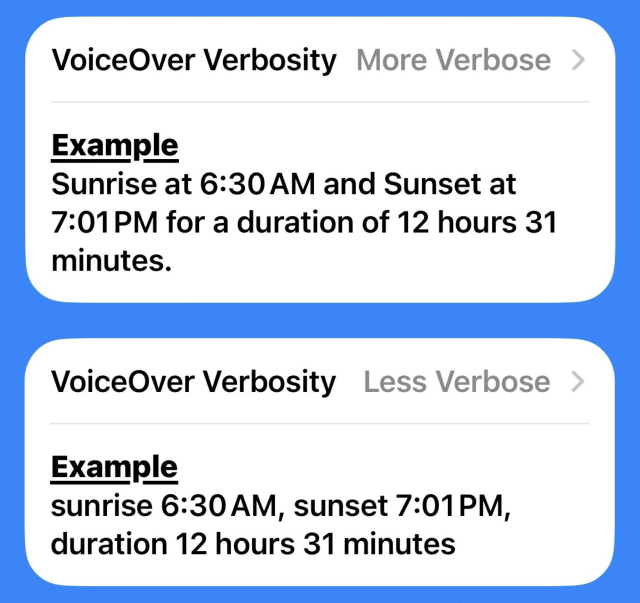
I've been debating how to have VoiceOver read the data points for a new section I'm adding to Please Don't Rain for sun events.

I asked on @AppleVis and a couple of users suggesting a setting for more/less verbose.

I'm experimenting with adding it.

#accessibility #a11y #PleaseDontRain


Hey Fedi, what does everyone think about DuckDuckGo's own browser as an alternative to Firefox? Anyone know how well stuff transfers or how cooperative it is in terms of #accessibility ? #a11y #askfedi


Sensitive content


either completely removed with a toggle or presented under a heading (<hx> HTML tag). I'm totally blind, so contrasts, colors and borders don't work for me and anyway violate #Accessibility standards.


✔ Say you search for something and there's a list of smart results.

You have a toggle that enables something like 'strict keyword matching' - which means any result not having those keywords will be dealt with.

👀 Catch: Keep in mind that often search results can be indirectly related to what you looking for without containing those keywords.

Question is, how would you like them dealt with?

#askfedi #userresearch #ux #ui #linux #youtube #google #browsers #webdev #enshittification #firefox #chrome #writing #cooking #accessibility

  • Lowered opacity (14%, 1 vote)
  • Border around to show who's the odd one out (14%, 1 vote)
  • Completely removed (57%, 4 votes)
  • Other (please comment) (14%, 1 vote)
7 voters. Poll end: 1 month ago


AutoCraft‑Bot: Telegram как пульт управления Windows

Этот проект я изначально писал для себя и под свои рабочие привычки: хотелось иметь быстрый “пульт” к компьютеру/серверу из Telegram, где всё управляется кнопками, без постоянного ввода команд. Потом стало понятно, что штука может пригодиться и другим людям, поэтому я решил выложить её в открытый доступ. Репозиторий на GitHub: github.com/andreykadelite/Auto… Последняя версия на GitHub на момент публикации: v1.1.7 . Если интересно, как всё начиналось и к чему я пришёл по ходу разработки, у меня уже выходили две статьи на Хабре:

habr.com/ru/articles/981150/

#telegram #Accessibility #windows #gui #bot


Spent a few days with the new #whatsApp UI on Windows.
So far, the experience is not as bad as it could be, but it's far from good as well:

- The time this Ui takes to load is painfully long. Understandable given essentially a whole entire browser is being spun up but that is a regression.
- Focus often doesn't stay where it's meant to when you leave and then return to the window. This worked fine in the previous version,thus a regression.
- Something in the underlying browser wrapper REALLY doesn't play nice with NVDA, often failing to properly focus or provide meaningful accessibility properties leading to an "unknown unknown unknown" reading. Not sure to what degree the Meta folks have control over this but if you're going to use third party wrappers you take on the responsibility of those wrappers malfunctioning and thus, regression.
- Resource usage has gone way up, I consider that a regression. #accessibility