Search

Items tagged with: a11y


I've been using the new Microsoft Outlook for a while, and although it was usable and had some nice features, it was never quite as accessible as I was hearing it was from other blind users. I went back and reviewed chapter 4 of David Kingsbury's book, Windows Screenreader Primer from the Carroll Center for the Blind, and changing the following setting made all of the difference! 😎

In the view group, I went into the Reading pane menu and checked the Popout only item.

#Accessibility #A11y


Happy to provide detailed documentation to NFB for escalation to Meta. This needs human review from people who understand assistive technology, and it needs to be escalated to Meta's accessibility and legal teams.
How are blind users supposed to access Threads if screen readers trigger automatic suspensions?
#Accessibility #A11y #Threads #Meta


Looks like @Tutanota wins in the screen reader accessibility department. Both the iOS app and the web version appear to be quite accessible with screen readers. Tested using both VoiceOver and Chromevox… I had no issues navigating the interface with either screen reader. #A11Y #Accessibility #Blind #ScreenReader #Email #Calendar #Contacts


AI captions do not conform to #WCAG they usually require a lot of work to make them usable

The highest-risk areas for real harm are: (1) named entities/numbers, (2) multi-speaker attribution, (3) timing/readability, and (4) hallucinated “corrections.”

#deaf #multimedia #justsayin #a11y


I can never remember the braille symbol for the hash tag, but Perplexity just came to the rescue. I find I'm using AI more and more lately.
#accessibility #a11y #braille


Call it hashtag stacking or just spamming, but addding 20 hashtags to your post is super annoying to screenreader users, since the screenreader reads out every single hashtag of yours. so, please, add your hashtags to end of your post, even preferably after an URL. And who ever of the app developers out there creates a feature which detects this pattern in posts and allows me to disable it, has my vote. #accessibility #a11y


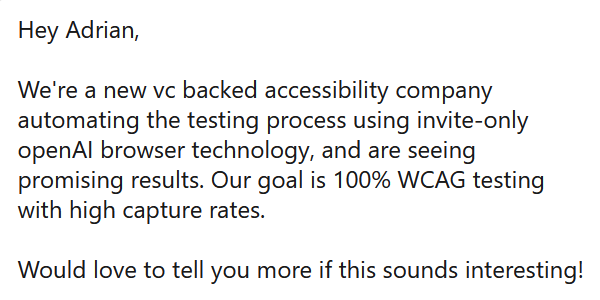
Oh goody, a LinkedIn connection request with a message!

Let’s break this down:

> …vc backed…
Focused on quarterly profits / RoI instead of outcomes.

> …invite-only…
NDAs and other gag agreements.

> …openAI browser…
Chromium that begs authors for ARIA to parse content.

> …seeing promising results…
Which aren’t genuine results.

> …goal is 100% WCAG testing…
Ah, snake oil.

> …with high capture rates.
Sales targets, not WCAG coverage.

#accessibility #a11y #WCAG


I am curious, so today, lets do some Mastodon research on typing verbosity on your #ScreenReader, when typing on a physical keyboard. What is your Typing echo set to? #accessibility #a11y

  • Characters and words (5%, 3 votes)
  • Words (25%, 13 votes)
  • Nothing (62%, 32 votes)
  • Characters (5%, 3 votes)
51 voters. Poll end: 4 days ago


I've gone through @bce 's product purchase process, including product browsing, configuration, adding to cart, viewing cart, and checkout pages to make sure they are accessible to screen reader users. I've replaced all tables with hierarchical headings, and made sure all inputs are labelled. I'm testing with LibreWolf on Debian with Orca. If any blind users out there could test with their setups and have any feedback, it would be greatly appreciated! Thank you!

Here is the link to the top level products page:
bce.center/products

CC: @jackf723

Note that once this web software is stable, it will be released as FOSS to assist other blind entrepreneurs as well.

#blind #a11y #accessibility #fosh #foss #freehardware #freesoftware


Hey #a11y folks,

I started writing an article about how you can sneak in #accessibility fixes (as a developer or designer) without telling your boss.

Do you have any stories you would like to share that I could use for the article?

I did it by silently adding landmark elements and a skip link, updating global focus styles so that they're consistent and accessible and other evil shenanigans. 😈

#blog #html #css #javascript #WebDev #frontend


SelfHosting week2, phase 1.
Setup: Hostinger provider, KVM2 VPS plan. 2 CPU cores, 8 GB RAM, 100 GB storage, Debian 12, YunoHost 12.1.39 stable, WordPress 6.9 branch.
WordPress procedure, I assumed it had to be the easiest, where I am mostly skilled in; obviously, it wasn't.
First of all, because YunoHost installs a plugin called "Companion auto update" which gives an error just on admin page. F-off to it. In that case I deactivated it through terminal, but I found the error's origin thanks to an LLM which interpreted the log for me. If I were unexperienced with web sites advanced configurations, I couldn't have figured it out.
My current multilingual approach on production website, has been a very satisfying experience but I'm noticing it requires too much attention in long term; full-site editing (gutenberg), manual template switch for each English or Italian post, some custom code to manage search and taxonomies. But any deep maintenance could break everything.

So I decided to follow an advice from @2ndkauboy a German blogger who wrote about MultiLingualPress, plug-in connected to MultiSite WordPress platforms during Advent period in his "Plugin Advent Calendar".
Having a VPS now I assumed to be 100% free to perform Multisite and began to build it: YunoHost's WordPress installer asked me if I wanted MultiSite or not, I confirmed YES.
The first obstacle was it did not work as I desired: my idea was to get "domain.extension/" as main site while "domain.extension/english" as second language website but YunoHost refused to place WordPress into the main directory, namely subdomain.domain.extension/, with multisite setup on.
So I removed WordPress from @yunohost by command: "sudo yunohost app remove wordpress"
Re-installed through the same script, sudo yunohost app install wordpress, this time answering "NO" to multisite option, and it accepted to provide the / directory as location.
Enabled MultiSite manually by editing wp-config.php file and installing it, then added extra-lines in the wp-config as well, after the network creation, using subdirectories for multisite setup. YunoHost uses nginx, so I went to modify the subdomain's WordPress nginx configuration; in that case as well, LLM helped me.
But then came trouble: I was logged off WordPress admin. No way to recover the password, no way to access its dashboard.
So, I gave up.
Tried another day: remove, re-install, set MultiSite manually. This time I used another e-mail address and when I got stuck, I managed to reset its password. But after setting main and secondary web sites, the result was wp-admin on main site worked, while /english/wp-admin returned an error: "ERR_TOO_MANY_REDIRECTS".
No way to make it work at all!
So, I resigned. Removed, re-installed with multi-site on natively, by setting the path to subdomain.domain.ext/wp/
having /wp/ and /wp/english/ seemed to be the less evil.
In the end the too_many_redirects error was still there, and disappeared only when I added this string:
try_files $uri $uri/ /index.php?$args;
into the nginx WordPress-specific configuration, under the "location" setting.
Not bad, I assumed it was OK.
But installing MultilingualPress, the plugin suggested by the German blogger of before, wp-admin returned a critical error. Maybe a database, or something else.
Increased the php memory to 256M in wp-config.php and the multilingual press then resulted as active, in the network setup.
So I tried to connect the two blogs, setting related languages and trying to flag relations one another.
But nothing worked. The relations weren't flagged, and going to network / plugins, returned an error again.
So, in the end, I've resigned at the moment, to create two subdomains. English and Italian. Where I have two separate WordPress installations.
I'd like to try again the Multisite experience, though.
#accessibility #a11y #debian #multilingual #multisite #SelfHost #SelfHosting #WordPress #Yunohost


If you share a video of a screen reader doing something, include the audio of the screen reader speaking. Do not just have a silent video with the speech captions shown. Otherwise, you’re preventing the very people who use screen readers from perceiving the video. 🤦

Mentioning this because I encountered this for probably the thousandth time today.

#a11y

#a11y


IAAP certified pros: Has certification increased your opportunities?

I have been developing accessible websites for five years as a freelancer. Some clients seek standards compliance, others don't. Although I love educating clients and getting them on a pathway to standards, I want to be doing all accessible work to standard all the time.

I am looking at the CPACC then adding the WAS for the CPWA combo. What do you think?

#Accessibility #WebAccessibility #a11y


Hey friends — quick accessibility question for the blind Discord users out there.

I’m on macOS using VoiceOver and trying to set a custom Discord keybind for “Disconnect from Voice Channel.” I’ve added it in Settings → Keybinds, but I can’t tell if it’s actually saving, and the shortcut never fires when I’m in a call.

Has anyone gotten this working reliably on Mac?
If so, what key combo are you using, and did you have to do anything special to make it stick?

Any tips, workarounds, or confirmations that this is just a Discord bug would be super appreciated.

Thanks in advance 🙏

#accessibility #a11y #blind #VoiceOver #macOS #Discord #screenreader #AssistiveTech


In general, any usage of the words "left" and "right" in computers is at least a yellow flag, or even a red flag. Anywhere. User interface strings, help pages, visual design documents, programming language keywords, and so on. It's a likely #accessibility problem for people with Left–right confusion and a likely #localization problem for people who read right-left (#RTL) languages. I happen to belong to both groups.

#L10n #A11y


I just commented on issue 7751 of the Nextcloud client. Please thumb it up if you agree and boost this post for more range and awareness, that would mean a lot!
github.com/nextcloud/desktop/i…
#a11y #accessibility #blind #nextcloud


Sensitive content


In my opinion, lack of accessibility is the main *real* argument against the widespread adoption of Free and Open Source Software.

I reckon, if, especially European, governments and institutions really are serious about digital sovereignty, they should invest serious money (I'm talking billions with "B") into that area.

#a11y #FOSS #DigitalSovereignty #EU


#a11y


Great. Two PDF forms I'm supposed to read and sign before a medical procedure are completely inaccessible - probably bad scans. Two OCR tools and ChatGPT either extract garbled text or report there is no text to be found. Time to find a sighted person to print this shit out, read all about everything, and fill things in by pen. It's 2025 for fuck sake! #blind #A11Y


Linux desktop voice control has a gap. Talon costs money. Other tools are X11-only or cloud-dependent.

So I built EasySpeak.

youtube.com/watch?v=dl5m2Zo1oI…

github.com/ctsdownloads/easysp…

- Free and open source (GPL-3.0)
- Fully local — no cloud, no accounts
- Wayland-native
- "Hey Jarvis, open downloads"

Built for RSI, accessibility, or anyone who wants to talk to their computer.

#Linux #OpenSource #Accessibility #VoiceControl #GNOME #Wayland #a11y


question for people- for the accessible description of an emoji, would you expect it to say the skin tones?

for instance, "women holding hands" vs "women holding hands: light skin tone, medium-light skin tone"

personally the latter feels very verbose, but i'd love to get thoughts!

#mastodon #mastodev #a11y #accessibility #screenreader


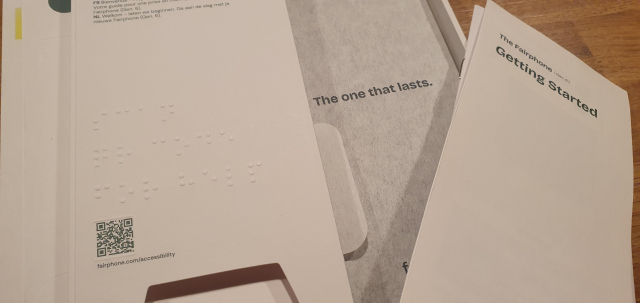
The packaging of the Fairphone and it's accessories has braille! I have never seen any packaging other than medicine have braille. I'm so impressed. Even the location of the qr code is highlighted with embossing. It seems to say "scan qr code for help".

#fairphone #braille #phone #smartphone #packaging #accessibility #a11y #blind


Totally agree. This drives me bananas! I have to turn off speech each night, and you're absolutely right that half the time it just restarts and comes back with speech on and screen courtain off. So infuriating. #a11y
#a11y


I’m _not_ saying to never put a live region in / on a button, but I _am_ saying it may not (will not) perform as you want.
cdpn.io/aardrian/debug/WbxvPOd…

Maybe try a ‘Multi-Function Button’ instead.
adrianroselli.com/2021/01/mult…

#HTML #ARIA #accessibility #a11y


Use headings and landmarks for better screen reader navigation. Bonus points: it improves SEO and AI interpretation. #accessibility #a11y


SelfHosting week 0, phase 2A, documentation.
There is one thing I find quite uncomfortable on @yunohost documentation: the emojis at the beginning of every chapter. They are very annoying to read for a blind user when going back and forth heading by heading with a screen reader. And, worse, when you attempt to isolate links through the "link list" or "heading list", "element list" whatever name used by screen readers for that feature, you cannot choose an item by initial letter and get into it quickly, from the list that pops up.
The "element list" feature allows a user to press a shortcut and find items of the same type, organized in a list. Links, headings, form controls, etc. So, if it is the table of contents in a documentation website, you have all chapters ordered. You press down arrow in the list, till you find the desired element then press Enter. Or, better, in a normal situation, if you have to choose "domains" for example, you pop up the link list and type "d", then if Domains is the first, you press Enter on it. Or at least, links with that initial are isolated by pressing the letter over and over again till you find the desired one.
But this YunoHost docs are full of those emoticons which maybe are pleasant for sighted folks, but not for blind. Not at all.
#accessibility #a11y #blind #docs #SelfHost #SelfHosting #YunoHost


Check out our games from last year, then join our fifth annual Games For Blind Gamers Game jam starting at the end of this month!

youtube.com/watch?v=eYe_9Bonn2…

itch.io/jam/games-for-blind-ga…

#Gamedev #GameJam #A11y #Indiedev #indiegame #indie


Anxiety about writing "imperfect" Alt Text can result in less Alt Text, and honestly? That’s the only way to truly fail.
Accessibility isn't mysticism. It isn't a manifesto. It’s just generosity and common sense.
Don't let the fear of being unpoetic leave us in the dark.
bad alt text > no alt text.
imperfect description > silence.
#a11y #Tech #Design #Fediverse #Accessibility #Blind


Stop treating Alt Text like you’re defending a PhD thesis on Semiotics. 🛑
I don't need the "spiritual implications of the void" or "what the colour blue represents to the human soul." I need to know if the button says "Save" or "Delete."
Blind people aren't encountering images in a vacuum. We have the context. We just lack the pixels. If you can see it, say it. Leave the existential dread for your diary.
#AltText #a11y #Accessibility #Blind #WebDev #KeepItSimple


Don’t forget to test with real users who have disabilities. Being 100% compliant is just the beginning. If you do user testing, then you already know their value! Tools alone aren’t enough. #accessibility #a11y